

Sign App: E-Signature Maker
Sign App: E-Signature Maker is made and published by Kenan Sezginbas. AppBrain is an independent app data site and isn't affiliated with Kenan Sezginbas. The app name, icon, screenshots and description belong to Kenan Sezginbas and are shown as published on the App Store.
AppBrain's verdict
- Rating on App Store
- 5.00
- 1 ratings
- Last updated
- June 5, 2026
- Size
- 13.4 MB
It doesn't have enough ratings yet to judge what users think.
User feedback
Ratings and reviews on the App StoreComments on Sign App: E-Signature Maker for iOS
We don't have enough comments to show example comments. Please check back later.
Store listing
By Kenan Sezginbas, from the App Store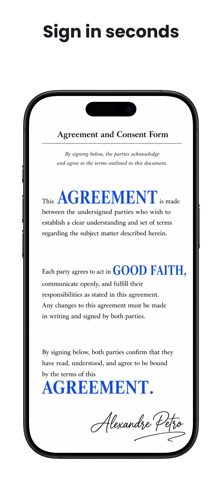



Description by Kenan Sezginbas Written by the developer, not by AppBrain. Click to read.
scanning paper files, and managing all your signed paperwork in one place.
Create your electronic signature once — draw, type, or upload — and apply it
to any document in seconds with the signature maker.
• Sign Documents Instantly •
- E-sign PDF documents with a legally-binding electronic signature.
- Create unique e-signatures: draw to sign with your finger or Apple Pencil,
type to sign with elegant handwriting fonts, or upload your real signature
from a photo.
- Save multiple signatures and reuse them across all your documents.
- Automatic background removal for uploaded signature images — clean,
professional results every time.
• Import & Scan Documents •
- Import PDF files directly from the Files app.
- Scan paper documents using your iPhone camera and convert them to PDF
instantly.
- Import images (JPEG, PNG) from your photo library and automatically convert
to PDF.
- Supports documents up to 50 MB for seamless PDF signing.
• Powerful Document Editor •
- Add e-signatures, text fields, dates, and checkmarks to any page of your
PDF.
- Drag and drop annotations to position them precisely on the document.
- Navigate and sign multi-page PDF documents with ease.
- Undo and redo edits — never worry about making a mistake.
• Organize & Manage Documents •
- Create folders to keep contracts, invoices, and agreements neatly organized.
- Search, rename, and filter documents by status: Draft, Signed, or Shared.
- Switch between grid and list views to browse your document library.
- Automatic thumbnail previews for quick document identification.
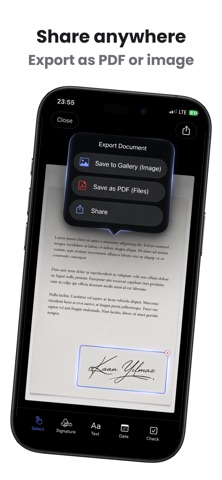
• Export & Share Signed Documents •
- Share signed PDF documents via email, messaging apps, AirDrop, and more.
- Save signed documents as PDF to the Files app for easy access.
- Export individual pages as images to your photo gallery.
- Track shared documents — every exported file is marked for your records.
• Securely Stored on Your Device •
- All documents and signatures are stored locally on your device — your data
never leaves your phone without your permission.
- No account or login required. Start signing documents immediately.
- Your sensitive contracts and personal documents remain private and secure.
• Free & Pro Plans •
- Sign up to 3 documents per month for free with the document signer.
- Upgrade to Sign App Pro for unlimited document signing, unlimited saved
signatures, folder organization, all editing tools, and priority support.
- Choose Monthly, Yearly, or Lifetime plans — cancel anytime.
Whether you need to sign a contract, fill out a form, e-sign an invoice, or
scan and digitize paper documents — Sign App is the fastest way to get
documents signed on your iPhone.
Download the #1 e-signature app and start signing documents today.
• Subscription Information •
Payment will be charged to your Apple ID account upon confirmation of
purchase. The subscription automatically renews unless auto-renewal is turned
off at least 24 hours before the end of the current billing period. You can
manage your subscription and turn off auto-renewal in your device's Account
Settings after purchase. No cancellation of the current subscription is
allowed during the active subscription period. Lifetime purchase is a
one-time payment with no renewal.
Privacy Policy: https://kenansezginbas.com/privacy-policy/
Terms of Service: https://www.apple.com/legal/internet-services/itunes/dev/stdeula/
Safety and technology
Found in the app by AppBrain- Price
- Free
- App size
- 13.4 MB
- Content rating
- Everyone
Technologies used by Sign App: E-Signature Maker
Releases
Updates seen on the App Store- Version
- 1.4.1
- Launched
- March 2026
No changelog data
Alternatives
Similar apps and more from Kenan SezginbasAlternatives to Sign App: E-Signature Maker


More from Kenan Sezginbas


Rankings
App Store top chartsApp Store Rankings for Sign App: E-Signature Maker
About the app and developer
About Sign App: E-Signature Maker
Sign App: E-Signature Maker is a productivity app developed by Kenan Sezginbas.
User Ratings
Sign App: E-Signature Maker is rated 5.00 out of 5 stars. The rating is based on one rating ratings.
App Information
Sign App: E-Signature Maker is freely available from the App Store. The app size is 13.37 MB. The latest version available is 1.4.1. The last update was on June 5, 2026.
Technical Requirements
The app has a content rating of Everyone. The app has been available on the App Store since March 2026.
Developer information for Kenan Sezginbas
Address:
Frequently asked questions about Sign App: E-Signature Maker
Is Sign App: E-Signature Maker free?
Yes. Sign App: E-Signature Maker is free on the App Store.
Is Sign App: E-Signature Maker still available?
Yes. Sign App: E-Signature Maker is on the App Store, and the last update we saw was on June 5, 2026.
How large is Sign App: E-Signature Maker?
Sign App: E-Signature Maker is 13.37 MB.
Is Sign App: E-Signature Maker suitable for children?
App Store rates the content of Sign App: E-Signature Maker as suitable for everyone.
How do people rate Sign App: E-Signature Maker?
Sign App: E-Signature Maker has one rating of 5.00 stars on the App Store.
Who made Sign App: E-Signature Maker?
Sign App: E-Signature Maker was developed by Kenan Sezginbas. It is listed in the productivity category on the App Store.
What are the best alternatives to Sign App: E-Signature Maker?
People looking at Sign App: E-Signature Maker also look at these productivity apps: Sign PDF documents, Sign Documents - eSign PDF, Office Word - Edit Word Docs, Signeasy: Sign PDF Documents, Toki: AI Executive Assistant.