

Sign Doc: PDF Scanner
Sign Doc: PDF Scanner is made and published by Siddharth Ghedia. AppBrain is an independent app data site and isn't affiliated with Siddharth Ghedia. The app name, icon, screenshots and description belong to Siddharth Ghedia and are shown as published on the App Store.
AppBrain's verdict
- Last updated
- October 16, 2026
Rankings
App Store top chartsApp Store Rankings for Sign Doc: PDF Scanner
Competitors
Similar apps and more from Siddharth GhediaAlternatives to Sign Doc: PDF Scanner





More from Siddharth Ghedia


Releases
Updates seen on the App Store- Version
- 1.0.6
- Launched
- September 2026
No changelog data
User feedback
Ratings and reviews on the App StoreComments on Sign Doc: PDF Scanner for iOS
We don't have enough comments to show example comments. Please check back later.
Technology
Found in the app by AppBrain- Price
- Free
- App size
- 70.1 MB
- Content rating
- Everyone
Technologies used by Sign Doc: PDF Scanner
About the app and developer
About Sign Doc: PDF Scanner
Sign Doc: PDF Scanner is a productivity app developed by Siddharth Ghedia.
User Ratings
The app has no ratings yet.
App Information
Sign Doc: PDF Scanner is freely available from the App Store. The app size is 70.10 MB. The latest version available is 1.0.6. The last update was on October 16, 2026.
Technical Requirements
The app has a content rating of Everyone. The app has been available on the App Store since September 2026.
Developer information for Siddharth Ghedia
Address:
Store listing
By Siddharth Ghedia, from the App Store


Description by Siddharth Ghedia Written by the developer, not by AppBrain. Click to read.
Sign Doc gives you a simple way to scan, sign, organize and share documents right from your iPhone, with no printing, no rescanning and no account to create.
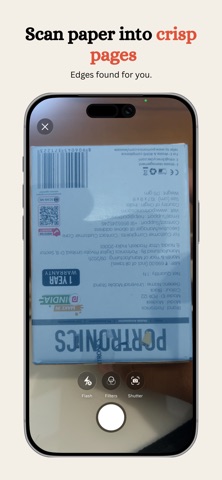
SCAN DOCUMENTS
Photograph paper documents with your camera and turn them into clear, professional PDF files. Combine several pages into one document, ready to sign or share.
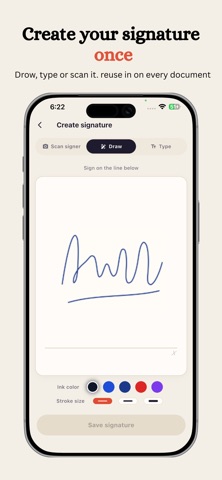
CREATE YOUR SIGNATURE
Draw your signature on screen or capture a handwritten signature from paper. Remove the background to create a clean, transparent signature that looks natural on any document.
SIGN PDF FILES
Place your signature exactly where it belongs. Resize and reposition it on the page, preview the finished document and export a PDF that is ready to share.
MADE FOR EVERYDAY DOCUMENTS
Use Sign Doc for:
• Contracts and agreements
• Consent and authorization forms
• Rental and business documents
• School and personal paperwork
• Invoices and other documents that need a signature
PRIVACY FIRST
Document scanning, PDF creation and signing happen on your device. Your documents and PDF contents are not uploaded to our servers.
A SIMPLE DOCUMENT WORKFLOW
• Scan one page or several
• Create and reuse signatures
• Capture signatures from paper
• Generate transparent signature images
• Position and resize signatures
• Build and export PDF documents
• Share with the iOS share sheet
• No account required
From paper to signed PDF, Sign Doc helps you finish important documents quickly and with confidence.
Download Sign Doc and sign documents easily, anytime.
Privacy Policy: https://sites.google.com/view/sign-doc-privacy-policy/home
Terms & Conditions: https://sites.google.com/view/sign-doc-terms-conditions/home