




AppBrain's verdict
New- Rating on App Store
- 5.00
- 1 ratings
- Last updated
- October 5, 2026
- Size
- 15.7 MB
Sign Documents: Signature App came out 78 days ago. It doesn't have enough ratings yet to judge what users think.
User feedback
Ratings and reviews on the App StoreComments on Sign Documents: Signature App for iOS
We don't have enough comments to show example comments. Please check back later.
Store listing
By Denis Parfenov, from the App StoreDescription by Denis Parfenov Written by the developer, not by AppBrain. Click to read.
Whether you need to sign a contract, agreement, form, application, invoice, or other document, this PDF signer gives you the tools to handle the entire process on your phone — no printing required.
EASY DOCUMENT SIGNING
Import your document and add your signature wherever you need it. The app supports PDF and DOCX files, making it easy to esign everyday documents for work, business, or personal use.
IMPORT DOCUMENTS YOUR WAY
Add documents from:
• Files — import PDF and DOCX files directly from your device
• Photo Library — use an existing photo or image of a document
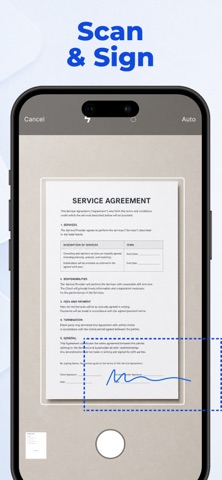
• Camera Scanner — scan a paper document with your camera and sign it digitally
CREATE YOUR SIGNATURE
Use the built-in Signature Maker to create and save your electronic signature in the way that works best for you:
• Draw — create a handwritten signature with your finger
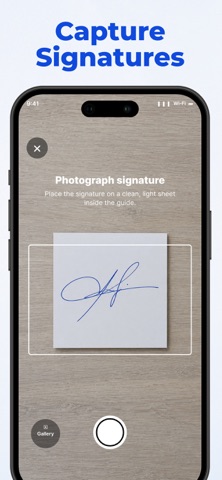
• Scan — capture your real signature from paper using the camera
• Type — create a signature, name, or initials using typed text
Create your signature once and use it whenever you need to Sign Documents.
SIGN PDF & DOCX DOCUMENTS
Add your digital signature to PDF and Word documents directly on your device. Position your signature where needed and prepare documents for sharing in seconds.
SAVE, SHARE & PRINT
Once your document is signed, you can:
• Save it inside the app for easy access
• Export it using the system Share menu
• Send it through your favorite apps and services
• Print the signed document directly from your device
ALL YOUR SIGNED DOCUMENTS IN ONE PLACE
Keep completed documents inside the app so you can easily find, review, and share them again whenever needed.
FROM PAPER TO SIGNED DOCUMENT
Need to sign a physical document? Scan it with your camera, add your electronic signature, and export the finished document — all from one app.
A SIMPLE ESIGN WORKFLOW
From creating a Signature Maker profile to using the app as a PDF signer or DOCX document signer, everything is designed to make electronic document signing fast and convenient.
Create your signature. Sign your document. Save or share it.
Privacy Policy:
https://mobileappsdevco.github.io/signature-legal/privacy.html
Terms of Use:
https://mobileappsdevco.github.io/signature-legal/terms.html
Contact Us:
parfenovapps@gmail.com
Safety and technology
Found in the app by AppBrain- Price
- Free
- App size
- 15.7 MB
- Content rating
- Everyone
Technologies used by Sign Documents: Signature App
Releases
Updates seen on the App Store- Version
- 1.1.0
- Launched
- September 2026
No changelog data
Alternatives
Similar apps and more from Denis ParfenovAlternatives to Sign Documents: Signature App


More from Denis Parfenov


Rankings
App Store top chartsApp Store Rankings for Sign Documents: Signature App
About the app and developer
About Sign Documents: Signature App
Sign Documents: Signature App is a productivity app developed by Denis Parfenov.
What is the rating of Sign Documents: Signature App?
Sign Documents: Signature App is rated 5.00 out of 5 stars, based on one rating ratings.
Is Sign Documents: Signature App free?
Sign Documents: Signature App is free. The app size is 15.68 MB. The latest version available is 1.1.0. The last update was on October 5, 2026.
What are the requirements for Sign Documents: Signature App?
The app has a content rating of Everyone. The app has been available on the App Store since September 2026.
Sign Documents: Signature App is made and published by Denis Parfenov. AppBrain is an independent app data site and isn't affiliated with Denis Parfenov. The app name, icon, screenshots and description belong to Denis Parfenov and are shown as published on the App Store.
Developer information for Denis Parfenov
Address:
Frequently asked questions about Sign Documents: Signature App
Is Sign Documents: Signature App free?
Yes. Sign Documents: Signature App is free on the App Store.
Is Sign Documents: Signature App still available?
Yes. Sign Documents: Signature App is on the App Store, and the last update we saw was on October 5, 2026.
How large is Sign Documents: Signature App?
Sign Documents: Signature App is 15.68 MB.
Is Sign Documents: Signature App suitable for children?
App Store rates the content of Sign Documents: Signature App as suitable for everyone.
How do people rate Sign Documents: Signature App?
Sign Documents: Signature App has one rating of 5.00 stars on the App Store.
Who made Sign Documents: Signature App?
Sign Documents: Signature App was developed by Denis Parfenov. It is listed in the productivity category on the App Store.
What are the best alternatives to Sign Documents: Signature App?
People looking at Sign Documents: Signature App also look at these productivity apps: Document Signer App - TinySign, PDF Maker Creator, Signlyus — Fill & Sign Docs, e Signature Scanner & Creator, Aukazi Pulse.