


AppBrain's verdict
- Rating on App Store
- 4.65
- 26 ratings
- Last updated
- January 4, 2025
- Size
- 39.5 MB
It doesn't have enough ratings yet to judge what users think.
User feedback
Ratings and reviews on the App StoreComments on Sign PDF & Document Signature for iOS
We don't have enough comments to show example comments. Please check back later.
Store listing
By Mariana Ruiz, from the App StoreDescription by Mariana Ruiz Written by the developer, not by AppBrain. Click to read.
Why settle for outdated methods when you can simplify every step of your document process? Instantly scan, upload, and tailor your files, keeping your signature ready whenever you need it. No more paper jams, no more wasted time—just seamless, modern document management at your fingertips. Embrace the smarter way forward!
Key Features:
Scan or Upload: Effortlessly scan your files or choose from your photos (scan file/pdf/photo) to get started with your documents.
Import Files with Ease: Seamlessly import files from various sources, giving you the flexibility to work with the documents you need.
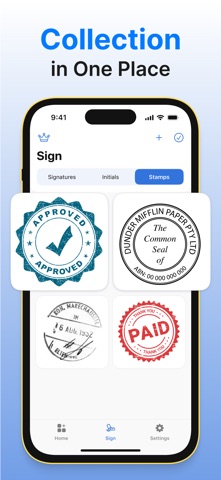
Customizable Signatures: Add your personal touch with customizable signatures, stamps, or initials on your documents.
Signature Options: Choose from various pen thicknesses and colors for your signature, allowing you to create a unique and professional appearance for each document.
Subscribe to enjoy unrestricted access to all features of the scanner application.
Subscription fees are billed on a weekly, monthly, quarterly, or annual basis, depending on the chosen plan.
Payment will be processed through your iTunes Account upon confirmation of the purchase.
Subscriptions will automatically renew unless the auto-renew option is disabled at least 24 hours before the end of the current billing cycle.
Your account will be charged for renewal within 24 hours prior to the conclusion of the current period, with the cost determined by the selected subscription plan.
Users can manage their subscriptions, and the auto-renew feature can be turned off by navigating to the Account Settings after the purchase.
Terms of Use: http://tiny.cc/n2jwzz
Privacy Policy: http://tiny.cc/k2jwzz
Safety and technology
Found in the app by AppBrain- Price
- Free
- App size
- 39.5 MB
- Content rating
- Everyone
Technologies used by Sign PDF & Document Signature
Releases
Updates seen on the App Store- Version
- 1.0.2
- Launched
- January 2025
No changelog data
Alternatives
Similar apps and more from Mariana RuizMore from Mariana Ruiz

Rankings
App Store top chartsApp Store Rankings for Sign PDF & Document Signature
About the app and developer
About Sign PDF & Document Signature
Sign PDF & Document Signature is a business app developed by Mariana Ruiz.
User Ratings
Sign PDF & Document Signature is rated 4.65 out of 5 stars. The rating is based on 26 ratings.
App Information
Sign PDF & Document Signature is freely available from the App Store. The app size is 39.50 MB. The latest version available is 1.0.2. The last update was on January 4, 2025.
Technical Requirements
The app has a content rating of Everyone. The app has been available on the App Store since January 2025.
Sign PDF & Document Signature is made and published by Mariana Ruiz. AppBrain is an independent app data site and isn't affiliated with Mariana Ruiz. The app name, icon, screenshots and description belong to Mariana Ruiz and are shown as published on the App Store.
Developer information for Mariana Ruiz
Address:
Frequently asked questions about Sign PDF & Document Signature
Is Sign PDF & Document Signature free?
Yes. Sign PDF & Document Signature is free on the App Store.
Is Sign PDF & Document Signature still available?
Yes. Sign PDF & Document Signature is on the App Store, and the last update we saw was on January 4, 2025.
How large is Sign PDF & Document Signature?
Sign PDF & Document Signature is 39.50 MB.
Is Sign PDF & Document Signature suitable for children?
App Store rates the content of Sign PDF & Document Signature as suitable for everyone.
How do people rate Sign PDF & Document Signature?
Sign PDF & Document Signature scores 4.65 out of 5 stars, from 26 ratings on the App Store.
Who made Sign PDF & Document Signature?
Sign PDF & Document Signature was developed by Mariana Ruiz. It is listed in the business category on the App Store.