AppBrain
AppBrain
  • Apps
  • Apps being viewed right now Trending apps today Most popular apps All-time most installed apps Top rated apps iPhone and iPad apps
  • Intelligence ▾
    Intelligence overview → Track any Android app or your whole market
    Track & analyze
    Keyword Tracker & OptimizerTrack & improve Play rankings App Performance ReportOne-off PDF for any app StatisticsFree Android & Play market stats
    Promote your app
    Featured Apps App Links
  • Intelligence
  • Pricing
  • Dashboard
  • Sign up
  • Log in
App Store Apps > Business > Sign PDF - eSign & Fill Docs
Sign PDF - eSign & Fill Docs icon

Sign PDF - eSign & Fill Docs

by CodeCross · Business · Free
On the App Store since March 2026 · Data updated 2026-10-25

Sign PDF - eSign & Fill Docs is made and published by CodeCross. AppBrain is an independent app data site and isn't affiliated with CodeCross. The app name, icon, screenshots and description belong to CodeCross and are shown as published on the App Store.

AppBrain's verdict

Rating on App Store
5.00
1 ratings
Last updated
June 6, 2026
Size
57.7 MB

It doesn't have enough ratings yet to judge what users think.

Official page on the App Store

User feedback

Ratings and reviews on the App Store

Comments on Sign PDF - eSign & Fill Docs for iOS

We don't have enough comments to show example comments. Please check back later.

Store listing

By CodeCross, from the App Store
Sign PDF - eSign & Fill Docs Screenshot 1 of 10
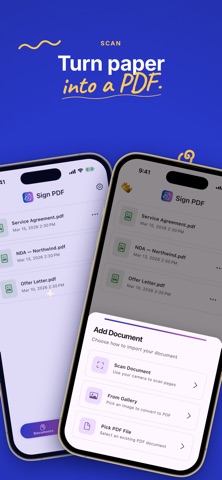
Sign PDF - eSign & Fill Docs Screenshot 2 of 10
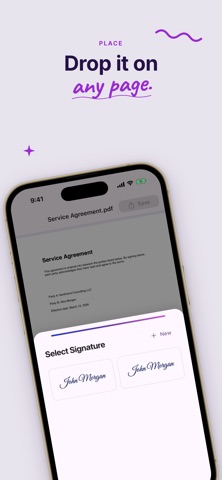
Sign PDF - eSign & Fill Docs Screenshot 3 of 10
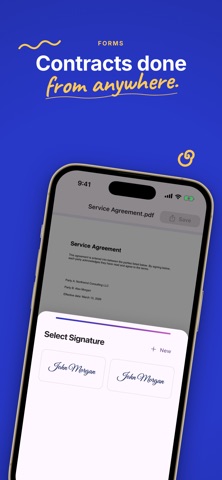
Sign PDF - eSign & Fill Docs Screenshot 4 of 10
Sign PDF - eSign & Fill Docs Screenshot 5 of 10
Sign PDF - eSign & Fill Docs Screenshot 6 of 10
Sign PDF - eSign & Fill Docs Screenshot 7 of 10
Sign PDF - eSign & Fill Docs Screenshot 8 of 10
Sign PDF - eSign & Fill Docs Screenshot 9 of 10
Sign PDF - eSign & Fill Docs Screenshot 10 of 10
Screenshots by CodeCross, from the the App Store listing
Description by CodeCross Written by the developer, not by AppBrain. Click to read.
Sign PDF lets you sign documents right on your device—no printing, no scanner, no account. Add your signature, initials, or a stamp to any PDF in seconds and keep everything private with 100% on-device signing. It's the fast, simple e-signature app to fill and sign contracts, forms, agreements, and paperwork.

Need to sign a PDF, fill a form, or e-sign a contract on the go? Sign PDF is a privacy-first PDF signer and document scanner: import a PDF, scan paper with your camera, draw an electronic signature, place it anywhere, then export a signed PDF. A complete fill and sign, esign, and signature maker toolkit that works offline.

WHY SIGN PDF?
• Sign any PDF in seconds — draw your signature, initials, or upload a stamp
• Automatic background removal — turn a photo of your signature into a clean, transparent stamp
• Document scanner — scan paper with your camera and turn it into a PDF
• Image to PDF — import photos and convert them to PDF
• Fill and sign forms — add text, today's date, and time anywhere on the page
• Watermark — add a custom watermark like DRAFT or CONFIDENTIAL
• Reusable signature library — save unlimited signatures, initials, and stamps
• 100% on-device — your documents never leave your phone, fully private and offline

USE SIGN PDF FOR:
• Contracts, agreements, and NDAs
• Job offers, HR forms, and onboarding paperwork
• Rental and lease agreements
• Invoices, quotes, and delivery notes
• School and government forms
• Consent forms and waivers
• Any PDF that needs a quick signature

FREE VS PREMIUM
Free: import and scan PDFs, create and save unlimited signatures, initials, and stamps, place them on any page, add text and watermarks, and preview your signed document. Free users cannot export or save the finished document.

Premium subscription unlocks exporting behind a paywall:
• Export and save signed PDFs — the only way to get your finished document out of the app
• Share signed PDFs to Files, Mail, and other apps
• Unlimited document exports

Exporting any document requires an active Premium subscription. Payment is charged to your Apple ID or Google Play account. Subscriptions renew automatically unless canceled at least 24 hours before the end of the current period. Manage or cancel anytime in your device subscription settings.

Download Sign PDF today—the fast, private way to sign PDF documents, fill and sign forms, and create electronic signatures, all on your device.

Terms of Use: https://www.apple.com/legal/internet-services/itunes/dev/stdeula/
Official page on the App Store Also on Google Play

Safety and technology

Found in the app by AppBrain
Price
Free
App size
57.7 MB
Content rating
Everyone

Technologies used by Sign PDF - eSign & Fill Docs

Releases

Updates seen on the App Store
Version
2.0.0
Launched
March 2026

No changelog data

Alternatives

Similar apps and more from CodeCross

Alternatives to Sign PDF - eSign & Fill Docs

Sign PDF Documents eSignDocPDF icon Sign PDF Documents eSignDocPDF
Mazanik Yury
0.0
Free
Sign PDF: eSign & Fill Forms icon Sign PDF: eSign & Fill Forms
DECLAN JOHN NANTON
5.0
Free
1 ratings
QuickSign: Signature & Stamp icon QuickSign: Signature & Stamp
Butler Labs LLC
5.0
Free
3 ratings
SignPaper: eSign PDF Documents icon SignPaper: eSign PDF Documents
Ilia Pisarenko
0.0
Free
SignSimpli icon SignSimpli
WorkSimpli
5.0
Free
7 ratings
Sign. Just sign and seal icon Sign. Just sign and seal
Mikhail Murzak
0.0
Free
Sign PDF: Fill & eSign Docs icon Sign PDF: Fill & eSign Docs
Shehar Yar
0.0
Free
Signlyus — Fill & Sign Docs icon Signlyus — Fill & Sign Docs
Javier Marin Bernal
0.0
Free

More from CodeCross

TempMail - Temp Mail Address icon TempMail - Temp Mail Address
CodeCross
4.2
Free
5 ratings
Single Tab - Private Browser icon Single Tab - Private Browser
CodeCross
3.2
Free
4 ratings
Simple POS: Cash Register icon Simple POS: Cash Register
CodeCross
5.0
Free
1 ratings
Voice Note to Text: Transcribe icon Voice Note to Text: Transcribe
CodeCross
1.0
Free
1 ratings
Mathyx – Mental Math Puzzle icon Mathyx – Mental Math Puzzle
CodeCross
2.0
Free
1 ratings
Financial Calculator: Mortgage icon Financial Calculator: Mortgage
CodeCross
0.0
Free
Paystub Generator - Pay Stub icon Paystub Generator - Pay Stub
CodeCross
0.0
Free
Typi – Phone Typing Speed Test icon Typi – Phone Typing Speed Test
CodeCross
0.0
Free

Also available on Google Play

Sign PDF : Secure eSignature icon Sign PDF : Secure eSignature
CodeCross, LLC
0.0
Free
5+

Rankings

App Store top charts

App Store Rankings for Sign PDF - eSign & Fill Docs

This app is not ranked

About the app and developer

About Sign PDF - eSign & Fill Docs

Sign PDF - eSign & Fill Docs is a business app developed by CodeCross.

What is the rating of Sign PDF - eSign & Fill Docs?

Sign PDF - eSign & Fill Docs is rated 5.00 out of 5 stars, based on one rating ratings.

Is Sign PDF - eSign & Fill Docs free?

Sign PDF - eSign & Fill Docs is free. The app size is 57.67 MB. The latest version available is 2.0.0. The last update was on June 6, 2026.

What are the requirements for Sign PDF - eSign & Fill Docs?

The app has a content rating of Everyone. The app has been available on the App Store since March 2026.

Developer information for CodeCross

CodeCross

Address:

Frequently asked questions about Sign PDF - eSign & Fill Docs

Is Sign PDF - eSign & Fill Docs free?

Yes. Sign PDF - eSign & Fill Docs is free on the App Store.

Is Sign PDF - eSign & Fill Docs still available?

Yes. Sign PDF - eSign & Fill Docs is on the App Store, and the last update we saw was on June 6, 2026.

How large is Sign PDF - eSign & Fill Docs?

Sign PDF - eSign & Fill Docs is 57.67 MB.

Is Sign PDF - eSign & Fill Docs suitable for children?

App Store rates the content of Sign PDF - eSign & Fill Docs as suitable for everyone.

How do people rate Sign PDF - eSign & Fill Docs?

Sign PDF - eSign & Fill Docs has one rating of 5.00 stars on the App Store.

Who made Sign PDF - eSign & Fill Docs?

Sign PDF - eSign & Fill Docs was developed by CodeCross. It is listed in the business category on the App Store.

What are the best alternatives to Sign PDF - eSign & Fill Docs?

People looking at Sign PDF - eSign & Fill Docs also look at these business apps: Sign PDF Documents eSignDocPDF, Sign PDF: eSign & Fill Forms, QuickSign: Signature & Stamp, SignPaper: eSign PDF Documents, SignSimpli.

Share Sign PDF - eSign & Fill Docs

Price drops on Google Play Top new apps Apps other people are watching Popular Business Apps Today's trending apps
Sign PDF Documents eSignDocPDF icon Sign PDF Documents eSignDocPDF
Sign PDF: eSign & Fill Forms icon Sign PDF: eSign & Fill Forms
QuickSign: Signature & Stamp icon QuickSign: Signature & Stamp
SignPaper: eSign PDF Documents icon SignPaper: eSign PDF Documents
SignSimpli icon SignSimpli
Sign. Just sign and seal icon Sign. Just sign and seal
Sign PDF: Fill & eSign Docs icon Sign PDF: Fill & eSign Docs
Signlyus — Fill & Sign Docs icon Signlyus — Fill & Sign Docs
Overview Alternatives Reviews Rankings Technology
AppBrain Intelligence premium content

Subscribe now to get full and unlimited access to AppBrain Intelligence. You'll have access to:

  • App Intelligence dashboard (performance timeline, competitor comparison, country rankings, insight cards)
  • Detailed ranking data per app
  • Full timeline per developer
  • Device market shares data per country
  • Unlimited keyword tracking
1 Month

$75/mo
(billed every month)

SAVE 0%
Subscribe
3 Months

$65/mo
($195 billed every 3 months)

SAVE 13%
Subscribe
1 Year

$57.50/mo
($690 billed every year)

SAVE 23%
Subscribe
Each subscription will automatically renew 3 days before the expiration date for the same time period. Subscriptions can be cancelled at any time before the renewal.

AppBrain is an app data site, we track rankings, ratings, installs for all apps and games on Google Play and the App Store. AppBrain doesn't host app files or APKs, all install links go directly to the official store. All trademarks are owned by their respective owners.

More apps

  • Top Android apps being viewed
  • Card Drop: Category Puzzle
  • Rivals at War stats
  • Voloco: Auto Vocal Tune Studio

App statistics

  • Android statistics
  • Google Play Developer stats
  • Trending Android Apps
  • Trending iOS apps
  • Top popular Apps
  • Buy the best Android phone
  • Buy & sell app businesses

About AppBrain

  • Contact
  • Privacy
  • Documentation
  • DMCA takedowns
  • Blog
  • Top Free Games Apps for your iPhone or iPad
© 2010-2026 - AppBrain