

Sign PDF: Fill Forms & Scan
Sign PDF: Fill Forms & Scan is made and published by Antonio Gonzalez de la aleja german. AppBrain is an independent app data site and isn't affiliated with Antonio Gonzalez de la aleja german. The app name, icon, screenshots and description belong to Antonio Gonzalez de la aleja german and are shown as published on the App Store.
AppBrain's verdict
- Last updated
- October 6, 2026
Rankings
App Store top chartsApp Store Rankings for Sign PDF: Fill Forms & Scan
Competitors
Similar apps and more from Antonio Gonzalez de la aleja germanAlternatives to Sign PDF: Fill Forms & Scan






More from Antonio Gonzalez de la aleja german


Also available on Google Play

Releases
Updates seen on the App Store- Version
- 1.1
- Launched
- August 2026
No changelog data
User feedback
Ratings and reviews on the App StoreComments on Sign PDF: Fill Forms & Scan for iOS
We don't have enough comments to show example comments. Please check back later.
Technology
Found in the app by AppBrain- Price
- Free
- App size
- 13.3 MB
- Content rating
- Everyone
Technologies used by Sign PDF: Fill Forms & Scan
About the app and developer
About Sign PDF: Fill Forms & Scan
Sign PDF: Fill Forms & Scan is an utilities app developed by Antonio Gonzalez de la aleja german.
What is the rating of Sign PDF: Fill Forms & Scan?
Sign PDF: Fill Forms & Scan has no ratings yet.
Is Sign PDF: Fill Forms & Scan free?
Sign PDF: Fill Forms & Scan is free. The app size is 13.28 MB. The latest version available is 1.1. The last update was on October 6, 2026.
What are the requirements for Sign PDF: Fill Forms & Scan?
The app has a content rating of Everyone. The app has been available on the App Store since August 2026.
Developer information for Antonio Gonzalez de la aleja german
Antonio Gonzalez de la aleja german
Address:
Store listing
By Antonio Gonzalez de la aleja german, from the App Store



Description by Antonio Gonzalez de la aleja german Written by the developer, not by AppBrain. Click to read.
NO LIMITS, NO WATERMARKS
Export and share the signed document as many times as you need. There is no subscription, no in-app purchase, no advertising and no daily document limit.
SIGN AND FILL
- Create your signature by drawing it, typing it or using a photo
- Save several signatures and initials and reuse them any time
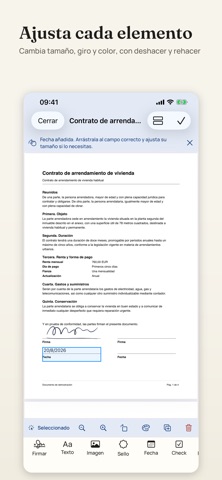
- Add text, dates, checkboxes, images and stamps
- Adjust the size, rotation and colour of each element, with undo and redo
- Fill PDF form fields by tapping them directly
- On-device text recognition suggests where the signature and date go, and you confirm
SCANNER AND TEXT RECOGNITION
- Scan multi-page documents with edge detection and perspective correction
- Apply colour, greyscale or black and white filters
- Review, reorder and remove pages before saving
- Turn photos from your gallery into a PDF
- Produce searchable text in English and Spanish with on-device OCR
PDF TOOLS
- Merge and split documents
- Organise pages: reorder, rotate, duplicate, delete and extract
- Compress a file
- Add page numbers and watermarks
- Protect a PDF with a password
- Open protected documents by entering their password
YOUR LIBRARY, KEPT PRIVATE
- Search by name and browse real page thumbnails
- Mark favourites, rename, duplicate and delete
- Autosave and draft recovery if you close the app
- Open files straight from other applications
PRIVACY
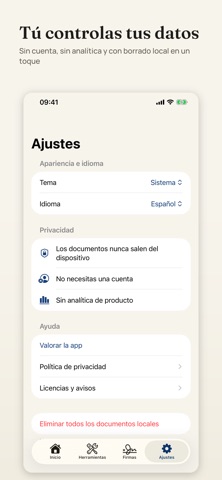
Documents, scans and signatures are stored in the app's private storage, protected with system encryption and excluded from automatic backup. There is no user account, no document server, no advertising and no product analytics. PDF passwords are never stored.
WHAT IT DOES AND WHAT IT DOES NOT
The app places a visual signature on the PDF: the equivalent of printing, signing and scanning, without the paper. It does not issue certificate-based digital signatures or qualified timestamps, and it does not send documents to other people for them to sign.
Terms of Use (EULA): https://www.apple.com/legal/internet-services/itunes/dev/stdeula/
Privacy Policy: https://www.freeprivacypolicy.com/live/6709a492-0082-4d37-b246-397c3cdc06a5