Download Android Apps and Games
AppBrain
  • Apps
  • Apps being viewed right now Trending apps today Most popular apps All-time most downloaded apps Top rated apps
  • Intelligence ▾
    Intelligence overview → Track any Android app or your whole market
    Track & analyze
    Keyword Tracker & OptimizerTrack & improve Play rankings App Performance ReportOne-off PDF for any app StatisticsFree Android & Play market stats
    Promote your app
    Featured Apps App Links
  • Intelligence
  • Pricing
  • Dashboard
  • Sign up
  • Log in
Last updated on: 2026-09-02
App Store Apps > Utilities > Signal & Frequency Generator
Signal & Frequency Generator icon

Signal & Frequency Generator

1.0
FOUTURE
0.00
0 reviews
$0.99

Signal & Frequency Generator Screenshot 1 of 8
Signal & Frequency Generator Screenshot 2 of 8
Signal & Frequency Generator Screenshot 3 of 8
Signal & Frequency Generator Screenshot 4 of 8
Signal & Frequency Generator Screenshot 5 of 8
Signal & Frequency Generator Screenshot 6 of 8
Signal & Frequency Generator Screenshot 7 of 8
Signal & Frequency Generator Screenshot 8 of 8
Download from the App Store

About Signal & Frequency Generator

Signal & Frequency Generator is an overall app developed by FOUTURE.

Download Statistics

User Ratings

The app has no ratings yet.

App Information

Signal & Frequency Generator costs $0.99 to download. The APK download size is 5.71 MB. The latest version available is 1.0. The last update was on August 26, 2026.

Technical Requirements

The app has a content rating of Everyone. The app has been available on Google Play 1 week ago.

Description
Signal & Frequency Generator is a precise tool for generating audio signals on iPhone and iPad. The app supports single tones, dual tones, MultiTone signals, noise, sweeps, and sequences. Frequencies can be set from 20 Hz to 20 kHz, entered manually, or selected from quick frequency presets.

For testing speakers, headphones, stereo setups, or audio chains, the app includes channel routing, phase offset, adjustable amplitude, burst mode, and a waveform preview. Custom configurations can be saved as presets and restored later.

High levels and high frequencies can damage hearing. Start with low volume and be especially careful with headphones.

Features

- Signal generator with multiple modes: single tone, dual tone, MultiTone, noise, and sweep.
- Frequency range from 20 Hz to 20 kHz.
- Manual frequency entry with Hz/kHz display.
- Logarithmic frequency slider for fast adjustments across the full frequency range.
- Fine frequency adjustment in steps of 0.1 Hz, 1 Hz, 10 Hz, and 100 Hz.
- Quick selection for fixed frequencies: 20 Hz, 31.5 Hz, 63 Hz, 125 Hz, 250 Hz, 500 Hz, 1 kHz, 2 kHz, 4 kHz, 8 kHz, 10 kHz, 16 kHz, and 20 kHz.
- Four waveforms: sine, square, triangle, and sawtooth.
- Adjustable amplitude per tone.
- Stereo output with channel selection: left, right, or left and right.
- Phase offset between left and right channel from 0 to 360 degrees.
- Dual tone mode for two simultaneously generated frequencies.
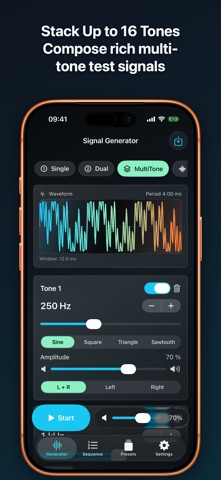
- MultiTone mode with up to 16 configurable tones at once.
- Individual MultiTone tones can be enabled, disabled, added, and deleted.
- Noise generator with white, pink, and brown noise.
- Sweep generator with start frequency, end frequency, and duration.
- Sweep scales: linear and logarithmic.
- Sweep repeat modes: once, loop, or back and forth.
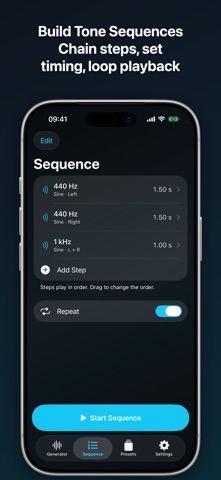
- Sequence mode with multiple tone steps.
- Sequence steps can be added, deleted, edited, and reordered.
- Adjustable duration per sequence step.
- Sequences can be played once or repeated.
- Burst mode for gated signals with adjustable on and off duration.
- Waveform preview with time window and period display.
- Transport bar with start/pause and master volume.
- Maximum output amplitude can be limited as a safety setting.
- Optional screen awake mode during playback.
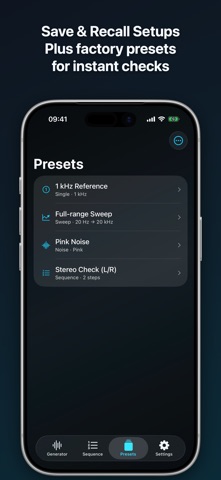
- Preset system for saving and restoring custom configurations.
- Factory presets for 1 kHz reference, full-range sweep, pink noise, and stereo check.
- Presets are stored locally.
- Audio output at 48 kHz sample rate, stereo, and 32-bit float.
- Smooth master gain smoothing and output limiting against clipping.

Generator: choose a mode (Single, Dual, MultiTone, Noise, Sweep). Set frequency by typing a value, by the logarithmic slider, by the +/- fine steps (0.1 / 1 / 10 / 100 Hz), or by tapping a preset frequency (20 Hz … 20 kHz). Choose a waveform (sine, square, triangle, sawtooth), amplitude, output channel (left, right, both) and stereo phase offset (0–360°). Dual mode adds a second independent tone; MultiTone allows up to 16 simultaneous tones that can each be added, enabled, disabled or deleted; Noise offers white, pink and brown noise; Sweep takes a start frequency, end frequency, duration, linear or logarithmic scale, and once / loop / ping-pong repeat. Burst mode gates the signal with adjustable on and off times.

Sequence: build a list of tone steps, each with its own settings and duration; add, edit, reorder and delete steps, then play the sequence once or looped.

Presets: four factory presets (1 kHz reference, full-range sweep, pink noise, stereo check) plus any configuration the user saves. Presets are stored locally on the device only.

Settings: default waveform, a maximum-amplitude safety limit, and an option to keep the screen awake during playback.
Note for the reviewer: the app deliberately produces continuous full-level test tones, including very low and very high frequencies. Please start at a low system volume and avoid headphones at high levels.
Show more Show less

More data about Signal & Frequency Generator

Price $0.99
Rating No ratings
Ranking Not ranked
Version 1.0
App download size 5.71 MB
Suitable for Everyone

More from FOUTURE

Potions – AI Shortcuts icon Potions – AI Shortcuts
FOUTURE
4.4
$0.99
19 ratings
Dream Potions icon Dream Potions
FOUTURE
5.0
$0.99
2 ratings
Marker: Podcast Notes icon Marker: Podcast Notes
FOUTURE
2.0
Free
1 ratings
FileToHash icon FileToHash
FOUTURE
0.0
$0.99
Prepper App Pro icon Prepper App Pro
FOUTURE
0.0
Free
Fou Flowers icon Fou Flowers
FOUTURE
0.0
Free
Rewrite Pro: AI Text Editor icon Rewrite Pro: AI Text Editor
FOUTURE
0.0
$0.99
Golden Memories icon Golden Memories
FOUTURE
0.0
Free

Changelog of Signal & Frequency Generator

No changelog data

Developer information for FOUTURE

FOUTURE

Address:

Share Signal & Frequency Generator

Comments on Signal & Frequency Generator for iOS

We don't have enough comments to show example comments. Please check back later.

App Store Rankings for Signal & Frequency Generator

This app is not ranked

Technologies used by Signal & Frequency Generator

More hot apps 🔥

Back to top
AppBrain Intelligence premium content

Subscribe now to get full and unlimited access to AppBrain Intelligence. You'll have access to:

  • App Intelligence dashboard (performance timeline, competitor comparison, country rankings, insight cards)
  • Detailed ranking data per app
  • Full timeline per developer
  • Device market shares data per country
  • Unlimited keyword tracking
1 Month

$75/mo
(billed every month)

SAVE 0%
Subscribe
3 Months

$65/mo
($195 billed every 3 months)

SAVE 13%
Subscribe
1 Year

$57.50/mo
($690 billed every year)

SAVE 23%
Subscribe
Each subscription will automatically renew 3 days before the expiration date for the same time period. Subscriptions can be cancelled at any time before the renewal.

AppBrain is a directory focused on discovering great apps and games. We give statistics, rankings and search options that Google Play and the App Store don't have. All trademarks are owned by their respective owners. AppBrain doesn't offer APKs or binaries, and always lets users install the official version from Google Play or the App Store.

More apps

  • Top Android apps being viewed
  • Pouf Burps stats
  • Baibuli Y'Oluganda Audio stats
  • EarnTime: Earn Screen Time for Android

Android Statistics

  • Android statistics
  • Google Play Developer stats
  • Trending Android Apps
  • Top popular Apps
  • Buy the best Android phone

About AppBrain

  • Contact
  • Privacy
  • Documentation
  • DMCA takedowns
  • Articles
  • Blog
  • Monetization tips: Understanding your eCPM
© 2010-2026 - AppBrain