




AppBrain's verdict
New- Rating on App Store
- 5.00
- 1 ratings
- Last updated
- October 19, 2026
- Size
- 13.9 MB
Signature Scanner: SignLeaf came out 67 days ago. It doesn't have enough ratings yet to judge what users think.
User feedback
Ratings and reviews on the App StoreComments on Signature Scanner: SignLeaf for iOS
We don't have enough comments to show example comments. Please check back later.
Store listing
By Billion Web Pte. Ltd., from the App StoreDescription by Billion Web Pte. Ltd. Written by the developer, not by AppBrain. Click to read.
CAPTURE YOUR HANDWRITING
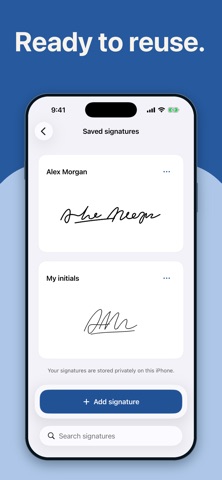
Photograph a signature or initials on plain paper, or choose an existing photo. Crop, rotate, remove the paper background, and adjust cleanup and ink strength. Zoom in to compare the result with your original. Keep signatures in your private library and reuse them on your documents.
SCAN AND REVIEW YOUR PAGES
Scan one or more paper pages with the iPhone camera. Review, crop, rotate, retake, reorder, or remove pages before signing. Your original scans are preserved separately from your edits.
SIGN AND FILL
Move and resize your signature without stretching it. Add editable text, dates, and checkmarks. Navigate and zoom through the pages, undo changes, and return to your editable draft later.
SAVE, THEN SHARE
Review the complete document and choose PDF, PNG, or JPG. PDFs include all signed pages; image formats create one numbered image per page. Save a completed copy inside SignLeaf, then share it or save it to Files. Cancelling sharing keeps your saved document.
ON YOUR IPHONE
Document and signature images are processed on-device. No account is required, and local scanning, editing, and signature storage work offline. Images, entered text, and filenames are excluded from app analytics. Local content is not synchronized between devices; keep exported copies of important files.
SUBSCRIPTIONS
Saving signed documents may require an auto-renewing weekly subscription. The localized price and any introductory trial for which you are eligible are shown before purchase. Subscriptions renew until cancelled through your Apple Account settings. Purchases and restores may require an internet connection.
SignLeaf places an image of handwriting on scanned paper documents. It does not verify identity or provide certification or a tamper-proof signature.
Privacy policy: https://arsh1219.github.io/signleaf-pages/privacy.html
Terms of use: https://arsh1219.github.io/signleaf-pages/terms.html
Apple standard EULA: https://www.apple.com/legal/internet-services/itunes/dev/stdeula/
Safety and technology
Found in the app by AppBrain- Price
- Free
- App size
- 13.9 MB
- Content rating
- Everyone
Technologies used by Signature Scanner: SignLeaf
Releases
Updates seen on the App Store- Version
- 1.0.6
- Launched
- September 2026
No changelog data
Alternatives
Similar apps and more from Billion Web Pte. Ltd.Alternatives to Signature Scanner: SignLeaf


More from Billion Web Pte. Ltd.


Rankings
App Store top chartsApp Store Rankings for Signature Scanner: SignLeaf
About the app and developer
About Signature Scanner: SignLeaf
Signature Scanner: SignLeaf is a productivity app developed by Billion Web Pte. Ltd.
User Ratings
Signature Scanner: SignLeaf is rated 5.00 out of 5 stars. The rating is based on one rating ratings.
App Information
Signature Scanner: SignLeaf is freely available from the App Store. The app size is 13.88 MB. The latest version available is 1.0.6. The last update was on October 19, 2026.
Technical Requirements
The app has a content rating of Everyone. The app has been available on the App Store since September 2026.
Signature Scanner: SignLeaf is made and published by Billion Web Pte. Ltd. AppBrain is an independent app data site and isn't affiliated with Billion Web Pte. Ltd. The app name, icon, screenshots and description belong to Billion Web Pte. Ltd. and are shown as published on the App Store.
Developer information for Billion Web Pte. Ltd.
Address:
Frequently asked questions about Signature Scanner: SignLeaf
Is Signature Scanner: SignLeaf free?
Yes. Signature Scanner: SignLeaf is free on the App Store.
Is Signature Scanner: SignLeaf still available?
Yes. Signature Scanner: SignLeaf is on the App Store, and the last update we saw was on October 19, 2026.
How large is Signature Scanner: SignLeaf?
Signature Scanner: SignLeaf is 13.88 MB.
Is Signature Scanner: SignLeaf suitable for children?
App Store rates the content of Signature Scanner: SignLeaf as suitable for everyone.
How do people rate Signature Scanner: SignLeaf?
Signature Scanner: SignLeaf has one rating of 5.00 stars on the App Store.
Who made Signature Scanner: SignLeaf?
Signature Scanner: SignLeaf was developed by Billion Web Pte. Ltd. It is listed in the productivity category on the App Store.
What are the best alternatives to Signature Scanner: SignLeaf?
People looking at Signature Scanner: SignLeaf also look at these productivity apps: Signature Maker - e Sign App, eSign PDF Documents: Signate, Signature maker - PDF Boost, Sign AI - Signature Maker App, Sign Documents - eSign PDF.