

SiliconLab Design Build Chips
SiliconLab Design Build Chips is made and published by Yuhsiu Lai. AppBrain is an independent app data site and isn't affiliated with Yuhsiu Lai. The app name, icon, screenshots and description belong to Yuhsiu Lai and are shown as published on the App Store.
AppBrain's verdict
- Last updated
- September 15, 2026
- Size
- 4.88 MB
User feedback
Ratings and reviews on the App StoreComments on SiliconLab Design Build Chips for iOS
We don't have enough comments to show example comments. Please check back later.
Store listing
By Yuhsiu Lai, from the App Store


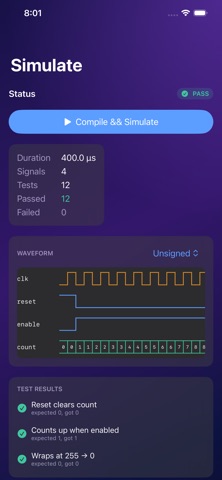
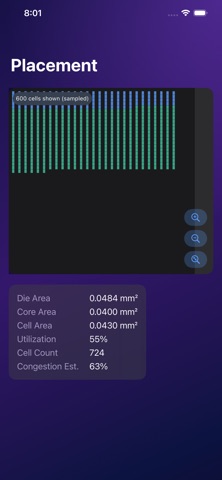

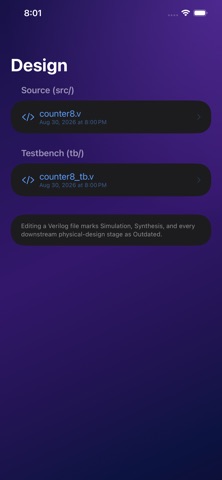

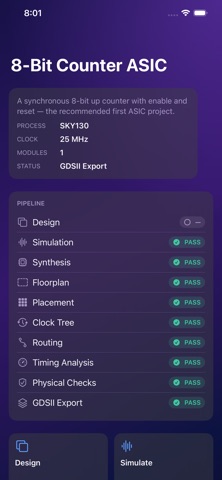

Description by Yuhsiu Lai Written by the developer, not by AppBrain. Click to read.
WHY SILICON LAB
Most people never see how a chip actually gets built. Silicon Lab makes every stage visible and touchable: pinch-zoom into thousands of placed standard cells, trace a single net through five metal layers, or open the worst timing path and see exactly which gate is costing you nanoseconds. It's the chip design flow, made interactive.
WHAT YOU CAN DO
Design
• Start from 11 templates — LED blinker, binary counter, PWM controller, UART, ALU, FSM, and more
• Edit real, synthesizable Verilog in a dedicated code editor with line numbers and file management
• Configure clock frequency, reset style, and top-level ports
Simulate
• Compile and run your design against an automatic testbench
• Explore an interactive waveform viewer — binary, hex, or decimal, with pinch-zoom and tap-to-inspect
• See pass/fail results for every test case
Synthesize
• Convert your RTL into standard cells from an SKY130-compatible cell library
• View cell counts, flip-flop counts, estimated area, and logic depth
Build the physical chip
• Floorplan: die and core boundaries, utilization targets
• Placement: every standard cell, positioned and zoomable — tap any cell for its instance name, type, and connected nets
• Clock Tree: see how the clock signal reaches every flip-flop through buffers, with latency and skew
• Routing: toggle individual metal layers, inspect any net's driver, loads, and routed length
• Timing: target frequency, setup/hold slack, and a full breakdown of the critical path
• Physical Checks: automated design-rule, connectivity, and routing verification
Explore the final layout
• Zoom continuously from the whole chip down to a single routed via
• Toggle cell and routing layers independently
• Tap any layer to learn what it does and why it exists
Learn as you go
• 20 short lessons covering ICs, RTL, standard cells, floorplanning, routing, timing, DRC, GDSII, tape-out, and more
• A guided "Build Your First Chip" walkthrough using an 8-bit counter, from idea to finished layout
• Every technical screen has an optional plain-language explanation
Track your work
• Version checkpoints and full build history for every project
• A persistent pipeline status — Design, Verify, Synthesize, Floorplan, Place, CTS, Route, Analyze, GDSII — so you always know what's current and what's outdated
• Export a complete project package (RTL, testbench, constraints, reports) via the share sheet
BUILT FOR IPAD AND IPHONE
Silicon Lab uses a persistent sidebar and multi-column layout on iPad, and a full, focused experience on iPhone — the same projects, same pipeline, same depth on either device.
IMPORTANT
Silicon Lab is an educational and prototyping tool. It is designed to teach digital ASIC design concepts and help you prototype small designs — it does not replace professional EDA software or a real fabrication flow. Results are for education, experimentation, and tape-out preparation, and require independent engineering verification before any real fabrication. "Ready for Export" means Silicon Lab's own automated workflow completed successfully; it is not foundry acceptance or production signoff.
Whether you're a student learning how chips are made, an engineer prototyping an idea, or just curious what's actually inside the silicon around you — Silicon Lab shows you, stage by stage.
Safety and technology
Found in the app by AppBrain- Price
- $6.99
- App size
- 4.88 MB
- Content rating
- Everyone
Technologies used by SiliconLab Design Build Chips
Releases
Updates seen on the App Store- Version
- 1.0
- Launched
- September 2026
No changelog data
Alternatives
Similar apps and more from Yuhsiu LaiMore from Yuhsiu Lai


Rankings
App Store top chartsApp Store Rankings for SiliconLab Design Build Chips
About the app and developer
About SiliconLab Design Build Chips
SiliconLab Design Build Chips is an education app developed by Yuhsiu Lai.
What is the rating of SiliconLab Design Build Chips?
SiliconLab Design Build Chips has no ratings yet.
Is SiliconLab Design Build Chips free?
SiliconLab Design Build Chips costs $6.99. The app size is 4.88 MB. The latest version available is 1.0. The last update was on September 15, 2026.
What are the requirements for SiliconLab Design Build Chips?
The app has a content rating of Everyone. The app has been available on the App Store since September 2026.
Developer information for Yuhsiu Lai
Address: