

Simmerdial is made and published by 凯 邢. AppBrain is an independent app data site and isn't affiliated with 凯 邢. The app name, icon, screenshots and description belong to 凯 邢 and are shown as published on the App Store.
AppBrain's verdict
New- Rating on App Store
- 3.00
- 1 ratings
- Last updated
- October 6, 2026
Simmerdial came out 32 days ago. It doesn't have enough ratings yet to judge what users think.
Rankings
App Store top chartsApp Store Rankings for Simmerdial
Competitors
Similar apps and more from 凯 邢Alternatives to Simmerdial


Releases
Updates seen on the App Store- Version
- 1.1.0
- Launched
- September 2026
No changelog data
User feedback
Ratings and reviews on the App StoreComments on Simmerdial for iOS
We don't have enough comments to show example comments. Please check back later.
Technology
Found in the app by AppBrain- Price
- Free
- App size
- 5.75 MB
- Content rating
- Everyone
Technologies used by Simmerdial
About the app and developer
About Simmerdial
Simmerdial is an utilities app developed by 凯 邢.
What is the rating of Simmerdial?
Simmerdial is rated 3.00 out of 5 stars, based on one rating ratings.
Is Simmerdial free?
Simmerdial is free. The app size is 5.75 MB. The latest version available is 1.1.0. The last update was on October 6, 2026.
What are the requirements for Simmerdial?
The app has a content rating of Everyone. The app has been available on the App Store since September 2026.
Developer information for 凯 邢
Address:
Store listing
By 凯 邢, from the App Store


Description by 凯 邢 Written by the developer, not by AppBrain. Click to read.
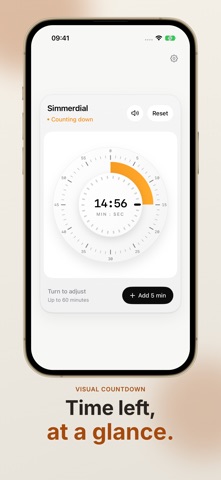
Turn the dial clockwise to set a time. Release to start. From eggs and tea to baking, set your timer and get back to the task at hand.
A short illustrated guide walks you through the basics on first launch.
TURN TO SET
Choose up to 60 minutes in 15-second steps. Mechanical clicks and haptic feedback make each turn feel familiar. Mute the dial sound whenever you like.
SEE WHAT IS LEFT
The orange ring shows time remaining at a glance. Adjust the dial while the timer runs, tap to add five minutes, or reset to start over.
HEAR WHEN IT IS READY
Allow system alerts and, once the alarm is scheduled, it can ring when your iPhone is locked or the app is closed. Check the live countdown on your Lock Screen or in the Dynamic Island on supported iPhones.
MAKE IT YOURS
Choose light, dark, or your system appearance. Open iOS Settings from the app menu to change the app language. Available in English, Simplified Chinese, and Japanese.
KEEP IT SIMPLE
No account, ads, or tracking SDKs. Timer state, sound settings, and appearance preferences stay on your device. Timing works offline. VoiceOver lets you adjust the time, and Reduce Motion is supported.
For iPhone with iOS 26 or later. System alerts require permission. If permission is off or an alarm cannot be scheduled, keep the app open to hear the alert. Dynamic Island features require a supported iPhone.