

Simple Sides
Simple Sides is made and published by Erik Osterberg. AppBrain is an independent app data site and isn't affiliated with Erik Osterberg. The app name, icon, screenshots and description belong to Erik Osterberg and are shown as published on the App Store.
AppBrain's verdict
- Last updated
- February 1, 2026
Rankings
App Store top chartsApp Store Rankings for Simple Sides
Competitors
Similar apps and more from Erik OsterbergMore from Erik Osterberg


Releases
Updates seen on the App Store- Version
- 1.15
- Launched
- November 2019
No changelog data
User feedback
Ratings and reviews on the App StoreComments on Simple Sides for iOS
We don't have enough comments to show example comments. Please check back later.
Technology
Found in the app by AppBrain- Price
- $29.99
- App size
- 743.7 KB
- Content rating
- Everyone
Technologies used by Simple Sides
About the app and developer
About Simple Sides
Simple Sides is a productivity app developed by Erik Osterberg.
User Ratings
The app has no ratings yet.
App Information
Simple Sides costs $29.99. The app size is 743.69 kB. The latest version available is 1.15. The last update was on February 1, 2026.
Technical Requirements
The app has a content rating of Everyone. The app has been available on the App Store since November 2019.
Developer information for Erik Osterberg
Address:
Frequently asked questions about Simple Sides
Is Simple Sides free?
No. Simple Sides costs $29.99 on the App Store.
Is Simple Sides still available?
Yes. Simple Sides is on the App Store, and the last update we saw was on February 1, 2026.
How large is Simple Sides?
Simple Sides is 743.69 kB.
Is Simple Sides suitable for children?
App Store rates the content of Simple Sides as suitable for everyone.
Who made Simple Sides?
Simple Sides was developed by Erik Osterberg. It is listed in the productivity category on the App Store.
Store listing
By Erik Osterberg, from the App Store

Description by Erik Osterberg Written by the developer, not by AppBrain. Click to read.
Simple Sides is like that specialist instrument in your production toolbox.
How it works.
Output view
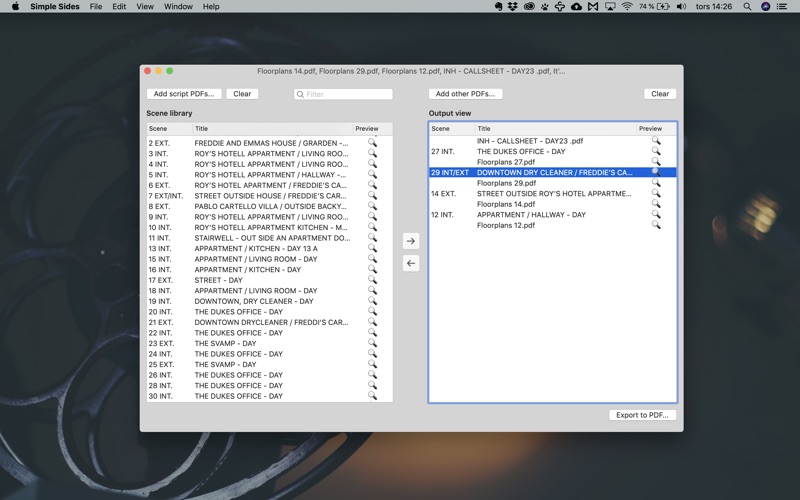
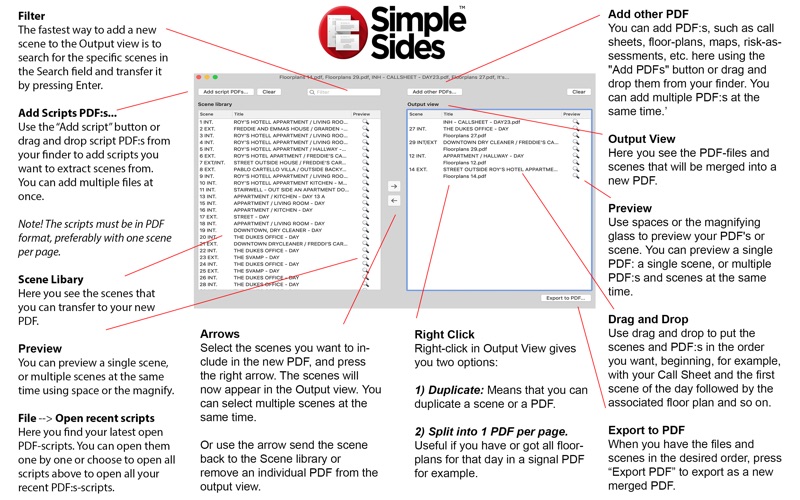
Here you see the files and scenes that will be merged into a new PDF.
You can add PDF:s, such as call sheets, floor-plans, maps, risk-assessments, etc. here using the “Add PDFs” button or drag and drop them from your finder. You can add multiple PDF:s at the same time.
Use spaces or the magnifying glass to preview your PDF’s or scene. You can preview a single PDF or a single scene, or multiple PDF:s and scenes at the same time.
Tips:
In preview mode, you can use the up and down arrows to step between your PDF:s and scenes without leaving the preview window.
Name your PDF-file that is associated with a specific scene with the number of the scene, for example "230A floorplan.pdf".
Scene library
Here you see the scenes that you can add to your new PDF.
Use the “Add script” button or drag and drop script PDF.s from your finder to add scripts you want to extract scenes from. You can import multiple files at once.
File -> Open recent scripts
Here you find your latest open PDF-scripts.
You can open them one by one or choose to open all scripts above to open all your recent scripts.
NOTE! The scripts must be in PDF format, preferably with one scene per page, a "scene per page script," so to speak.
When you have added your scripts, select the scenes you want to include in the new PDF, and press the right arrow. The scenes will now appear in the Output view. You can select multiple scenes at the same time.
The fastest way to add a new scene to the Output view is to search for the specific scenes in the Search field and transfer it by pressing Enter.
You can preview a single scene, or multiple scenes at the same time using space or the magnifying glass.
Tips:
Always add ALL your scripts PDF:s (If you have multiple episodes), so you don't have to question if you've got the scripts that include the scenes you like to add to the new PDF.
Here is a link to Final Draft explaining how to get each scene on a single page.
https://kb.finaldraft.com/s/article/How-can-I-have-each-scene-or-act-begin-on-a-new-page
Export your PDF
In the Output view, you now have a mix of scenes and PDFs that you want to include in the new PDF.
Use drag and drop to put the scenes and PDF:s in the order you want, beginning, for example, with your Call Sheet and the first scene of the day followed by the associated floor plan and so on.
Use spacebar or the magnifying glass (in the right column) to preview your PDF or scenes. If you have multiple PDFs and/or scenes selected, they will be previewed together.
When you finish ordering your scenes and PDF:s, you can preview the new PDF by selecting all PDF and scenes and pressing the spacebar or magnifying glass.
Use the arrow buttons in the middle or delete on your keyboard to send the scene back to the Scene library or remove an individual PDF from the output view.
Right-click in Output View gives you two options.
Duplicate: That means that you can duplicate a scene or a PDF.
You can also use the shortcut “Command + D”.
Split into 1 PDF per page. Useful if you have or got all floor plans for that day in a signal PDF for example.
When you have the files and scenes in the desired order, press “Export PDF” to export as a new merged PDF.
Tip.
You can also do multiple variations of the new PDF if you want to send the different scenes to an actor, or some team members need a modified version of the call sheet PDF.
PDF-Merger
Simple Sides can also work as a PDF-merger for multiples PDFs. Use the Output view and add the PDF’:s you want to merge, arrange the order, and export as a new merge PDF.