





AppBrain's verdict
- Last updated
- October 9, 2026
- Size
- 4.79 MB
User feedback
Ratings and reviews on the App StoreComments on Simple Video Blur for iOS
We don't have enough comments to show example comments. Please check back later.
Store listing
By Val Tech Studio, from the App StoreDescription by Val Tech Studio Written by the developer, not by AppBrain. Click to read.
Everything runs on your device. No account, no uploads, no servers touching your video.
HIDE ANYTHING
• Up to 10 zones per video, in 10 shapes: ellipse, rectangle, rounded rectangle, capsule, diamond, triangle, hexagon, octagon, star and heart.
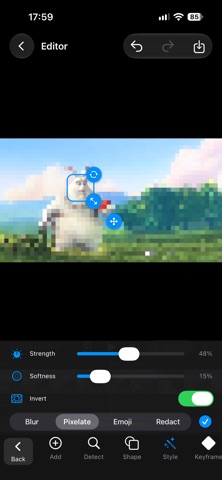
• Four effects: smooth blur, pixelate, emoji, or a solid color to fully redact.
• Open Detect, choose Faces or Plates, and cover them in the current frame in one step. Plate detection is a helper, so check the result before exporting.
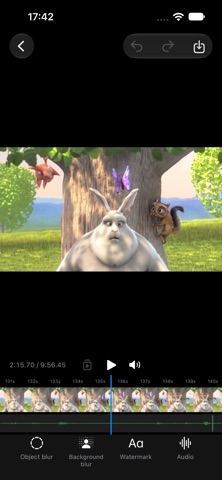
• Blur the background and keep people sharp, using on-device person detection.
• Adjust intensity, opacity and edge softness. Add fade in and fade out, invert a zone, duplicate it, rename it or hide it.
TRACK MOVEMENT
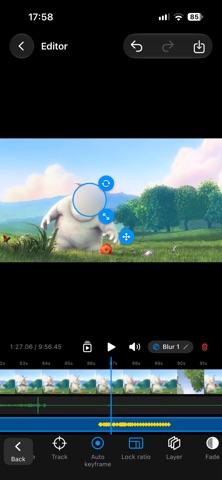
• Tracking follows a moving subject and keeps the zone on it.
• Keyframes give you full control. Move or resize a zone and a keyframe is created automatically.
• Keyframe preview jumps from one keyframe to the next so you can check the motion without playing the whole clip.
YOUR OWN WATERMARK (PRO)
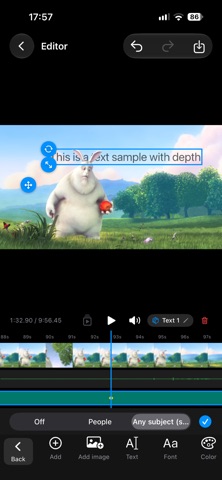
• Add text or an image on top of the video.
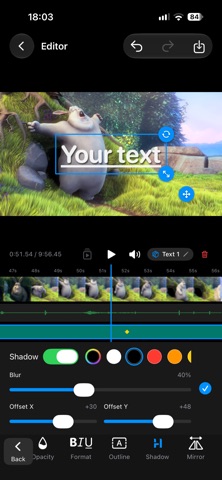
• Text options: fonts, bold, italic, underline, strikethrough, color, opacity, outline, shadow, tiling and mirroring.
• Place it in front of everything, behind people, or behind any foreground subject.
• Move, resize and track it like any other zone.
AUDIO (PRO)
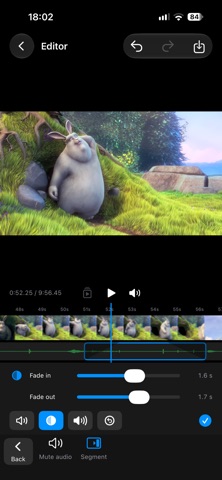
• Change the track volume, or split it into segments.
• Give each segment its own volume, mute and fade in/out.
• Muting the whole track is free on every plan.
A TIMELINE MADE FOR THIS
• Video thumbnails, audio waveform, one track per zone with handles for start and end.
• Trim a zone or the background blur exactly at the playhead.
• Undo and redo, and your project is saved automatically.
EXPORT
• Original, 1080p or 720p. High quality H.264 MP4, and vertical videos stay vertical.
• Save to Photos or Files, or share directly.
• Export continues in the background on iPad with an M3 chip or newer, with progress on the Lock Screen and in the Dynamic Island.
PRIVATE BY DESIGN
• Processing happens on your device with Apple's Vision, Core Image and AVFoundation frameworks.
• No ads, no analytics, no tracking, no third-party SDKs.
AVAILABLE IN 16 LANGUAGES
English, Deutsch, Español, Français, Português (Brasil), Italiano, 日本語, 한국어, 简体中文, 繁體中文, Türkçe, Nederlands, Polski, Bahasa Indonesia, Tiếng Việt and हिन्दी.
PLANS
Simple Video Blur is free to download and needs a plan to use. Start with a 3-day free trial, then choose:
• Lite: every blur tool, tracking, detection and export.
• Pro: everything in Lite, plus your own watermark and audio editing.
• Pro Lifetime: everything in Pro, one payment, no renewal.
Lite: $3.49 per month or $11.49 per year.
Pro: $5.49 per month or $17.49 per year.
Pro Lifetime: $59.00, one time.
Prices are in USD and may vary by country. During the free trial, the watermark and audio tools are locked, and exports include a small Simple Video Blur badge, which is removed when your paid plan starts.
Payment is charged to your Apple Account at confirmation of purchase, after the free trial ends. Lite and Pro subscriptions renew automatically unless canceled at least 24 hours before the end of the current period. You can manage or cancel them in your account settings after purchase. Any unused part of a free trial is forfeited when you buy a subscription. Pro Lifetime is a one-time purchase and does not renew.
Terms of Use: https://www.apple.com/legal/internet-services/itunes/dev/stdeula/
Privacy Policy: https://valtechstudio.com/apps/simple-video-blur/privacy-policy
Safety and technology
Found in the app by AppBrain- Price
- Free
- App size
- 4.79 MB
- Content rating
- Everyone
Technologies used by Simple Video Blur
Releases
Updates seen on the App Store- Version
- 1.0
- Launched
- October 2026
No changelog data
Rankings
App Store top chartsApp Store Rankings for Simple Video Blur
About the app and developer
About Simple Video Blur
Simple Video Blur is a photo & video app developed by Val Tech Studio.
User Ratings
The app has no ratings yet.
App Information
Simple Video Blur is freely available from the App Store. The app size is 4.79 MB. The latest version available is 1.0. The last update was on October 9, 2026.
Technical Requirements
The app has a content rating of Everyone. The app has been available on the App Store since October 2026.
Simple Video Blur is made and published by Val Tech Studio. AppBrain is an independent app data site and isn't affiliated with Val Tech Studio. The app name, icon, screenshots and description belong to Val Tech Studio and are shown as published on the App Store.
Developer information for Val Tech Studio
Address:
Frequently asked questions about Simple Video Blur
Is Simple Video Blur free?
Yes. Simple Video Blur is free on the App Store.
Is Simple Video Blur still available?
Yes. Simple Video Blur is on the App Store, and the last update we saw was on October 9, 2026.
How large is Simple Video Blur?
Simple Video Blur is 4.79 MB.
Is Simple Video Blur suitable for children?
App Store rates the content of Simple Video Blur as suitable for everyone.
Who made Simple Video Blur?
Simple Video Blur was developed by Val Tech Studio. It is listed in the photo & video category on the App Store.
Share Simple Video Blur
Subscribe now to get full and unlimited access to AppBrain Intelligence. You'll have access to:
- App Intelligence dashboard (performance timeline, competitor comparison, country rankings, insight cards)
- Detailed ranking data per app
- Full timeline per developer
- Device market shares data per country
- Unlimited keyword tracking
AppBrain is an app data site, we track rankings, ratings, installs for all apps and games on Google Play and the App Store. AppBrain doesn't host app files or APKs, all install links go directly to the official store. All trademarks are owned by their respective owners.
More apps
App statistics