
AppBrain
AppBrain
  • Apps
  • Apps being viewed right now Trending apps today Most popular apps All-time most installed apps Top rated apps iPhone and iPad apps
  • Intelligence ▾
    Intelligence overview → Track any Android app or your whole market
    Track & analyze
    Keyword Tracker & OptimizerTrack & improve Play rankings App Performance ReportOne-off PDF for any app StatisticsFree Android & Play market stats
    Promote your app
    Featured Apps App Links
  • Intelligence
  • Pricing
  • Dashboard
  • Sign up
  • Log in
App Store Apps > Productivity > Simply Scan documents
Simply Scan documents icon

Simply Scan documents

by James Hudson · Productivity · Free
On the App Store since September 2013 · Data updated 2026-10-30

Simply Scan documents is made and published by James Hudson. AppBrain is an independent app data site and isn't affiliated with James Hudson. The app name, icon, screenshots and description belong to James Hudson and are shown as published on the App Store.

AppBrain's verdict

Established
Rating on App Store
4.00
4 ratings
Last updated
June 6, 2023
Size
13.4 MB

It doesn't have enough ratings yet to judge what users think.

Official page on the App Store

User feedback

Ratings and reviews on the App Store

Comments on Simply Scan documents for iOS

We don't have enough comments to show example comments. Please check back later.

Store listing

By James Hudson, from the App Store
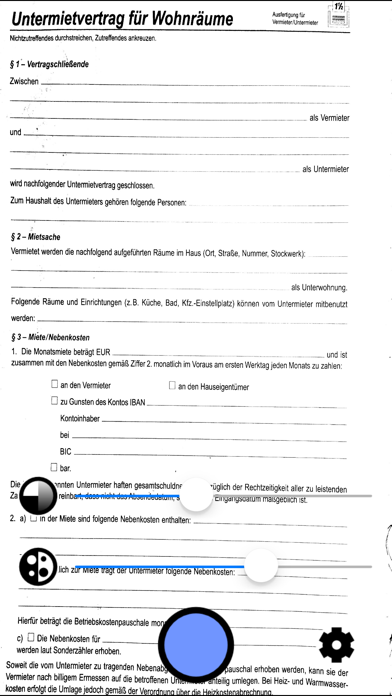
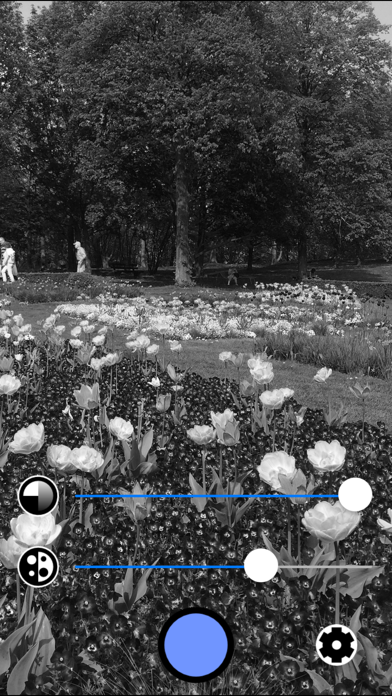
Simply Scan documents Screenshot 1 of 3
Simply Scan documents Screenshot 2 of 3
Simply Scan documents Screenshot 3 of 3
Screenshots by James Hudson, from the the App Store listing
Description by James Hudson Written by the developer, not by AppBrain. Click to read.
Instantly scan documents with your iPhone or iPad camera, ready to be printed, filed or emailed. Other apps are slow and complicated, have too many controls, make you sign up for services, or require you to edit and tweak every page. None of that here: just line up the document and click! The scans are automatically stored in your camera roll.

Photography is also a popular use for this app. Simply Scan out-hipsters all the hipster photo apps if you use it to take gritty black-and-white photos.

Features

• super-fast realtime filter lets you see how your scans will look instantly.
• captures printable pages even in bad lighting conditions.
• saves high-quality scans at the maximum native camera resolution.
• rapid capture: line up the next page instantly while the previous page is saving.
• saves straight to its own photo album, ready for emailing, printing, or filing.
• adjust whiteness level in realtime, if needed.
• automatic conversion to grayscale, ready for printing.
• optional "256 shades" add-on to turn Simply Scan into a high-powered black-and-white camera with full grayscale control.
• sleek, minimal look - no glitter and chrome.

It works like this:

1. Hold your device over the page you want to scan.
2. If needed, adjust the whiteness slider to get clear text and images.
3. Press the camera shutter button.
4. Repeat step 3 for every page.
5. Go to the "Scans" album in your photo roll to share, print, or store your scans.

Note, you need to give permission for Simply Scan to access your photo library. This can be changed later in the Settings app.

"Kokosnuss" scans by Dean Whitbread.
Official page on the App Store

Safety and technology

Found in the app by AppBrain
Price
Free
App size
13.4 MB
Content rating
Everyone

Technologies used by Simply Scan documents

Releases

Updates seen on the App Store
Version
1.1.8
Launched
September 2013

No changelog data

Alternatives

Similar apps and more from James Hudson

Alternatives to Simply Scan documents
EverClipper icon EverClipper
Koichi Otera
5.0
Free
4 ratings
WaterGo icon WaterGo
Oilfield Tracking Services LLC
3.2
Free
11 ratings
Cam PDF Scanner icon Cam PDF Scanner
Abhayrajsinh Vala
4.8
Free
6 ratings
Apply Yourself icon Apply Yourself
Agri-Inject
3.7
Free
3 ratings
Xerox DocuShare Flex icon Xerox DocuShare Flex
Xerox Corporation
5.0
Free
3 ratings
TowCentric icon TowCentric
TowCentric LLC
3.0
Free
2 ratings
Agent REmind icon Agent REmind
Miller-Thurston Group LLC
3.8
Free
6 ratings
iNeo Pro Field Daily Reports icon iNeo Pro Field Daily Reports
Dexati
4.1
Free
43 ratings

More from James Hudson

Hands-free Browser icon Hands-free Browser
James Hudson
3.6
Free
14 ratings
Basic Journal icon Basic Journal
James Hudson
3.2
Free
4 ratings
Postcard Creator icon Postcard Creator
James Hudson
3.5
Free
4 ratings
Universal Tour Guide icon Universal Tour Guide
James Hudson
5.0
Free
1 ratings
spirit yoga icon spirit yoga
James Hudson
0.0
Free
Chill Soundscapes icon Chill Soundscapes
James Hudson
0.0
Free
Fotomatik Photo Booth icon Fotomatik Photo Booth
James Hudson
0.0
Free

Rankings

App Store top charts

App Store Rankings for Simply Scan documents

This app is not ranked

About the app and developer

About Simply Scan documents

Simply Scan documents is a productivity app developed by James Hudson.

What is the rating of Simply Scan documents?

Simply Scan documents is rated 4.00 out of 5 stars, based on 4 ratings.

Is Simply Scan documents free?

Simply Scan documents is free. The app size is 13.41 MB. The latest version available is 1.1.8. The last update was on June 6, 2023.

What are the requirements for Simply Scan documents?

The app has a content rating of Everyone. The app has been available on the App Store since September 2013.

Developer information for James Hudson

James Hudson

Address:

Share Simply Scan documents

Apps other people are watching Price drops on Google Play Top new apps Today's trending apps Popular Productivity Apps
EverClipper icon EverClipper
WaterGo icon WaterGo
Cam PDF Scanner icon Cam PDF Scanner
Apply Yourself icon Apply Yourself
Xerox DocuShare Flex icon Xerox DocuShare Flex
TowCentric icon TowCentric
Agent REmind icon Agent REmind
iNeo Pro Field Daily Reports icon iNeo Pro Field Daily Reports
Overview Alternatives Reviews Rankings Technology
AppBrain Intelligence premium content

Subscribe now to get full and unlimited access to AppBrain Intelligence. You'll have access to:

  • App Intelligence dashboard (performance timeline, competitor comparison, country rankings, insight cards)
  • Detailed ranking data per app
  • Full timeline per developer
  • Device market shares data per country
  • Unlimited keyword tracking
1 Month

$75/mo
(billed every month)

SAVE 0%
Subscribe
3 Months

$65/mo
($195 billed every 3 months)

SAVE 13%
Subscribe
1 Year

$57.50/mo
($690 billed every year)

SAVE 23%
Subscribe
Each subscription will automatically renew 3 days before the expiration date for the same time period. Subscriptions can be cancelled at any time before the renewal.

AppBrain is an app data site, we track rankings, ratings, installs for all apps and games on Google Play and the App Store. AppBrain doesn't host app files or APKs, all install links go directly to the official store. All trademarks are owned by their respective owners.

More apps

  • Top Android apps being viewed
  • View JLIO: Ask, Share & Chat
  • BodyCam: FPS Shooting Games
  • View Wave Blessing 777 Slots

App statistics

  • Android statistics
  • Google Play Developer stats
  • Trending Android Apps
  • Trending iOS apps
  • Top popular Apps
  • Buy the best Android phone
  • Buy & sell app businesses

About AppBrain

  • Contact
  • Privacy
  • Documentation
  • DMCA takedowns
  • Blog
  • Android App Marketing: Learn how to better market your Android app
© 2010-2026 - AppBrain