

Site Records is made and published by Ioannis Fakos. AppBrain is an independent app data site and isn't affiliated with Ioannis Fakos. The app name, icon, screenshots and description belong to Ioannis Fakos and are shown as published on the App Store.
AppBrain's verdict
- Last updated
- October 13, 2026
Rankings
App Store top chartsApp Store Rankings for Site Records
Competitors
Similar apps and more from Ioannis FakosAlternatives to Site Records







Releases
Updates seen on the App Store- Version
- 3.1.3
- Launched
- May 2023
No changelog data
User feedback
Ratings and reviews on the App StoreComments on Site Records for iOS
We don't have enough comments to show example comments. Please check back later.
Technology
Found in the app by AppBrain- Price
- Free
- App size
- 24.2 MB
- Content rating
- Everyone
Technologies used by Site Records
About the app and developer
About Site Records
Site Records is a productivity app developed by Ioannis Fakos.
User Ratings
The app has no ratings yet.
App Information
Site Records is freely available from the App Store. The app size is 24.23 MB. The latest version available is 3.1.3. The last update was on October 13, 2026.
Technical Requirements
The app has a content rating of Everyone. The app has been available on the App Store since May 2023.
Developer information for Ioannis Fakos
Address:
Frequently asked questions about Site Records
Is Site Records free?
Yes. Site Records is free on the App Store.
Is Site Records still available?
Yes. Site Records is on the App Store, and the last update we saw was on October 13, 2026.
How large is Site Records?
Site Records is 24.23 MB.
Is Site Records suitable for children?
App Store rates the content of Site Records as suitable for everyone.
Who made Site Records?
Site Records was developed by Ioannis Fakos. It is listed in the productivity category on the App Store.
What are the best alternatives to Site Records?
People looking at Site Records also look at these productivity apps: Bar Bending Schedule rebar bbs, Planflow, Imposio - Construction Manager, SWPPPTrack BUILDTrack SWM, Crastination.
Store listing
By Ioannis Fakos, from the App Store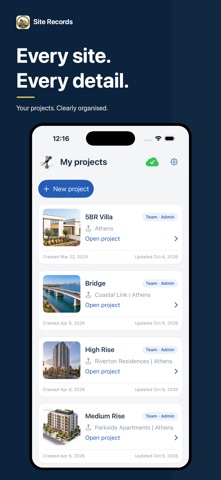



Description by Ioannis Fakos Written by the developer, not by AppBrain. Click to read.
TEAM MODE. BETTER TOGETHER.
Improve productivity, coordination and collaboration with shared project records. Prepare reports with your team, see who recorded the work and keep members aligned through cloud updates. Manage project membership and bring everyone together around the same site information.
YOUR PROJECT, AT A GLANCE
Review workforce, materials and photos by day, week or month. Follow activity progress and open the source reports behind each record. Organise multiple projects and switch between them as work moves forward.
COMPLETE DAILY REPORTS
Bring site notes, weather, workforce numbers, total hours, material quantities, activities and photographs together in one daily record. Keep a clear account of what happened on site and the resources used.
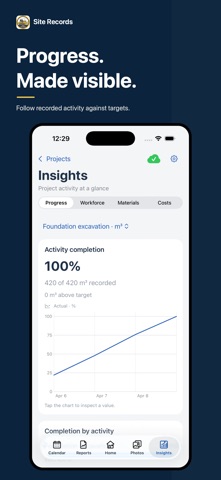
ACTIVITY PROGRESS & INSIGHTS
Record completed quantities against planned targets. Compare daily totals, cumulative progress and remaining work, with charts and links to source reports that help you understand how work is progressing.
WORKFORCE & MATERIALS
Track workers and total hours by trade. Review material quantities with their units and trace entries back to the daily reports they came from.
SITE PHOTOS, ORGANISED
Link site photos directly to activities and materials, and review their photo journals inside saved reports. Add annotations and tags to keep visual evidence in context. Review photographs by date and category, with photo and report filtering available on eligible premium plans.
REPORTS READY TO SHARE
Export records in PDF, Excel and Word formats, with site notes, resource details and photographs. Available formats and options depend on your plan. Share progress with clients, colleagues and stakeholders. Premium plans remove the watermark for a clean presentation.
START FREE. UPGRADE AS YOUR NEEDS GROW.
Start with the Free plan for Solo reporting or a shared Team project, within the included project and record limits.
Premium Solo adds more capacity for individual projects, up to 12 photos per Solo report, automatic weather for new reports, filtering and watermark-free PDF exports.
Premium Team includes Premium Solo benefits, expanded Team capacity, shared project records and cloud synchronisation, and the ability to upload Solo projects to the cloud.
Subscriptions apply to each user. A Team subscription does not automatically upgrade invited members. Current prices, plan limits and eligible trial offers are shown in the app before purchase.
Built for site managers, contractors, engineers and construction teams who need clear daily records and better coordination.
Terms & Conditions: https://www.site-records.app/terms-condition
Privacy Policy: https://www.site-records.app/privacy-policy
Support: admin@site-records.app