

Site Reporter: PDF Reports
Site Reporter: PDF Reports is made and published by Moeki Kozawa. AppBrain is an independent app data site and isn't affiliated with Moeki Kozawa. The app name, icon, screenshots and description belong to Moeki Kozawa and are shown as published on the App Store.
AppBrain's verdict
- Last updated
- October 20, 2026
Rankings
App Store top chartsApp Store Rankings for Site Reporter: PDF Reports
Competitors
Similar apps and more from Moeki KozawaAlternatives to Site Reporter: PDF Reports


More from Moeki Kozawa


Releases
Updates seen on the App Store- Version
- 1.1.15
- Launched
- April 2026
No changelog data
User feedback
Ratings and reviews on the App StoreComments on Site Reporter: PDF Reports for iOS
We don't have enough comments to show example comments. Please check back later.
Technology
Found in the app by AppBrain- Price
- Free
- App size
- 63.7 MB
- Content rating
- Everyone
Technologies used by Site Reporter: PDF Reports
About the app and developer
About Site Reporter: PDF Reports
Site Reporter: PDF Reports is a business app developed by Moeki Kozawa.
What is the rating of Site Reporter: PDF Reports?
Site Reporter: PDF Reports has no ratings yet.
Is Site Reporter: PDF Reports free?
Site Reporter: PDF Reports is free. The app size is 63.73 MB. The latest version available is 1.1.15. The last update was on October 20, 2026.
What are the requirements for Site Reporter: PDF Reports?
The app has a content rating of Everyone. The app has been available on the App Store since April 2026.
Developer information for Moeki Kozawa
Address:
Frequently asked questions about Site Reporter: PDF Reports
Is Site Reporter: PDF Reports free?
Yes. Site Reporter: PDF Reports is free on the App Store.
Is Site Reporter: PDF Reports still available?
Yes. Site Reporter: PDF Reports is on the App Store, and the last update we saw was on October 20, 2026.
How large is Site Reporter: PDF Reports?
Site Reporter: PDF Reports is 63.73 MB.
Is Site Reporter: PDF Reports suitable for children?
App Store rates the content of Site Reporter: PDF Reports as suitable for everyone.
Who made Site Reporter: PDF Reports?
Site Reporter: PDF Reports was developed by Moeki Kozawa. It is listed in the business category on the App Store.
What are the best alternatives to Site Reporter: PDF Reports?
People looking at Site Reporter: PDF Reports also look at these business apps: 工事写真台帳 - KojiLog, 報告書アプリ, 入退去フォト台帳, Kloudac Portal, AnyBookmark、お気に入り登録ウィジェットで表示!.
Store listing
By Moeki Kozawa, from the App Store




Description by Moeki Kozawa Written by the developer, not by AppBrain. Click to read.
- Photos pile up on your phone and turning them into a report takes forever
- Tweaking Excel layouts every time eats into your day
- You want a clean handover that shows your work to the client
- Most management apps are too heavy for a small crew
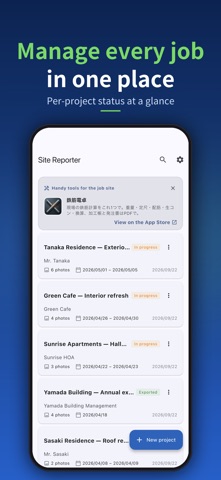
Site Reporter turns site photos into a polished PDF report — straight from your phone. Shoot, comment, pick a layout, generate the PDF, share. That's it.
[Highlights]
- 6 report layouts (Standard / Before-After / Inspection / Photo Album / Issue Summary / Photo Ledger)
- Photo ledger: a cover page (project, work period, contractor) plus 3 numbered photos per page — the customary construction photo-ledger format (Pro)
- Blackboard stamp: overlay a chalkboard-style stamp (project, work type, date, memo) on photos; the original photo stays untouched
- Automatic serial numbers (No.1, No.2, ...) that follow your photo order
- Tag each photo as Before / During / After / Issue / Other
- Per-project photo management
- One-tap project duplication, with photos reusable across sites
- Save frequent comments as one-tap snippets
- One-tap PDF generation and sharing
- Per-project export history
- Rename report fields (Project, Before/After, photo ledger labels and more) for inspection, cleaning or general reports
- Change the cover title for just one PDF right from the PDF screen (site survey report, proposal, or your own wording)
- Photo date and time: add the shooting date (or date and time) to the corner of each photo in the PDF — photos from your camera roll keep the time they were taken (the original photo is untouched)
- Add or remove blackboard stamps on every photo in a project at once
- Rotate or replace photos, zoom in full screen, and print one large photo per page (except the photo ledger)
- Customer, location and staff names you've entered before appear as one-tap suggestions
- Before / After: set a photo's category to Before or After and the PDF shows them side by side (paired in the order you arrange them). Select several photos to set their category at once
- Drag to reorder photos — the PDF follows the same order
- iPhone and iPad: with Pro, iCloud sync keeps your projects in step on both devices (no sign-in required)
- Embed your company logo in PDFs (Pro)
[Great for]
- Sole-prop renovators, exterior painters, roofers
- House cleaning and janitorial businesses
- Property condition reports, move-out reports
- Building and equipment inspections
- Showing clients a clear before / after
[Privacy and offline use]
Your data stays on your device and never goes to our servers (with iCloud sync on, it is kept in your own iCloud). No logins, no ads, no required network. Anonymous usage analytics and crash diagnostics can be turned off in Settings.
[Pricing]
The free version covers up to 3 projects. The Pro upgrade (one-time, no subscription) removes the project limit and the PDF watermark, unlocks all 6 templates including the photo ledger, and adds the company-logo feature. One payment, lifetime use.
A simple report tool that fits on your phone.