

Situpstar: sit-up counter
Situpstar: sit-up counter is made and published by Youngwan Choi. AppBrain is an independent app data site and isn't affiliated with Youngwan Choi. The app name, icon, screenshots and description belong to Youngwan Choi and are shown as published on the App Store.
AppBrain's verdict
- Rating on App Store
- 2.33
- 3 ratings
- Last updated
- October 14, 2026
- Size
- 110.2 MB
It doesn't have enough ratings yet to judge what users think.
User feedback
Ratings and reviews on the App StoreComments on Situpstar: sit-up counter for iOS
We don't have enough comments to show example comments. Please check back later.
Store listing
By Youngwan Choi, from the App Store



Description by Youngwan Choi Written by the developer, not by AppBrain. Click to read.
◉ Automatic sit-up measurement
When you hold your iPhone and do sit-ups, the number of sit-ups is automatically counted using the iPhone's accelerometer.
◉ Count voice guidance
• Voice Guidance: You can hear the number of times when performing sit-ups. You don't have to remember how many times you've done it or look at the screen.
◉ Automatic workout recording
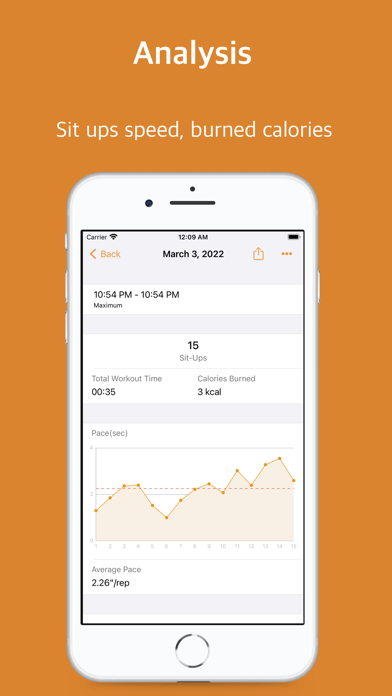
It automatically records the date exercised, the number of times per set, total number of times, time required, maximum number of sets, time per set, rest time, highest number of times, and calories burned.
◉ Sit-up speed analysis
You can automatically measure the time taken for each number and check it with a graph.
◉ Measure sit-ups in different ways
• Target count: You can automatically measure the number of minutes the target counts.
• Goal time: You can automatically measure how many times you do in a target time.
• Maximum number of times: You can measure the maximum number of times and times without time and number restrictions.
• Sets: You can create a routine by specifying reps and rest times for each set.
◉ Challenge
• You can create and challenge your own number of times and time-limited goals.
◉ Workout Calendar
• You can check at a glance the days you exercised and the days you didn't exercise on the monthly calendar.
◉ Workout Stats
• You can view statistics such as the number and frequency of exercise days, exercise time, and calories burned by day, month, and year.
◉ Save on Apple Health
• Record your workout results in Apple Health, read your profile information from Apple Health and use it to calculate calories.
◉ Share
• You can share your workout history as an image on social media or messenger on the workout completion screen and workout details screen.
◉ Dark Mode
• Reduces battery consumption and reduces glare.
◉ Support
If you have any questions or suggestions, please send them through Settings > App Information > Inquiries and Suggestions in the app and we will do our best to answer them.
◉ Terms of Use: http://waneelab.com/en/terms/
Safety and technology
Found in the app by AppBrain- Price
- Free
- App size
- 110.2 MB
- Content rating
- Everyone
Technologies used by Situpstar: sit-up counter
Releases
Updates seen on the App Store- Version
- 2.9
- Launched
- March 2022
No changelog data
Alternatives
Similar apps and more from Youngwan ChoiAlternatives to Situpstar: sit-up counter





More from Youngwan Choi


Rankings
App Store top chartsApp Store Rankings for Situpstar: sit-up counter
About the app and developer
About Situpstar: sit-up counter
Situpstar: sit-up counter is a health & fitness app developed by Youngwan Choi.
What is the rating of Situpstar: sit-up counter?
Situpstar: sit-up counter is rated 2.33 out of 5 stars, based on 3 ratings.
Is Situpstar: sit-up counter free?
Situpstar: sit-up counter is free. The app size is 110.17 MB. The latest version available is 2.9. The last update was on October 14, 2026.
What are the requirements for Situpstar: sit-up counter?
The app has a content rating of Everyone. The app has been available on the App Store since March 2022.
Developer information for Youngwan Choi
Address:
Frequently asked questions about Situpstar: sit-up counter
Is Situpstar: sit-up counter free?
Yes. Situpstar: sit-up counter is free on the App Store.
Is Situpstar: sit-up counter still available?
Yes. Situpstar: sit-up counter is on the App Store, and the last update we saw was on October 14, 2026.
How large is Situpstar: sit-up counter?
Situpstar: sit-up counter is 110.17 MB.
Is Situpstar: sit-up counter suitable for children?
App Store rates the content of Situpstar: sit-up counter as suitable for everyone.
How do people rate Situpstar: sit-up counter?
Situpstar: sit-up counter scores 2.33 out of 5 stars, from 3 ratings on the App Store.
Who made Situpstar: sit-up counter?
Situpstar: sit-up counter was developed by Youngwan Choi. It is listed in the health & fitness category on the App Store.
What are the best alternatives to Situpstar: sit-up counter?
People looking at Situpstar: sit-up counter also look at these health & fitness apps: Muscle Training Counter, sit-Ups, SitUp - Workout DailyCrunch, Sit Up Counter! - Auto Count, Situps Coach.