

Sketch Steps: AI Loomis Draw
Sketch Steps: AI Loomis Draw is made and published by Recep Can Akdemir. AppBrain is an independent app data site and isn't affiliated with Recep Can Akdemir. The app name, icon, screenshots and description belong to Recep Can Akdemir and are shown as published on the App Store.
AppBrain's verdict
Well rated- Rating on App Store
- 4.14
- 178 ratings
- Last updated
- October 20, 2026
- Size
- 110.7 MB
Users rate it well: 4.1 stars from 178 ratings.
User feedback
Ratings and reviews on the App StoreComments on Sketch Steps: AI Loomis Draw for iOS
We don't have enough comments to show example comments. Please check back later.
Store listing
By Recep Can Akdemir, from the App Store



Description by Recep Can Akdemir Written by the developer, not by AppBrain. Click to read.
AI LOOMIS STUDIO
Upload a portrait photo and get a construction guide that starts with simple shapes and builds up to a finished drawing, from the first forms to the final shading. Choose the drawing mode that fits the look you want.
Follow one step at a time, or scroll through the whole breakdown. Zoom in to check proportions, crop your photo before you generate, and leave the screen while your guide is being created. It will be waiting on Home when it is ready.
TRACING STUDIO
Put any reference on paper, two ways:
• Draw with Camera: prop your phone above your paper and see the reference over the live camera view while you trace
• Draw on Screen: turn the brightness up, lay paper over the screen and trace directly
Adjust opacity, size and rotation, flip the image, add a grid, or switch on the flashlight. Take a photo of your finished drawing or record a video of the session.
REFERENCES FOR EVERY MOOD
• Ready-to-trace templates: animals, anime, cars, fruits and vegetables, portraits
• Your own photos from the camera or library
• AI styles that turn a photo into a tracing reference: pencil sketch, line art, charcoal, colored pencil, cartoon and watercolor
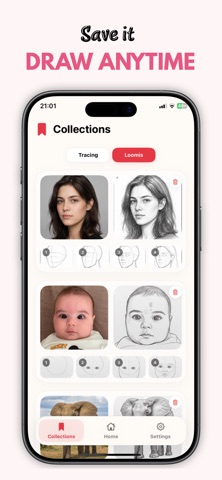
SAVE AND DRAW AGAIN
Save your Loomis guides to your collection and return to them whenever you want to practice. AI tracing references are saved automatically, and you can favorite the templates you like. Individual steps or the full guide can be saved to Photos.
MADE FOR LEARNING
Sketch Steps is for beginners, hobby artists and anyone who wants a more approachable way to study drawing fundamentals. No account is needed to start, and the app is available in 11 languages.
AI-generated guides can occasionally be imperfect, and results vary from photo to photo.
SUBSCRIPTION AND COINS
AI generation requires an active subscription or coins. Subscriptions renew automatically unless cancelled at least 24 hours before the end of the current period, and can be managed in your App Store account settings. Coins are offered as in-app purchases.
Privacy Policy:
https://sketchsteps.app/ios-privacy-policy
Terms of Use:
https://www.apple.com/legal/internet-services/itunes/dev/stdeula/
Safety and technology
Found in the app by AppBrain- Price
- Free
- App size
- 110.7 MB
- Content rating
- Everyone
Technologies used by Sketch Steps: AI Loomis Draw
Releases
Updates seen on the App Store- Version
- 1.0.9
- Launched
- May 2026
No changelog data
Alternatives
Similar apps and more from Recep Can AkdemirAlternatives to Sketch Steps: AI Loomis Draw


More from Recep Can Akdemir

Rankings
App Store top chartsApp Store Rankings for Sketch Steps: AI Loomis Draw
About the app and developer
About Sketch Steps: AI Loomis Draw
Sketch Steps: AI Loomis Draw is a graphics & design app developed by Recep Can Akdemir.
User Ratings
Sketch Steps: AI Loomis Draw is rated 4.14 out of 5 stars. The rating is based on 180 ratings.
App Information
Sketch Steps: AI Loomis Draw is freely available from the App Store. The app size is 110.71 MB. The latest version available is 1.0.9. The last update was on October 20, 2026.
Technical Requirements
The app has a content rating of Everyone. The app has been available on the App Store since May 2026.
Developer information for Recep Can Akdemir
Address:
Frequently asked questions about Sketch Steps: AI Loomis Draw
Is Sketch Steps: AI Loomis Draw free?
Yes. Sketch Steps: AI Loomis Draw is free on the App Store.
Is Sketch Steps: AI Loomis Draw still available?
Yes. Sketch Steps: AI Loomis Draw is on the App Store, and the last update we saw was on October 20, 2026.
How large is Sketch Steps: AI Loomis Draw?
Sketch Steps: AI Loomis Draw is 110.71 MB.
Is Sketch Steps: AI Loomis Draw suitable for children?
App Store rates the content of Sketch Steps: AI Loomis Draw as suitable for everyone.
How do people rate Sketch Steps: AI Loomis Draw?
Sketch Steps: AI Loomis Draw scores 4.14 out of 5 stars, from 178 ratings on the App Store.
Who made Sketch Steps: AI Loomis Draw?
Sketch Steps: AI Loomis Draw was developed by Recep Can Akdemir. It is listed in the graphics & design category on the App Store.
What are the best alternatives to Sketch Steps: AI Loomis Draw?
People looking at Sketch Steps: AI Loomis Draw also look at these graphics & design apps: GridArt - Drawing Grid, Artino: AR Trace to Sketch, Art Toolbox: Values & Guides, Sketra AR: AR Drawing, AR Sketch & Trace.