

Skriptr - Voice to Notes
Skriptr - Voice to Notes is made and published by PT. Adicita Karya Inovatif. AppBrain is an independent app data site and isn't affiliated with PT. Adicita Karya Inovatif. The app name, icon, screenshots and description belong to PT. Adicita Karya Inovatif and are shown as published on the App Store.
AppBrain's verdict
- Last updated
- October 30, 2026
Rankings
App Store top chartsApp Store Rankings for Skriptr - Voice to Notes
Competitors
Similar apps and more from PT. Adicita Karya InovatifAlso available on Google Play

Releases
Updates seen on the App Store- Version
- 1.12.0
- Launched
- May 2026
No changelog data
User feedback
Ratings and reviews on the App StoreComments on Skriptr - Voice to Notes for iOS
We don't have enough comments to show example comments. Please check back later.
Technology
Found in the app by AppBrain- Price
- Free
- App size
- 72.6 MB
- Content rating
- Everyone
Technologies used by Skriptr - Voice to Notes
About the app and developer
About Skriptr - Voice to Notes
Skriptr - Voice to Notes is a productivity app developed by PT. Adicita Karya Inovatif.
User Ratings
The app has no ratings yet.
App Information
Skriptr - Voice to Notes is freely available from the App Store. The app size is 72.64 MB. The latest version available is 1.12.0. The last update was on October 30, 2026.
Technical Requirements
The app has a content rating of Everyone. The app has been available on the App Store since May 2026.
Developer information for PT. Adicita Karya Inovatif
Address:
Store listing
By PT. Adicita Karya Inovatif, from the App Store



Description by PT. Adicita Karya Inovatif Written by the developer, not by AppBrain. Click to read.
Record meetings, lectures, interviews, or your own ideas. Skriptr transcribes them with AI, generates a clean summary, and saves everything in one place. No fiddling with files, no waiting for someone else to write it up.
KEY FEATURES
• Instant transcription — accurate, speaker-labeled
• AI summaries — pull out the key points so you don't have to re-listen
• Import audio you already have — an existing MP3, WAV, M4A, AAC, AIFF, or FLAC file, up to 500 MB
• Uploads that survive bad signal — lose connection mid-upload and Skriptr picks up where it left off instead of starting over
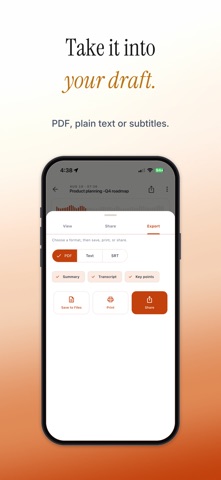
• Export anywhere — PDF with color-coded speakers, plain text, or SRT subtitles
• Share by link or email, straight from the recording
• Background recording — lock your phone or switch apps, Skriptr keeps capturing
• Smart upload modes — Auto, Auto-on-Wi-Fi (default), or Manual. You control when recordings sync.
• Works offline — record anywhere, sync when you're back online
• Mark the moments that matter — tap Mark while you record, or add a marker while you listen, then jump straight back to it. Rename or delete a marker any time.
• Search your recordings to jump straight back to the one you need
• Transcribes 99 languages, detected automatically — interface in 13
• Connect an AI app — let an AI assistant read your recordings over MCP. You approve each app with Face ID or Touch ID, and can disconnect it from Settings at any time.
• Private — your recordings stay tied to your account, and uploads are encrypted in transit. Delete any recording, or your whole account and its data, right in the app.
WHO IT'S FOR
• Students who want their lectures captured + summarized
• Reporters and researchers running interviews
• PMs and execs who'd rather talk than type
• Podcasters and video creators who need subtitles, not just audio
• Recruiters replaying what a candidate actually said
• Consultants and coaches writing up client sessions
• Whoever's stuck taking the minutes
• Anyone who's ever tried to remember what was said in that meeting
FREE AND PRO
Free: 5 hours of transcription a month, up to 1 hour per recording.
Skriptr Pro: up to 3 hours per recording and a much larger monthly allowance. Monthly subscription.
Questions or feedback? Reach us at support@skriptr.app