

SLC SafeBrowse
SLC SafeBrowse is made and published by StopTheScam, LLC. AppBrain is an independent app data site and isn't affiliated with StopTheScam, LLC. The app name, icon, screenshots and description belong to StopTheScam, LLC and are shown as published on the App Store.
AppBrain's verdict
- Last updated
- April 17, 2026
Rankings
App Store top chartsApp Store Rankings for SLC SafeBrowse
Competitors
Similar apps and more from StopTheScam, LLCAlternatives to SLC SafeBrowse


More from StopTheScam, LLC

Releases
Updates seen on the App Store- Version
- 1.0
- Launched
- April 2026
No changelog data
User feedback
Ratings and reviews on the App StoreComments on SLC SafeBrowse for iOS
We don't have enough comments to show example comments. Please check back later.
Technology
Found in the app by AppBrain- Price
- Free
- App size
- 1.44 MB
- Content rating
- High
Technologies used by SLC SafeBrowse
About the app and developer
About SLC SafeBrowse
SLC SafeBrowse is a productivity app developed by StopTheScam, LLC.
What is the rating of SLC SafeBrowse?
SLC SafeBrowse has no ratings yet.
Is SLC SafeBrowse free?
SLC SafeBrowse is free. The app size is 1.44 MB. The latest version available is 1.0. The last update was on April 17, 2026.
What are the requirements for SLC SafeBrowse?
The app has a content rating of High Maturity. The app has been available on the App Store since April 2026.
Developer information for StopTheScam, LLC
Address:
Frequently asked questions about SLC SafeBrowse
Is SLC SafeBrowse free?
Yes. SLC SafeBrowse is free on the App Store.
Is SLC SafeBrowse still available?
Yes. SLC SafeBrowse is on the App Store, and the last update we saw was on April 17, 2026.
How large is SLC SafeBrowse?
SLC SafeBrowse is 1.44 MB.
Is SLC SafeBrowse suitable for children?
App Store gives SLC SafeBrowse a high maturity rating. It is meant for adults.
Who made SLC SafeBrowse?
SLC SafeBrowse was developed by StopTheScam, LLC. It is listed in the productivity category on the App Store.
What are the best alternatives to SLC SafeBrowse?
People looking at SLC SafeBrowse also look at these productivity apps: myPefy: Web to PDF, Narrow32, OffBlock, Auto Clicker:Automatic Tap App, LastPass Password Manager.
Store listing
By StopTheScam, LLC, from the App Store


Description by StopTheScam, LLC Written by the developer, not by AppBrain. Click to read.
we built for our parents and grandparents — simple, readable, and protective by default.
Why SafeBrowse is different
Most browsers treat you like a power user. SafeBrowse treats you like a person who just wants to check the weather, read the news, and keep in touch with
family — without accidentally downloading malware or calling a fake "Microsoft Support" number.
Every protective feature is on by default. There are no settings to misconfigure, no extensions to install, and no permission dialogs to decipher.
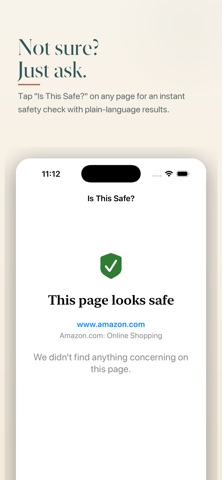
Tap "Is This Safe?" on any page
Not sure about a website? Tap the shield button in the corner of any page. SafeBrowse scans the page for:
• Tech support scam language and fake virus warnings
• Phone numbers paired with urgent wording
• Forms that send your information to a different site
• Hidden elements loading from unknown domains
• Suspicious background scripts
• Automatic redirects
You get a plain-English verdict — "This page looks safe," "Be careful," or "This page may be dangerous" — along with the exact reasons.
Protection you don't have to think about
• Scam URL blocking — known tech-support scams, fake virus alerts, and prize schemes are stopped before the page loads
• Pop-up blocking — annoying and dangerous pop-ups are silently suppressed
• Cross-site redirect blocking — sites can't bounce you to a different domain without your say-so
• Downloads disabled — files from websites can't be saved to the device, a common malware vector
• Sensitive-field warnings — if a page asks for a Social Security number, credit card, or bank login, a clear banner explains what's being requested
• Forced SafeSearch — Google searches are always filtered
• HTTPS warnings — unencrypted connections are flagged in plain language
Built to be readable
• Three text sizes (default, large, largest) that scale every screen in the app
• High-contrast type that respects system Dynamic Type
• A five-button navigation bar — Back, Forward, Reload, Home, Bookmarks — and nothing else
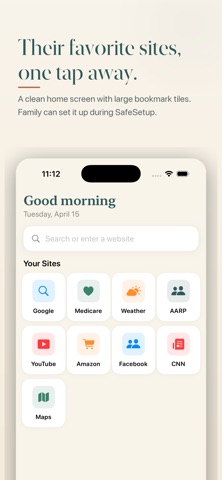
• Bookmarks appear as big tiles with familiar logos, not a text menu
Family-connected bookmarks
Bookmarks sync to your SafeLineCare account, so a family member or support team can set up favorite sites from a laptop and they'll appear on the phone
automatically. No more walking someone through "just go to the address bar and type…"
Sign in with SafeLineCare
SafeBrowse is part of SafeLineCare — a family-first safety platform for seniors. One account, one login, same protections across the ecosystem.
Privacy
SafeBrowse does not track your browsing, sell your history, or show ads. Page scans for the "Is This Safe?" feature only send the page URL and runtime signals
from your session — never your form input, cookies, or personal data.