




AppBrain's verdict
- Last updated
- March 3, 2026
- Size
- 58.5 MB
User feedback
Ratings and reviews on the App StoreComments on Slides Maker : AI Presentation for iOS
We don't have enough comments to show example comments. Please check back later.
Store listing
By Ling Hwe Ming, from the App StoreDescription by Ling Hwe Ming Written by the developer, not by AppBrain. Click to read.
Create stunning, professional-grade slide decks in minutes—not hours.
AI Slides Studio helps you write, design, and organize presentations with AI-generated slide outlines, smart layouts, beautiful templates, and a clean glass-style editing experience.
Whether you’re pitching, teaching, reporting, or building a business deck, AI Slides Studio gives you everything you need to produce polished slides instantly.
Why you’ll love it
Instant AI-powered slide creation
Turn any topic into a complete, structured presentation in seconds.
AI generates slide titles, bullet points, and flow—so you start from a solid foundation.
Professional templates
Choose from curated templates such as:
• AI Pitch Deck
• Startup Pitch
• Business Report
• Education Layout
• Marketing Campaign
• Minimal White
Or start with a clean blank deck.
Smart editing workflow
Each slide can be edited effortlessly:
• Change title & bullet points
• Add or replace images
• Apply design styles
• Rearrange slides
• Use autosave for peace of mind
Elegant glass-style UI
The entire app uses a premium glass-liquid interface with soft motion, smooth transitions, and a modern presentation-studio feel.
Your deck, your rules
Mix AI-generated content with your own edits. Import images, refine structure, and create custom slide designs that match your voice and goals.
What it does
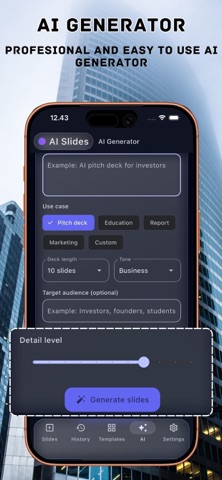
AI Slide Generator
Give the app a topic and optional audience or tone:
• Pitch Deck
• Education
• Marketing
• Reports
• Custom decks
AI instantly creates a structured outline with as many slides as you want.
Template Selector
Start from templates crafted for:
• Business & startups
• Teachers & classrooms
• Analysts & reporting
• Marketers & content creators
• Minimal aesthetics
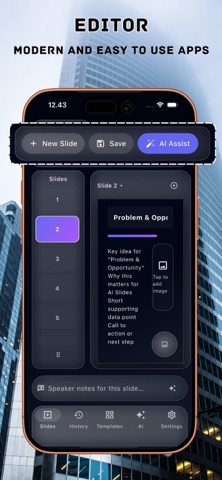
Slide Editor
A clean workspace featuring:
• Topic & bullet editor
• Image upload
• Slide navigator
• Toolbar with Insert, Clean, View, Review, and AI Assist
• Horizontal scroll toolbar with smooth animation
Autosave & Draft Recovery
Your deck is automatically saved as you work—never lose progress again.
History
Every project is stored locally:
• Reopen previous decks
• View slide previews
• Full-screen deck preview
• Rename or delete decks
• Share or duplicate projects
Export & Share
Export your deck to:
• PDF (print-ready & presentation-ready)
• Share sheet for collaboration or external editing
Features
AI-generated slide outlines
Curated & customizable templates
Glass-style professional interface
Slide-by-slide editing
Add images & custom assets
Autosave & draft recovery
Project History with rename, delete, and reopen
PDF export & sharing
Offline-friendly local storage
Smooth animations & transitions
Dark editor mode
How it works
1. Enter your topic (optional: audience, tone, details).
2. Choose slide count & style.
3. Generate an instant outline with AI.
4. Edit any slide: text, bullets, images, layout.
5. Save, export, or continue refining your deck.
Pricing
Weekly: $5
Monthly: $15
Yearly: $35 (best value)
Extra token for generate just $1.99 for 5 token.
Free users can explore templates and edit manually.
AI generation & premium features require Premium or credits (if available).
Pro perks
• Unlimited AI deck generation (fair-use limits)
• All premium templates
• Faster, priority AI processing
• Advanced slide editing tools
• Access to new styles & pro layouts
• Ongoing updates and seasonal templates
Transparency
• AI results are creative & structural suggestions—not guaranteed factual content.
• Your decks are stored locally—delete them anytime.
• No online tracking of your content.
• No camera, LiDAR, or AR scanning required.
Privacy Policy: https://ultrazoom.site/privacy.html
Terms of Use: https://ultrazoom.site/terms.html
Safety and technology
Found in the app by AppBrain- Price
- Free
- App size
- 58.5 MB
- Content rating
- Everyone
Technologies used by Slides Maker : AI Presentation
Releases
Updates seen on the App Store- Version
- 1.2
- Launched
- November 2025
No changelog data
Alternatives
Similar apps and more from Ling Hwe MingMore from Ling Hwe Ming




Rankings
App Store top chartsApp Store Rankings for Slides Maker : AI Presentation
About the app and developer
About Slides Maker : AI Presentation
Slides Maker : AI Presentation is an education app developed by Ling Hwe Ming.
User Ratings
The app has no ratings yet.
App Information
Slides Maker : AI Presentation is freely available from the App Store. The app size is 58.54 MB. The latest version available is 1.2. The last update was on March 3, 2026.
Technical Requirements
The app has a content rating of Everyone. The app has been available on the App Store since November 2025.
Slides Maker : AI Presentation is made and published by Ling Hwe Ming. AppBrain is an independent app data site and isn't affiliated with Ling Hwe Ming. The app name, icon, screenshots and description belong to Ling Hwe Ming and are shown as published on the App Store.
Developer information for Ling Hwe Ming
Address: