

SlimByte: Phone Storage Saver
SlimByte: Phone Storage Saver is made and published by Aleksandar Golubovic. AppBrain is an independent app data site and isn't affiliated with Aleksandar Golubovic. The app name, icon, screenshots and description belong to Aleksandar Golubovic and are shown as published on the App Store.
AppBrain's verdict
- Last updated
- May 24, 2026
Rankings
App Store top chartsApp Store Rankings for SlimByte: Phone Storage Saver
Competitors
Similar apps and more from Aleksandar GolubovicAlternatives to SlimByte: Phone Storage Saver


Releases
Updates seen on the App Store- Version
- 1.0.1
- Launched
- August 2025
No changelog data
User feedback
Ratings and reviews on the App StoreComments on SlimByte: Phone Storage Saver for iOS
We don't have enough comments to show example comments. Please check back later.
Technology
Found in the app by AppBrain- Price
- Free
- App size
- 14.9 MB
- Content rating
- Everyone
Technologies used by SlimByte: Phone Storage Saver
About the app and developer
About SlimByte: Phone Storage Saver
SlimByte: Phone Storage Saver is an utilities app developed by Aleksandar Golubovic.
User Ratings
The app has no ratings yet.
App Information
SlimByte: Phone Storage Saver is freely available from the App Store. The app size is 14.92 MB. The latest version available is 1.0.1. The last update was on May 24, 2026.
Technical Requirements
The app has a content rating of Everyone. The app has been available on the App Store since August 2025.
Developer information for Aleksandar Golubovic
Address:
Store listing
By Aleksandar Golubovic, from the App Store


Description by Aleksandar Golubovic Written by the developer, not by AppBrain. Click to read.
The Apple way — simple controls, the right options, nothing in the
way. Pick videos, choose target, hit Convert. Typical iPhone
recordings drop 70–90% in size with the quality you see kept intact.
SMART COMPRESSION
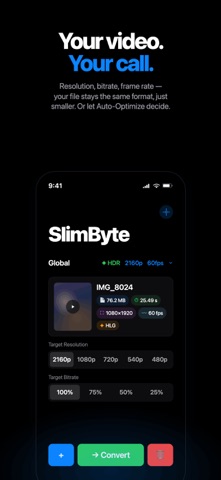
• Reduce 4K to 1080p, 720p, or any preset — or let Auto-Optimize
pick per video
• HEVC, H.264, MP4, MOV — work with what your library already uses
• Custom bitrate control for finer-grained quality vs. size
• Adjust frame rate independently (60fps → 30fps saves real space)
• HDR → SDR conversion for sharing-friendly compatibility
• Batch convert dozens of videos in one queue
BUILT FOR iOS
• Native iOS 26 design — Liquid Glass throughout
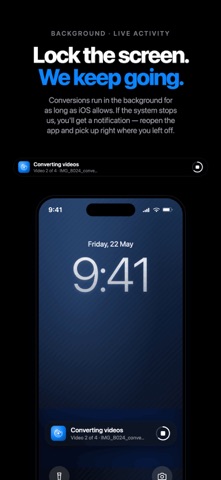
• Background conversion that survives device lock — start a batch,
lock your phone, come back to finished files
• Live Activity on the Lock Screen tracks per-video progress
• Saved files keep original creation date, modification date, and
location metadata — they sit naturally next to originals in your
Photos library
• Works on iPhone and iPad
GALLERY + LIBRARY TOOLS
• Browse and filter your videos by resolution, HDR/SDR, or date
• Preview before you convert
• Detailed info per video — resolution, duration, file size, codec
PRIVATE BY DESIGN
• Runs entirely on your phone — nothing uploaded, no servers, no
cloud
• No analytics, no tracking, no ads, no accounts
• No watermarks on free or paid output — ever
• Apple's privacy nutrition label confirms minimal data collection
FREE TIER
• 10 conversions every month — refreshed automatically
• Every feature except Auto-Optimize included
• Full interface, batch processing, all formats, all quality
controls
• No ads, no watermarks, no upsell popups during conversion
PREMIUM
• Unlimited conversions
• Auto-Optimize — SlimByte picks the right settings per video so
you don't have to
• 1 week — $1.99
• 1 month — $2.99
• 1 year — $34.99 (works out to $2.92/month)
SUPPORT
Questions? Tap Settings → Help & Support. We read every message.
Terms of Use: https://slimbyte.app/terms
Privacy Policy: https://slimbyte.app/privacy