

SLO - Slow motion, just swipe.
SLO - Slow motion, just swipe. is made and published by Yosuke Wainai. AppBrain is an independent app data site and isn't affiliated with Yosuke Wainai. The app name, icon, screenshots and description belong to Yosuke Wainai and are shown as published on the App Store.
AppBrain's verdict
- Last updated
- July 12, 2026
Rankings
App Store top chartsApp Store Rankings for SLO - Slow motion, just swipe.
Competitors
Similar apps and more from Yosuke WainaiAlternatives to SLO - Slow motion, just swipe.




More from Yosuke Wainai


Releases
Updates seen on the App Store- Version
- 2.0
- Launched
- March 2026
No changelog data
User feedback
Ratings and reviews on the App StoreComments on SLO - Slow motion, just swipe. for iOS
We don't have enough comments to show example comments. Please check back later.
Technology
Found in the app by AppBrain- Price
- Free
- App size
- 5.05 MB
- Content rating
- Everyone
Technologies used by SLO - Slow motion, just swipe.
About the app and developer
About SLO - Slow motion, just swipe.
SLO - Slow motion, just swipe. is a photo & video app developed by Yosuke Wainai.
What is the rating of SLO - Slow motion, just swipe.?
SLO - Slow motion, just swipe. has no ratings yet.
Is SLO - Slow motion, just swipe. free?
SLO - Slow motion, just swipe. is free. The app size is 5.05 MB. The latest version available is 2.0. The last update was on July 12, 2026.
What are the requirements for SLO - Slow motion, just swipe.?
The app has a content rating of Everyone. The app has been available on the App Store since March 2026.
Developer information for Yosuke Wainai
Address:
Frequently asked questions about SLO - Slow motion, just swipe.
Is SLO - Slow motion, just swipe. free?
Yes. SLO - Slow motion, just swipe. is free on the App Store.
Is SLO - Slow motion, just swipe. still available?
Yes. SLO - Slow motion, just swipe. is on the App Store, and the last update we saw was on July 12, 2026.
How large is SLO - Slow motion, just swipe.?
SLO - Slow motion, just swipe. is 5.05 MB.
Is SLO - Slow motion, just swipe. suitable for children?
App Store rates the content of SLO - Slow motion, just swipe. as suitable for everyone.
Who made SLO - Slow motion, just swipe.?
SLO - Slow motion, just swipe. was developed by Yosuke Wainai. It is listed in the photo & video category on the App Store.
What are the best alternatives to SLO - Slow motion, just swipe.?
People looking at SLO - Slow motion, just swipe. also look at these photo & video apps: Video Photo Compare, Speed Video - Fast & Slow, Video to Music - MP3 Converter, Super Zoom 100x - Moon Camera, AlbumCamera -Organize Camera-.
Store listing
By Yosuke Wainai, from the App Store



Description by Yosuke Wainai Written by the developer, not by AppBrain. Click to read.
- Import videos: Shoot with the camera or pick a video from your photo library
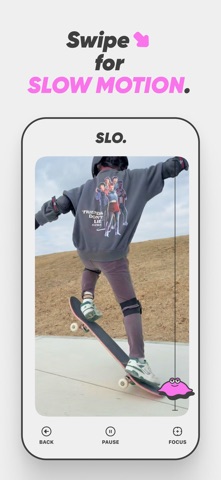
- Change playback speed: Just swipe to go from 0.2x (slow motion) to 2.0x (fast forward), applied in real time while the video plays
- Focus zoom: As you slow down, the video automatically zooms in on a center point you set in advance — and the zoom is baked into the exported video
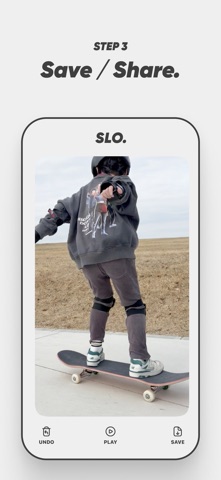
- Save & share: Save videos to your photo library or share them to other apps via the share sheet
## 2. Home Screen
- TAKE: Record a video with the camera and edit it right away
- PICK: Choose one video from your photo library
- ABOUT: Open a sheet with the Terms of Use, Privacy Policy, and version info
## 3. Editing Screen
- Back: Stop editing and return to the home screen (to pick another video)
- Start: Start playback
- Pause: Pause playback
- Focus: Toggle the focus zoom feature on or off (shown before playback starts)
### How to Change the Speed (during playback only)
- Swipe Slowee (the character on the right edge) up or down
- Swipe up → fast forward (up to 2.0x)
- Swipe down → slow motion (down to 0.2x)
- Release your finger to return to normal speed (1.0x)
- When the video finishes playing, a new video reflecting your speed changes is exported automatically
### Focus Zoom (Focus)
- Turn on the Focus button before playback to show a center-point icon on the video
- Tap or drag to place the zoom center anywhere you like
- During playback, the slower you go, the closer the video zooms in on the center point (up to 2.0x at 0.2x speed)
- No zoom is applied when playing at 1.0x or faster
- The zoom is baked into the exported video
## 4. After Export
- Undo: Discard the exported video and edit the same video again
- Play / Pause: Preview the exported video
- Save: Save to your photo library or share via the share sheet