

SloMo: Screen Time Control
SloMo: Screen Time Control is made and published by Armando Jr Pagkalinawan. AppBrain is an independent app data site and isn't affiliated with Armando Jr Pagkalinawan. The app name, icon, screenshots and description belong to Armando Jr Pagkalinawan and are shown as published on the App Store.
AppBrain's verdict
- Last updated
- October 13, 2026
Rankings
App Store top chartsApp Store Rankings for SloMo: Screen Time Control
Competitors
Similar apps and more from Armando Jr PagkalinawanAlternatives to SloMo: Screen Time Control


More from Armando Jr Pagkalinawan


Releases
Updates seen on the App Store- Version
- 1.8
- Launched
- July 2026
No changelog data
User feedback
Ratings and reviews on the App StoreComments on SloMo: Screen Time Control for iOS
We don't have enough comments to show example comments. Please check back later.
Technology
Found in the app by AppBrain- Price
- Free
- App size
- 39.8 MB
- Content rating
- Everyone
Technologies used by SloMo: Screen Time Control
About the app and developer
About SloMo: Screen Time Control
SloMo: Screen Time Control is a productivity app developed by Armando Jr Pagkalinawan.
User Ratings
The app has no ratings yet.
App Information
SloMo: Screen Time Control is freely available from the App Store. The app size is 39.82 MB. The latest version available is 1.8. The last update was on October 13, 2026.
Technical Requirements
The app has a content rating of Everyone. The app has been available on the App Store since July 2026.
Developer information for Armando Jr Pagkalinawan
Address:
Store listing
By Armando Jr Pagkalinawan, from the App Store



Description by Armando Jr Pagkalinawan Written by the developer, not by AppBrain. Click to read.
SloMo helps you take back control of your screen time. Block distracting apps and unlock them by moving a little, or set a time lock when you need to focus. Small changes, at your own pace.
BLOCK DISTRACTING APPS
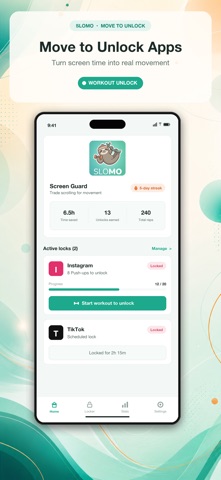
Choose the apps that pull you away from what you want to do. Group several apps under one rule and decide how you’ll unlock them.
MOVE TO UNLOCK
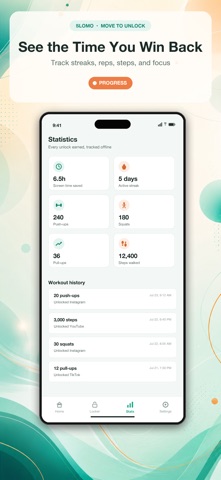
Earn your next scroll with push-ups, squats, pull-ups, steps, or a distance challenge. Set your goal, complete it, and unlock the apps covered by that rule. Camera-assisted exercise counting and step tracking help you follow your progress.
MAKE ROOM FOR FOCUS
Studying, working, or taking a break from your phone? Set a Time Lock for a fixed duration or until a chosen time. Start now or create a repeating schedule that fits your routine.
CHECK YOUR PROGRESS AT A GLANCE
Follow active Time Lock countdowns with Live Activities and widgets on supported iOS versions. See step and distance progress on your Lock Screen during challenges.
UNDERSTAND YOUR SCREEN TIME
See your daily app usage, most-used apps, and weekly comparisons. Notice where your time goes and choose which habits you want to change.
BUILD A STREAK
Completed workouts and Time Locks both count toward your daily streak. Look back at your history, track your personal best, and keep building on small wins.
SHARE YOUR WINS
Share workout unlocks, Time Lock progress, and weekly recaps as cards on your socials or in a group chat. Choose whether app names appear on individual result cards.
GET STARTED WITHOUT AN ACCOUNT
Core features work offline. Your rules, workout history, and fitness stats stay on your device. Camera images are processed on your device and are never recorded, stored, or uploaded.
SloMo is free and supported by ads. It uses basic app-open analytics, and ad privacy choices are available in Settings where applicable.
Requires iOS 16 or later. Live Activities require iOS 16.2 or later. Screen Time access is required for app blocking and usage reports. Camera, motion, and Health permissions are requested for features that use them.
Less scrolling. More living.