



AppBrain's verdict
- Last updated
- August 18, 2026
- Size
- 2.56 MB
User feedback
Ratings and reviews on the App StoreComments on Slot: Lock Your Apps for iOS
We don't have enough comments to show example comments. Please check back later.
Store listing
By Palmedia, from the App StoreDescription by Palmedia Written by the developer, not by AppBrain. Click to read.
Slot blocks the apps and websites that pull you in. To unlock, you tap a physical NFC sticker you stuck somewhere deliberate: the hallway, the fridge, the office. Getting up and walking there is a small effort — and that small effort is usually enough to break the mindless scroll.
HOW IT WORKS
1. Choose what to block. Individual apps, entire categories, or websites in Safari. Blacklist what distracts you, or whitelist only what's allowed.
2. Lock it. One tap — or let a schedule or a location do it for you.
3. Tap your sticker to open. Slot unlocks for the time you set (15 to 120 minutes) and then locks itself again, automatically.
WORKS WITHOUT A STICKER TOO
No sticker linked yet? You unlock with a button in the app, so you can try Slot before buying any tags. You can also keep using it sticker-free and let the schedule and your location rules do the work. Link a sticker and it becomes the key.
FEATURES
• Profiles — work, holiday, study: each with its own apps, mode and unlock duration. Switch with one tap.
• Smart schedule — like an alarm clock: Mon–Fri 08:30–17:00 the work profile, evenings free. Keeps running with the app closed.
• Location rules — draw a circle around the office, school or gym. Inside it your profile applies, whatever the schedule says.
• Always blocked — mark the apps that stay shut in a profile, even while it is unlocked.
• Any NFC sticker — standard NTAG tags work. No proprietary hardware, and you can link as many as you like.
• One-tap via Shortcuts — unlock without opening the app.
• Websites too — block distracting sites in Safari.
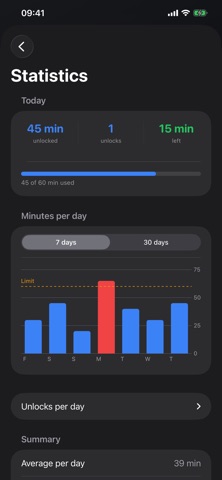
• Usage insight — see how often and how long you actually unlock: per day, over a week or a month, split by profile.
• Daily limit — cap yourself at 60 minutes a day, or 3 unlocks. Running low? Your last session is shortened to what is left. After that Slot stays shut until midnight.
PRIVATE BY DESIGN
No account. No server. No tracking. No ads. No subscription. Your selections, your schedule, your statistics and your location stay on your iPhone — there is no backend to send them to.
A SPEED BUMP, NOT A VAULT
Slot is honest about what it is. You can always lift the block through iOS Settings, and you can register several stickers so you are never locked out. It is not built to trap you. It is built to make one thoughtless swipe cost a walk to the hallway.
Slot uses Apple's Screen Time technology to block apps and websites, and asks for Screen Time permission on first launch. Unlocking by sticker needs an iPhone with NFC and a standard NFC tag; location rules need 'Always' location access.
Safety and technology
Found in the app by AppBrain- Price
- Free
- App size
- 2.56 MB
- Content rating
- Everyone
Technologies used by Slot: Lock Your Apps
Releases
Updates seen on the App Store- Version
- 1.0
- Launched
- August 2026
No changelog data
Alternatives
Similar apps and more from PalmediaAlternatives to Slot: Lock Your Apps


Rankings
App Store top chartsApp Store Rankings for Slot: Lock Your Apps
About the app and developer
About Slot: Lock Your Apps
Slot: Lock Your Apps is a productivity app developed by Palmedia.
What is the rating of Slot: Lock Your Apps?
Slot: Lock Your Apps has no ratings yet.
Is Slot: Lock Your Apps free?
Slot: Lock Your Apps is free. The app size is 2.56 MB. The latest version available is 1.0. The last update was on August 18, 2026.
What are the requirements for Slot: Lock Your Apps?
The app has a content rating of Everyone. The app has been available on the App Store since August 2026.
Slot: Lock Your Apps is made and published by Palmedia. AppBrain is an independent app data site and isn't affiliated with Palmedia. The app name, icon, screenshots and description belong to Palmedia and are shown as published on the App Store.
Developer information for Palmedia
Address: