

Smart AI PDF Converter
Smart AI PDF Converter is made and published by Brittney Pilarcik. AppBrain is an independent app data site and isn't affiliated with Brittney Pilarcik. The app name, icon, screenshots and description belong to Brittney Pilarcik and are shown as published on the App Store.
AppBrain's verdict
- Last updated
- May 31, 2026
- Size
- 33.2 MB
User feedback
Ratings and reviews on the App StoreComments on Smart AI PDF Converter for iOS
We don't have enough comments to show example comments. Please check back later.
Store listing
By Brittney Pilarcik, from the App Store

Description by Brittney Pilarcik Written by the developer, not by AppBrain. Click to read.
No watermarks on free conversions. No clunky web uploads. Everything runs fast, right on your device, with optional AI to make your documents smarter.
— WHAT YOU CAN DO —
• Convert between formats: PDF ⇄ Word (DOCX), Excel (XLSX), PowerPoint (PPTX), PNG, JPG, TXT
• Scan paper with your camera and get a crisp, searchable PDF
• OCR — extract text from scans, screenshots and photos
• Summarize long documents into clear bullet points with AI
• Extract key terms — dates, amounts, parties, percentages
• Pull tables out of PDFs straight into Excel rows and columns
• Sign documents with your finger or Apple Pencil
• Add watermarks, page numbers and headers
• Merge multiple PDFs, split pages, reorder, rotate, delete
• Compress big PDFs without losing quality
• Redact sensitive info (SSNs, emails, account numbers)
• Translate documents into another language
• Chat with your document — ask questions, get answers
• Make any PDF fillable
— SOURCES —
Import from Files, iCloud Drive, Google Drive, Dropbox, OneDrive, Photos or your Camera. Export back anywhere with the native share sheet.
— PROFESSION PLAYBOOKS —
• Legal — contract review, clause extraction, redaction, e‑sign
• Accounting — bank statements & invoices to Excel, receipt scanning
• Real Estate — lease prep, signature workflows, listing PDFs
• Students — lecture slides to notes, scan handwritten pages, summarize textbooks
• Everyone — turn a photo into a PDF, sign a form, send it off
— WHY PEOPLE LOVE IT —
Fast — conversions happen on‑device in seconds
Private — your files don't sit on someone's server
Beautiful — clean, native iOS design that feels at home
Smart — AI actions that actually understand your document
Reliable — real Word, Excel and PDF files that open cleanly in Microsoft Office, Apple Pages, Numbers and Google Workspace
— USE CASES —
• Photo of a contract → editable Word doc
• Bank statement PDF → Excel with real rows and totals
• Messy phone scan → clean, OCR'd, searchable PDF
• 40‑page lease → one‑paragraph summary + key dates
• Tax form → fillable PDF you can sign and send
• Receipts pile → one merged PDF for your expense report
— HELPFUL HINTS —
Stack actions: summarize + extract key terms + redact in a single tap. Pin your favorite recipe to home. Reprocess any saved document with new options anytime.
— SUBSCRIPTION (OPTIONAL) —
Most tools are free. Pro unlocks unlimited AI actions, batch conversions, large files, and priority processing. Cancel anytime in Settings.
— SUPPORT —
In‑app Help & Guide with quickstart, FAQs and profession playbooks. Browse our knowledge base from Settings.
Download AI PDF and File Conversion and turn your phone into a full document workstation.
What's New (release notes, 4000 char)
This release is a major upgrade to the conversion engine:
• Real Word, Excel, PowerPoint and PDF output — files now open cleanly in Microsoft Office, Pages, Numbers and Google Workspace
• On‑device OCR for photos and scans — text actually lands in your converted file
• Smarter AI actions: Summarize, Key terms, Tables, Redact, Translate, Chat with doc
• Sign, watermark, merge, split and compress now fully wired up
• New Help & Guide with profession playbooks (Legal, Accounting, Real Estate, Students)
• New home screen with Helpful hints and one‑tap Use cases
• Faster file picker — Files, iCloud, Google Drive, Dropbox, OneDrive, Camera, Photos
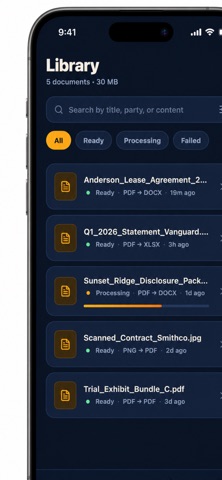
• Library now persists across launches with Open, Share, Reprocess and Delete
• Dozens of bug fixes and performance improvements
Thanks for using the app — please leave a review if it helped you!
Safety and technology
Found in the app by AppBrain- Price
- $6.99
- App size
- 33.2 MB
- Content rating
- Everyone
Technologies used by Smart AI PDF Converter
Releases
Updates seen on the App Store- Version
- 1.0.0
- Launched
- May 2026
No changelog data
Alternatives
Similar apps and more from Brittney PilarcikMore from Brittney Pilarcik


Rankings
App Store top chartsApp Store Rankings for Smart AI PDF Converter
About the app and developer
About Smart AI PDF Converter
Smart AI PDF Converter is a productivity app developed by Brittney Pilarcik.
What is the rating of Smart AI PDF Converter?
Smart AI PDF Converter has no ratings yet.
Is Smart AI PDF Converter free?
Smart AI PDF Converter costs $6.99. The app size is 33.22 MB. The latest version available is 1.0.0. The last update was on May 31, 2026.
What are the requirements for Smart AI PDF Converter?
The app has a content rating of Everyone. The app has been available on the App Store since May 2026.
Developer information for Brittney Pilarcik
Address:
Frequently asked questions about Smart AI PDF Converter
Is Smart AI PDF Converter free?
No. Smart AI PDF Converter costs $6.99 on the App Store.
Is Smart AI PDF Converter still available?
Yes. Smart AI PDF Converter is on the App Store, and the last update we saw was on May 31, 2026.
How large is Smart AI PDF Converter?
Smart AI PDF Converter is 33.22 MB.
Is Smart AI PDF Converter suitable for children?
App Store rates the content of Smart AI PDF Converter as suitable for everyone.
Who made Smart AI PDF Converter?
Smart AI PDF Converter was developed by Brittney Pilarcik. It is listed in the productivity category on the App Store.