

Smart Alarm - Puzzle Wake Up
Smart Alarm - Puzzle Wake Up is made and published by Hevin Technoweb LLP. AppBrain is an independent app data site and isn't affiliated with Hevin Technoweb LLP. The app name, icon, screenshots and description belong to Hevin Technoweb LLP and are shown as published on the App Store.
AppBrain's verdict
- Last updated
- July 4, 2026
Rankings
App Store top chartsApp Store Rankings for Smart Alarm - Puzzle Wake Up
Competitors
Similar apps and more from Hevin Technoweb LLPAlternatives to Smart Alarm - Puzzle Wake Up




More from Hevin Technoweb LLP


Releases
Updates seen on the App Store- Version
- 1.0.1
- Launched
- June 2026
No changelog data
User feedback
Ratings and reviews on the App StoreComments on Smart Alarm - Puzzle Wake Up for iOS
We don't have enough comments to show example comments. Please check back later.
Technology
Found in the app by AppBrain- Price
- Free
- App size
- 98.3 MB
- Content rating
- High
Technologies used by Smart Alarm - Puzzle Wake Up
About the app and developer
About Smart Alarm - Puzzle Wake Up
Smart Alarm - Puzzle Wake Up is a lifestyle app developed by Hevin Technoweb LLP.
What is the rating of Smart Alarm - Puzzle Wake Up?
Smart Alarm - Puzzle Wake Up has no ratings yet.
Is Smart Alarm - Puzzle Wake Up free?
Smart Alarm - Puzzle Wake Up is free. The app size is 98.26 MB. The latest version available is 1.0.1. The last update was on July 4, 2026.
What are the requirements for Smart Alarm - Puzzle Wake Up?
The app has a content rating of High Maturity. The app has been available on the App Store since June 2026.
Developer information for Hevin Technoweb LLP
Address:
Frequently asked questions about Smart Alarm - Puzzle Wake Up
Is Smart Alarm - Puzzle Wake Up free?
Yes. Smart Alarm - Puzzle Wake Up is free on the App Store.
Is Smart Alarm - Puzzle Wake Up still available?
Yes. Smart Alarm - Puzzle Wake Up is on the App Store, and the last update we saw was on July 4, 2026.
How large is Smart Alarm - Puzzle Wake Up?
Smart Alarm - Puzzle Wake Up is 98.26 MB.
Is Smart Alarm - Puzzle Wake Up suitable for children?
App Store gives Smart Alarm - Puzzle Wake Up a high maturity rating. It is meant for adults.
Who made Smart Alarm - Puzzle Wake Up?
Smart Alarm - Puzzle Wake Up was developed by Hevin Technoweb LLP. It is listed in the lifestyle category on the App Store.
What are the best alternatives to Smart Alarm - Puzzle Wake Up?
People looking at Smart Alarm - Puzzle Wake Up also look at these lifestyle apps: Loud Alarm Clock - RiseUp, LookVise: AI Outfit Planner, Rambam Calendar, loody: Your AI Companion, Simple Alarm Clock-Smart Wake.
Store listing
By Hevin Technoweb LLP, from the App Store


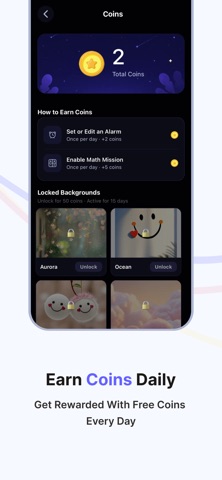
Description by Hevin Technoweb LLP Written by the developer, not by AppBrain. Click to read.
MULTIPLE & RECURRING ALARMS
Set unlimited alarms with custom labels. Daily, weekday, weekend, or one-time — schedule your day your way.
CUSTOM SOUNDS & MUSIC
Wake up to your favourite music, ringtones, or built-in alarm sounds. Choose what feels right for your morning.
PUZZLE TO DISMISS
Stop hitting snooze! Solve a quick math puzzle or pattern challenge to turn off the alarm. Proven to fully wake your brain.
CLEAN SYSTEM-LIKE INTERFACE
Simple, fast, and distraction-free. Designed to feel native on iOS — no clutter, just what you need.
PERFECT FOR EVERYONE
— Students: Never miss a lecture or exam
— Working Professionals: Be on time for every meeting
— Travellers: Set alarms across time zones
— Heavy Sleepers: Puzzles ensure you actually wake up
RELIABLE & LIGHTWEIGHT
No background battery drain. No unnecessary permissions. Just a powerful alarm that works every time.
Download Alarm2026 today and take control of your mornings!
SUBSCRIPTION INFORMATION
Alarm2026 Premium offers the following auto-renewing subscription plans to unlock premium features and remove ads:
Weekly Pro Access – 1 week – $5.99
Monthly Pro Access – 1 month – $19.99
Yearly Pro Access – 1 year – $149.99
Payment will be charged to your Apple ID account at confirmation of purchase. Subscription automatically renews unless auto-renew is turned off at least 24 hours before the end of the current period. Your account will be charged for renewal within 24 hours prior to the end of the current period. You can manage and cancel your subscriptions by going to your App Store account settings after purchase.
Terms of Use (EULA): https://www.apple.com/legal/internet-services/itunes/dev/stdeula/
Privacy Policy: https://alarm-app.blogspot.com/2026/06/privacy-policy-this-privacy-policy.html