

Smart Cast Mirroring
Smart Cast Mirroring is made and published by NGUYEN VAN DINH. AppBrain is an independent app data site and isn't affiliated with NGUYEN VAN DINH. The app name, icon, screenshots and description belong to NGUYEN VAN DINH and are shown as published on the App Store.
AppBrain's verdict
- Rating on App Store
- 5.00
- 1 ratings
- Last updated
- August 28, 2026
It doesn't have enough ratings yet to judge what users think.
Rankings
App Store top chartsApp Store Rankings for Smart Cast Mirroring
Competitors
Similar apps and more from NGUYEN VAN DINHAlternatives to Smart Cast Mirroring


Releases
Updates seen on the App Store- Version
- 1.0.7
- Launched
- May 2026
No changelog data
User feedback
Ratings and reviews on the App StoreComments on Smart Cast Mirroring for iOS
We don't have enough comments to show example comments. Please check back later.
Technology
Found in the app by AppBrain- Price
- Free
- App size
- 50.3 MB
- Content rating
- Everyone
Technologies used by Smart Cast Mirroring
About the app and developer
About Smart Cast Mirroring
Smart Cast Mirroring is an utilities app developed by NGUYEN VAN DINH.
What is the rating of Smart Cast Mirroring?
Smart Cast Mirroring is rated 5.00 out of 5 stars, based on one rating ratings.
Is Smart Cast Mirroring free?
Smart Cast Mirroring is free. The app size is 50.27 MB. The latest version available is 1.0.7. The last update was on August 28, 2026.
What are the requirements for Smart Cast Mirroring?
The app has a content rating of Everyone. The app has been available on the App Store since May 2026.
Developer information for NGUYEN VAN DINH
Address:
Store listing
By NGUYEN VAN DINH, from the App Store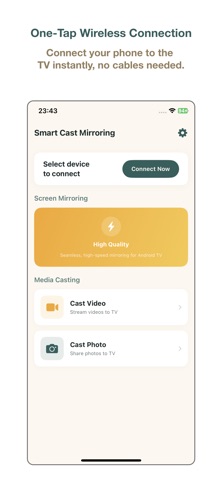


Description by NGUYEN VAN DINH Written by the developer, not by AppBrain. Click to read.
Smart Cast Mirroring provides a reliable way to mirror your iPhone screen and cast media content to compatible smart TVs. Designed for simplicity and performance, this app allows you to enjoy your content on a larger display with just a few taps.
Key Features:
Screen Mirroring: Mirror your entire device screen to the TV with low latency, perfect for presentations or browsing photos.
Media Casting: Cast videos and photos directly from your library to the big screen in high quality.
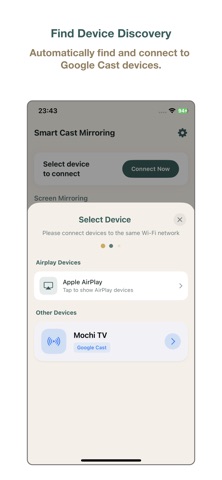
Instant Connection: Quickly discover and connect to available devices on the same Wi-Fi network.
Versatile Use: Ideal for home entertainment, business meetings, or educational purposes.
How to Use:
Ensure both your iPhone and Smart TV are connected to the same Wi-Fi network.
Open the app and select your TV from the list of available devices.
Start mirroring or select media files to cast to your TV.
Subscription Information:
- Flexible subscription plans are available: Weekly Subscription (with 3-day free trial), Monthly Subscription, and Annual Subscription.
- Payment will be charged to your Apple ID account at confirmation of purchase.
- Subscription automatically renews unless auto-renew is turned off at least 24 hours before the end of the current period.
- Account will be charged for renewal within 24 hours prior to the end of the current period.
- Subscriptions can be managed or canceled in your App Store account settings at any time after purchase.
- Any unused portion of a free trial period, if offered, will be forfeited when the user purchases a subscription to that publication, where applicable.
* Terms of Use (EULA): https://www.apple.com/legal/internet-services/itunes/dev/stdeula/
* Privacy Policy: https://tinhtx98.github.io/smartcastmirroring.github.io/