

Smart Digital & Analog Clock
Smart Digital & Analog Clock is made and published by Yuuki Shimizu. AppBrain is an independent app data site and isn't affiliated with Yuuki Shimizu. The app name, icon, screenshots and description belong to Yuuki Shimizu and are shown as published on the App Store.
AppBrain's verdict
Established- Rating on App Store
- 5.00
- 1 ratings
- Last updated
- November 3, 2025
It doesn't have enough ratings yet to judge what users think.
Rankings
App Store top chartsApp Store Rankings for Smart Digital & Analog Clock
Competitors
Similar apps and more from Yuuki ShimizuAlternatives to Smart Digital & Analog Clock



More from Yuuki Shimizu


Releases
Updates seen on the App Store- Version
- 3.4.2
- Launched
- October 2020
No changelog data
User feedback
Ratings and reviews on the App StoreComments on Smart Digital & Analog Clock for iOS
We don't have enough comments to show example comments. Please check back later.
Technology
Found in the app by AppBrain- Price
- Free
- App size
- 51.3 MB
- Content rating
- Everyone
Technologies used by Smart Digital & Analog Clock
About the app and developer
About Smart Digital & Analog Clock
Smart Digital & Analog Clock is an utilities app developed by Yuuki Shimizu.
User Ratings
Smart Digital & Analog Clock is rated 5.00 out of 5 stars. The rating is based on one rating ratings.
App Information
Smart Digital & Analog Clock is freely available from the App Store. The app size is 51.26 MB. The latest version available is 3.4.2. The last update was on November 3, 2025.
Technical Requirements
The app has a content rating of Everyone. The app has been available on the App Store since October 2020.
Developer information for Yuuki Shimizu
Address:
Store listing
By Yuuki Shimizu, from the App Store




Description by Yuuki Shimizu Written by the developer, not by AppBrain. Click to read.
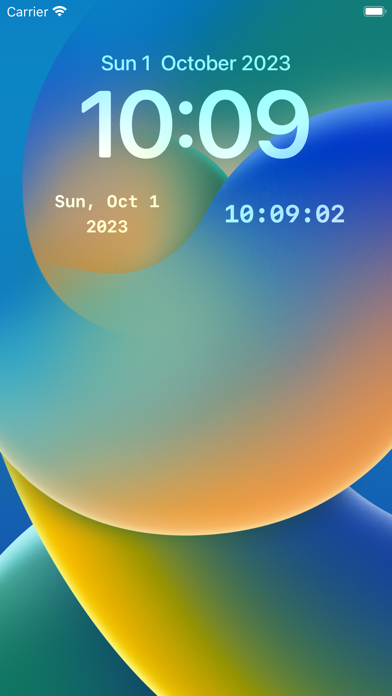
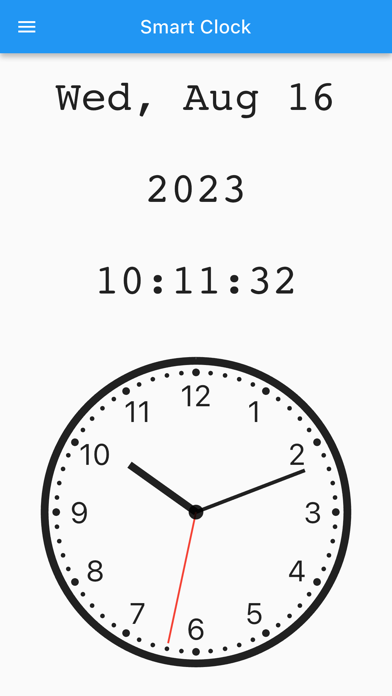
This elegant clock app shows the current time with both digital and analog displays. The analog clock features a smooth-moving second hand for precise timekeeping, while the digital display shows the date, day of the week, and time in an easy-to-read format.
KEY FEATURES
■ Home Screen Widgets
Add convenient widgets to your home screen to display today's date and current time at a glance. Simply long-press the app icon or home screen to add widgets to your device.
■ Built-in Calendar
Swipe right while viewing the clock to access the integrated calendar.
• Add events by double-tapping a date or tapping the plus button in the popup
• Delete events by swiping left on them in the popup screen
• Reorder events with long-press and drag
• Disable the calendar in settings if not needed
■ Extensive Customization Options
*Size Adjustment*
Use the top-right button to resize both digital and analog clocks to perfectly fit your screen dimensions and viewing preferences.
*Complete Color Customization*
Personalize every aspect of your clock's appearance:
- Background color
- Text and numbers
- Analog clock hour hand, minute hand, and second hand
- Individual settings for Light and Dark modes
*Flexible Display Modes*
- Toggle between Light and Dark modes
- Auto Dark Mode: automatically switches to dark mode during specified hours (when auto mode is enabled, manual toggle is disabled)
- Show/hide title bar (swipe from left edge to access settings when hidden)
- Show/hide status bar for an immersive, clutter-free display
*Smart Screen Management*
Keep your screen awake while the app is running with three convenient options:
- Always keep screen on
- Keep screen on while charging only
- Normal screen timeout
*Additional Useful Features*
- Copy current time to clipboard in your preferred format with one tap
- Backup and restore all your settings to/from a file for easy transfer between devices
PERFECT FOR:
- Using your phone or tablet as a stylish desk clock while studying or working
- Those who prefer analog clock displays with visible second hands
- Quickly checking the current date and time when filling out documents
- Creating a personalized timepiece that matches your style or room decor
- Anyone who wants a clean, distraction-free clock display
- Keeping track of time during presentations or meetings
WE VALUE YOUR FEEDBACK
Your suggestions help us improve! Contact us anytime via:
- Email: mizuki.naotaka@gmail.com
- X: https://x.com/NaotakaMizuki
- App Store reviews