

Smart PDF: Edit, Scan, Convert
Smart PDF: Edit, Scan, Convert is made and published by Ahmad Hamzeh. AppBrain is an independent app data site and isn't affiliated with Ahmad Hamzeh. The app name, icon, screenshots and description belong to Ahmad Hamzeh and are shown as published on the App Store.
AppBrain's verdict
- Rating on App Store
- 5.00
- 1 ratings
- Last updated
- February 15, 2026
It doesn't have enough ratings yet to judge what users think.
Rankings
App Store top chartsApp Store Rankings for Smart PDF: Edit, Scan, Convert
Competitors
Similar apps and more from Ahmad HamzehAlternatives to Smart PDF: Edit, Scan, Convert


More from Ahmad Hamzeh


Releases
Updates seen on the App Store- Version
- 1.1.0
- Launched
- February 2026
No changelog data
User feedback
Ratings and reviews on the App StoreComments on Smart PDF: Edit, Scan, Convert for iOS
We don't have enough comments to show example comments. Please check back later.
Technology
Found in the app by AppBrain- Price
- Free
- App size
- 96.0 MB
- Content rating
- Everyone
Technologies used by Smart PDF: Edit, Scan, Convert
About the app and developer
About Smart PDF: Edit, Scan, Convert
Smart PDF: Edit, Scan, Convert is a productivity app developed by Ahmad Hamzeh.
User Ratings
Smart PDF: Edit, Scan, Convert is rated 5.00 out of 5 stars. The rating is based on one rating ratings.
App Information
Smart PDF: Edit, Scan, Convert is freely available from the App Store. The app size is 95.97 MB. The latest version available is 1.1.0. The last update was on February 15, 2026.
Technical Requirements
The app has a content rating of Everyone. The app has been available on the App Store since February 2026.
Developer information for Ahmad Hamzeh
Address:
Frequently asked questions about Smart PDF: Edit, Scan, Convert
Is Smart PDF: Edit, Scan, Convert free?
Yes. Smart PDF: Edit, Scan, Convert is free on the App Store.
Is Smart PDF: Edit, Scan, Convert still available?
Yes. Smart PDF: Edit, Scan, Convert is on the App Store, and the last update we saw was on February 15, 2026.
How large is Smart PDF: Edit, Scan, Convert?
Smart PDF: Edit, Scan, Convert is 95.97 MB.
Is Smart PDF: Edit, Scan, Convert suitable for children?
App Store rates the content of Smart PDF: Edit, Scan, Convert as suitable for everyone.
How do people rate Smart PDF: Edit, Scan, Convert?
Smart PDF: Edit, Scan, Convert has one rating of 5.00 stars on the App Store.
Who made Smart PDF: Edit, Scan, Convert?
Smart PDF: Edit, Scan, Convert was developed by Ahmad Hamzeh. It is listed in the productivity category on the App Store.
What are the best alternatives to Smart PDF: Edit, Scan, Convert?
People looking at Smart PDF: Edit, Scan, Convert also look at these productivity apps: PDF Editor Converter, PDF Editor: PDF fill and sign, PDF Editor - PDF4.com, Farmly, MRS: PDF Editor, Scanner & OCR.
Store listing
By Ahmad Hamzeh, from the App Store



Description by Ahmad Hamzeh Written by the developer, not by AppBrain. Click to read.
Smart PDF AI is your all-in-one PDF editor, reader, scanner, converter, and AI assistant. Built for speed, privacy, and productivity, it gives you every tool you need to manage PDFs on iPhone or iPad. Whether you want to annotate a contract, sign forms, scan receipts, convert Word files, compress large presentations, or ask AI to summarize reports, Smart PDF AI is ready.
CORE PDF TOOLS
• Editor & Annotator – Highlight, underline, strikeout, freehand draw, add text, shapes, notes, and stamps.
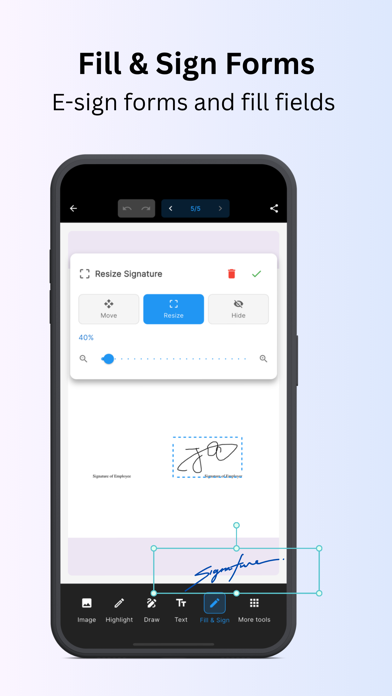
• Form Filler – Fill, save, and re-open interactive forms.
• E-Signatures – Create, store, and apply signatures or initials.
• Page Tools – Reorder, rotate, add, delete, or extract pages; bookmarks; table of contents.
• Fast Viewer – Smooth scrolling, smart zoom, quick search, and document info.
SCAN & CREATE
• Scan to PDF – Capture with camera, auto-detect edges, fix perspective, clean with filters.
• Image to PDF – Convert photos into single or multi-page PDFs.
• Batch Create – Combine images, rearrange pages, rename before saving.
CONVERT & OPTIMIZE
• Convert To/From PDF – Works with Word, Excel, PowerPoint, and images.
• Merge & Split – Combine files or split page ranges.
• Compress PDFs – Reduce file size with quality presets.
• Watermark – Add text or image marks for protection.
AI DOCUMENT ASSISTANT (PRO):
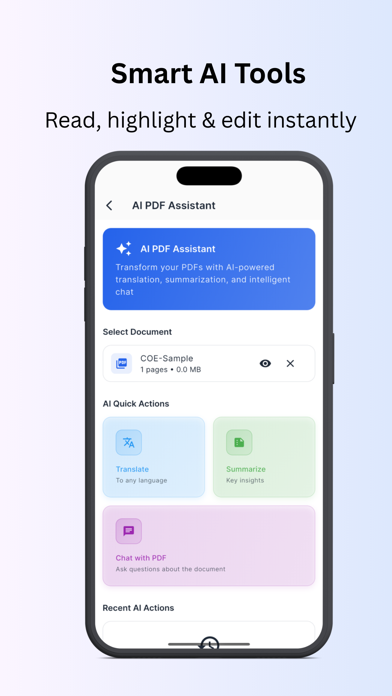
• Summarize PDFs – Turn long docs into clear notes.
• Ask Questions – Get instant answers grounded in content.
• Translate – Convert into 15+ languages.
• OCR – Extract editable text from scans.
• Insights – Detect topics, entities, and action items.
Note: AI/OCR use encrypted, temporary processing. Core tools work offline.
ORGANIZE & SHARE
• Library Tools – Folders, favorites, tags, recents.
• Search – Find by name or OCR text.
• Share & Export – Send via email, chat, or iOS share sheet.
• Open from Anywhere – Full support for Files app and cloud drives.
READING EXPERIENCE
• Layouts – Single-page or continuous scroll.
• Navigation – Thumbnails, quick jump, bookmarks.
• Dark Mode – Optimized for day or night.
• Large File Support – Smooth with huge PDFs.
DESIGNED FOR PRODUCTIVITY
• Batch Operations – Convert, compress, or rename multiple files.
• Quick Actions – Shortcuts for common PDF tasks.
• Tablet Ready – Optimized for touch, keyboard, mouse.
• Cross-Platform Mindset – Mobile-first but powerful enough to replace desktop for most tasks.
FREE VS PREMIUM
Start free with essential tools: view, edit, annotate, scan, convert, merge, split, compress. Upgrade to Pro for AI assistant, OCR, batch ops, advanced annotations, watermarking, and priority support.
WHY SMART PDF AI
• Complete Toolkit – Edit, read, scan, convert, merge, split, compress, sign.
• AI-Powered – Summarize, translate, Q&A, OCR, insights.
• Secure & Private – Offline by default, no ads, encrypted processing.
• Time-Saving – Fast viewer, batch tools, page management, quick share.
• Future-Ready – Constantly evolving with new AI features, improved OCR accuracy, smarter document insights, and faster performance across devices. Smart PDF AI is designed not just for today, but to keep growing with your workflow.
QUICK START
Open any PDF from Files or Share. Tap Edit to highlight, add text, fill forms, or sign. Use Convert for Office files, Merge/Split to organize, Compress to reduce size, Scan to PDF to digitize instantly. AI tools like Summarize and Q&A help make complex documents simple.
COMING SOON
We’re just getting started. Expect more AI insights, advanced form handling, expanded cloud integrations, customizable exports, team collaboration features, enhanced security, and multi-device sync. With every update, Smart PDF AI is becoming faster, smarter, and more complete. Feedback is always welcome—this app is built with you.
Privacy Policy: https://adev-tech.com/apps/smart-pdf/privacy/
Terms of Use: https://adev-tech.com/apps/smart-pdf/terms/