

Smart Photo Crop & Resize
Smart Photo Crop & Resize is made and published by 冲 洪. AppBrain is an independent app data site and isn't affiliated with 冲 洪. The app name, icon, screenshots and description belong to 冲 洪 and are shown as published on the App Store.
AppBrain's verdict
- Last updated
- September 29, 2026
Rankings
App Store top chartsApp Store Rankings for Smart Photo Crop & Resize
Competitors
Similar apps and more from 冲 洪Alternatives to Smart Photo Crop & Resize





More from 冲 洪


Releases
Updates seen on the App Store- Version
- 1.2
- Launched
- May 2026
No changelog data
User feedback
Ratings and reviews on the App StoreComments on Smart Photo Crop & Resize for iOS
We don't have enough comments to show example comments. Please check back later.
Technology
Found in the app by AppBrain- Price
- Free
- App size
- 2.01 MB
- Content rating
- Everyone
Technologies used by Smart Photo Crop & Resize
About the app and developer
About Smart Photo Crop & Resize
Smart Photo Crop & Resize is a photo & video app developed by 冲 洪.
What is the rating of Smart Photo Crop & Resize?
Smart Photo Crop & Resize has no ratings yet.
Is Smart Photo Crop & Resize free?
Smart Photo Crop & Resize is free. The app size is 2.01 MB. The latest version available is 1.2. The last update was on September 29, 2026.
What are the requirements for Smart Photo Crop & Resize?
The app has a content rating of Everyone. The app has been available on the App Store since May 2026.
Developer information for 冲 洪
Address:
Store listing
By 冲 洪, from the App Store


Description by 冲 洪 Written by the developer, not by AppBrain. Click to read.
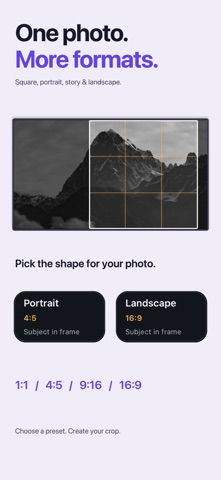
Smart Photo Crop helps you turn existing photos into cleaner portrait, square, story, and landscape crops without opening a full editor.
Choose a photo, review smart crop suggestions, adjust if needed, and save. No filters. No retouching. No upload. Just better framing.
KEY FEATURES
- Smart crop suggestions for existing photos
- Portrait, square, story, and landscape crop options
- Subject-aware framing using local photo analysis
- Rule-of-thirds guide overlays
- Optional manual adjustment before saving
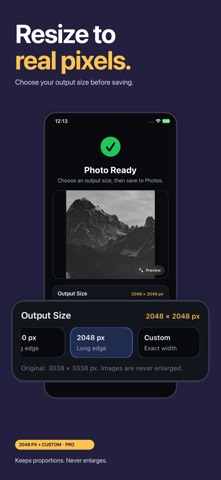
- Save cropped photos directly to Photos
- Local processing on your device
HOW IT WORKS
1. Choose a photo
2. Pick a suggested crop
3. Save or share
PERFECT FOR
- Creators preparing photos for posts
- Small sellers cropping product images
- Profile pictures and thumbnails
- Anyone who wants a better crop without using a full editor
Smart Photo Crop is not a full photo editor. It is the faster way to crop, resize, and reframe a photo when you already have the image you want.
Terms of Use: https://www.apple.com/legal/internet-services/itunes/dev/stdeula/