



AppBrain's verdict
- Last updated
- October 10, 2026
- Size
- 28.1 MB
User feedback
Ratings and reviews on the App StoreComments on Smart Printer App ® for iOS
We don't have enough comments to show example comments. Please check back later.
Store listing
By Free PDF Inc, from the App StoreDescription by Free PDF Inc Written by the developer, not by AppBrain. Click to read.
Features:
Flexible Printing Options
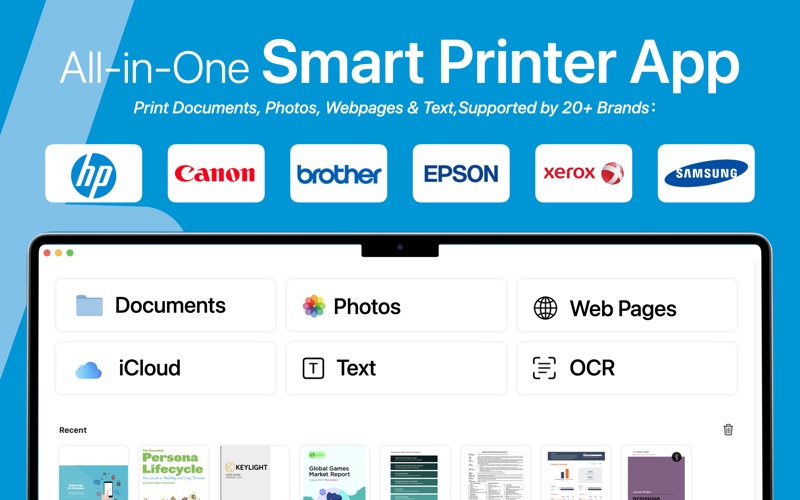
Printer App offers a variety of convenient printing methods, including:
- Select File: Select the file you want to print from your Mac computer and print it quickly;
- Select Pictures: Select pictures from the gallery and print them directly;
- Print Web Pages: Save time by logging in to a website and printing the contents of the web page directly;
- Select iCloud files: Easily select files from iCloud for printing, realizing cloud printing;
- Create Text: Support creating text content and printing to meet various text needs;
- OCR Scanning: OCR scanning function converts the content of the document into a printable format to improve printing efficiency.
Convenient Document Editing and Printing
Users can edit documents through the Printer App software, add text, labels, stamps, signatures and other elements, printing operations at any time to meet the personalized needs of document processing more flexible and convenient.
Convenient document saving and management
Printer App supports users to save the edited document, to ensure that the work results are effectively retained, convenient for users to access and use in the future, improve work efficiency and document management convenience.
Printer App provides convenient document printing, editing and management functions, allowing you to work on documents with less effort. Whether it's fast printing, flexible editing, or convenient management, Printer can meet your needs, improve work efficiency, and make it easy for you to meet all kinds of document processing challenges. Let Printer App become your right-hand man for document tasks, making work more efficient and convenient.
License information:
One-Time purchase for the best offer of $59.99
We offer one auto-renewing subscription option with 3 day free trial
- Yearly: as low as $29.99
Subscription Information
· Payment will be charged to your iTunes account at confirmation of purchase.
· Subscription automatically renews unless auto-renew is turned off at least 24 hours before the end of the current period.
· The account will be charged for renewal within 24 hours of the end of the current period, and the renewal cost will be provided.
· The user may manage subscriptions. After purchase, auto-renewal can be turned off by going to the user's Account Settings.
· Cancellations and refunds are managed by the store directly.
Privacy Policy: https://freepdftechnologies.com/privacy-policy.html
Terms of Use: https://freepdftechnologies.com/terms-of-service.html
Safety and technology
Found in the app by AppBrain- Price
- Free
- App size
- 28.1 MB
- Content rating
- High
Technologies used by Smart Printer App ®
Releases
Updates seen on the App Store- Version
- 1.7.1
- Launched
- September 2024
No changelog data
Alternatives
Similar apps and more from Free PDF IncMore from Free PDF Inc

Rankings
App Store top chartsApp Store Rankings for Smart Printer App ®
About the app and developer
About Smart Printer App ®
Smart Printer App ® is a productivity app developed by Free PDF Inc.
What is the rating of Smart Printer App ®?
Smart Printer App ® has no ratings yet.
Is Smart Printer App ® free?
Smart Printer App ® is free. The app size is 28.09 MB. The latest version available is 1.7.1. The last update was on October 10, 2026.
What are the requirements for Smart Printer App ®?
The app has a content rating of High Maturity. The app has been available on the App Store since September 2024.
Smart Printer App ® is made and published by Free PDF Inc. AppBrain is an independent app data site and isn't affiliated with Free PDF Inc. The app name, icon, screenshots and description belong to Free PDF Inc and are shown as published on the App Store.
Developer information for Free PDF Inc
Address:
Frequently asked questions about Smart Printer App ®
Is Smart Printer App ® free?
Yes. Smart Printer App ® is free on the App Store.
Is Smart Printer App ® still available?
Yes. Smart Printer App ® is on the App Store, and the last update we saw was on October 10, 2026.
How large is Smart Printer App ®?
Smart Printer App ® is 28.09 MB.
Is Smart Printer App ® suitable for children?
App Store gives Smart Printer App ® a high maturity rating. It is meant for adults.
Who made Smart Printer App ®?
Smart Printer App ® was developed by Free PDF Inc. It is listed in the productivity category on the App Store.