

Smart Printer & Scanner: Fax
Smart Printer & Scanner: Fax is made and published by MOBILE ALCHEMY LTD. AppBrain is an independent app data site and isn't affiliated with MOBILE ALCHEMY LTD. The app name, icon, screenshots and description belong to MOBILE ALCHEMY LTD and are shown as published on the App Store.
AppBrain's verdict
- Rating on App Store
- 5.00
- 3 ratings
- Last updated
- August 19, 2026
It doesn't have enough ratings yet to judge what users think.
Rankings
App Store top chartsApp Store Rankings for Smart Printer & Scanner: Fax
Competitors
Similar apps and more from MOBILE ALCHEMY LTDMore from MOBILE ALCHEMY LTD







Releases
Updates seen on the App Store- Version
- 2.4
- Launched
- March 2026
No changelog data
User feedback
Ratings and reviews on the App StoreComments on Smart Printer & Scanner: Fax for iOS
We don't have enough comments to show example comments. Please check back later.
Technology
Found in the app by AppBrain- Price
- Free
- App size
- 18.3 MB
- Content rating
- High
Technologies used by Smart Printer & Scanner: Fax
About the app and developer
About Smart Printer & Scanner: Fax
Smart Printer & Scanner: Fax is a productivity app developed by MOBILE ALCHEMY LTD.
User Ratings
Smart Printer & Scanner: Fax is rated 5.00 out of 5 stars. The rating is based on 3 ratings.
App Information
Smart Printer & Scanner: Fax is freely available from the App Store. The app size is 18.32 MB. The latest version available is 2.4. The last update was on August 19, 2026.
Technical Requirements
The app has a content rating of High Maturity. The app has been available on the App Store since March 2026.
Developer information for MOBILE ALCHEMY LTD
Address:
Frequently asked questions about Smart Printer & Scanner: Fax
Is Smart Printer & Scanner: Fax free?
Yes. Smart Printer & Scanner: Fax is free on the App Store.
Is Smart Printer & Scanner: Fax still available?
Yes. Smart Printer & Scanner: Fax is on the App Store, and the last update we saw was on August 19, 2026.
How large is Smart Printer & Scanner: Fax?
Smart Printer & Scanner: Fax is 18.32 MB.
Is Smart Printer & Scanner: Fax suitable for children?
App Store gives Smart Printer & Scanner: Fax a high maturity rating. It is meant for adults.
How do people rate Smart Printer & Scanner: Fax?
Smart Printer & Scanner: Fax scores 5.00 out of 5 stars, from 3 ratings on the App Store.
Who made Smart Printer & Scanner: Fax?
Smart Printer & Scanner: Fax was developed by MOBILE ALCHEMY LTD. It is listed in the productivity category on the App Store.
Store listing
By MOBILE ALCHEMY LTD, from the App Store




Description by MOBILE ALCHEMY LTD Written by the developer, not by AppBrain. Click to read.
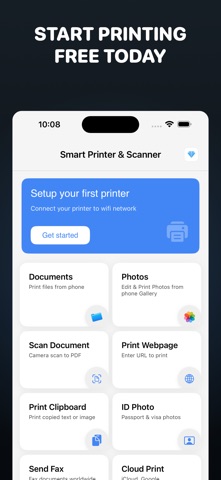
PRINT ANYTHING FROM YOUR PHONE
• Photos from your gallery with built-in editing tools
• PDF documents, Word files, Excel spreadsheets, and PowerPoint
• Webpages — just enter a URL and print instantly
• Clipboard content — copied text or images
• Test pages to verify your printer connection
CLOUD PRINT
• Print files directly from iCloud Drive, Google Drive, and Dropbox
• Browse and select documents from your cloud storage
• No need to download first — print straight from the cloud
PRINT EMAIL
• Print email content directly from your inbox
• Import and print .eml email files
• Keep a paper copy of important correspondence
PRINT CONTACTS
• Print contacts from your address book
• Includes names, phone numbers, emails, and addresses
• Great for backup or sharing contact details
POWERFUL PHOTO EDITOR & COLLAGE MAKER
• 15 photo filters — Enhance, Chrome, Fade, Instant, Mono, Noir, Process, Tonal, Transfer, Sepia, Vignette, Sharpen, Warm, Cool
• Crop, rotate, adjust brightness and blur
• Mask adjustments for precise edits
• Create stunning collages with multiple layouts
• Black & white mode for clean document prints
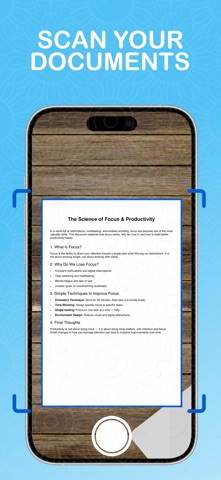
SMART DOCUMENT SCANNER WITH OCR
• Scan documents and photos using your camera
• Auto-scan mode for fast, hands-free document capture
• Extract text from scanned documents with OCR
• Save scans as high-quality PDF files
ID PHOTO MAKER
• Create passport, visa, and ID card photo sheets
• Multiple size options — 35×45mm, 50×50mm, 25×35mm
• Auto-generates print-ready A4 grid layout
SEND FAX WORLDWIDE
• Fax documents to any number worldwide
• Country code selector for international faxing
• Premium feature included with subscription
BATCH PRINTING & PRINT QUEUE
• Print All button for multiple items at once
• Sequential print queue with live progress tracking
• Save any file as PDF or share via the Share Sheet
ADVANCED PRINT SETTINGS
• Watermark — add text or image overlay to prints
• Page range selection for PDF documents
• 10 paper sizes — A3, A4, A5, Letter, Legal, 4×6, 5×7, 8×10, Postcard, Envelope
• Scale, orientation, and color mode controls
• Full document preview with QuickLook — Word, Excel, PowerPoint
SECURE & RELIABLE PRINTING
• Encrypted data transfers with IPPS (IPP over TLS) for secure print jobs
• Low supply notifications — get alerted when printer ink or toner is running low
• IPP-based supply level monitoring
EASY WI-FI PRINTER SETUP
• Step-by-step wireless printer connection guide
• WPS and laptop-assisted setup instructions
FAVORITES & ORGANIZATION
• Star your favorite prints for quick access
• Organize prints into folders
• Print stats to track your printing activity
• iPad drag & drop support from Files and Photos
SHARE EXTENSION & WIDGET
• Print directly from any app via the iOS Share Sheet
• Home Screen widget with quick actions and print stats
Download Smart Printer & Scanner today and turn your iPhone into a powerful wireless printing station.
SUBSCRIPTION INFORMATION
• Smart Printer & Scanner offers a Premium subscription for unlimited printing and full access to all features
• Payment will be charged to your Apple ID account at confirmation of purchase
• Subscription automatically renews unless auto-renew is turned off at least 24 hours before the end of the current period
• Your account will be charged for renewal within 24 hours prior to the end of the current period
• You can manage and cancel your subscriptions by going to your account settings on the App Store after purchase
• Privacy Policy: https://printsmart.app/privacy.html
• Terms of Use: https://printsmart.app/terms.html