

Smart Receipt Scan: Receiptly
Smart Receipt Scan: Receiptly is made and published by Karmjit Singh. AppBrain is an independent app data site and isn't affiliated with Karmjit Singh. The app name, icon, screenshots and description belong to Karmjit Singh and are shown as published on the App Store.
AppBrain's verdict
Established- Rating on App Store
- 4.54
- 65 ratings
- Last updated
- October 11, 2026
It doesn't have enough ratings yet to judge what users think.
Rankings
App Store top chartsApp Store Rankings for Smart Receipt Scan: Receiptly
Competitors
Similar apps and more from Karmjit SinghAlternatives to Smart Receipt Scan: Receiptly







More from Karmjit Singh


Releases
Updates seen on the App Store- Version
- 7.2.4
- Launched
- October 2020
No changelog data
User feedback
Ratings and reviews on the App StoreComments on Smart Receipt Scan: Receiptly for iOS
We don't have enough comments to show example comments. Please check back later.
Technology
Found in the app by AppBrain- Price
- Free
- App size
- 121.2 MB
- Content rating
- Everyone
Technologies used by Smart Receipt Scan: Receiptly
About the app and developer
About Smart Receipt Scan: Receiptly
Smart Receipt Scan: Receiptly is a finance app developed by Karmjit Singh.
User Ratings
Smart Receipt Scan: Receiptly is rated 4.54 out of 5 stars. The rating is based on 65 ratings.
App Information
Smart Receipt Scan: Receiptly is freely available from the App Store. The app size is 121.23 MB. The latest version available is 7.2.4. The last update was on October 11, 2026.
Technical Requirements
The app has a content rating of Everyone. The app has been available on the App Store since October 2020.
Developer information for Karmjit Singh
Address:
Frequently asked questions about Smart Receipt Scan: Receiptly
Is Smart Receipt Scan: Receiptly free?
Yes. Smart Receipt Scan: Receiptly is free on the App Store.
Is Smart Receipt Scan: Receiptly still available?
Yes. Smart Receipt Scan: Receiptly is on the App Store, and the last update we saw was on October 11, 2026.
How large is Smart Receipt Scan: Receiptly?
Smart Receipt Scan: Receiptly is 121.23 MB.
Is Smart Receipt Scan: Receiptly suitable for children?
App Store rates the content of Smart Receipt Scan: Receiptly as suitable for everyone.
How do people rate Smart Receipt Scan: Receiptly?
Smart Receipt Scan: Receiptly scores 4.54 out of 5 stars, from 65 ratings on the App Store.
Who made Smart Receipt Scan: Receiptly?
Smart Receipt Scan: Receiptly was developed by Karmjit Singh. It is listed in the finance category on the App Store.
What are the best alternatives to Smart Receipt Scan: Receiptly?
People looking at Smart Receipt Scan: Receiptly also look at these finance apps: MemoMa, Word Counter + Plain Text Pro, Check Later, myReceipt Scanner & Expenses, ReceiptMate - AI Receipt Scan.
Store listing
By Karmjit Singh, from the App Store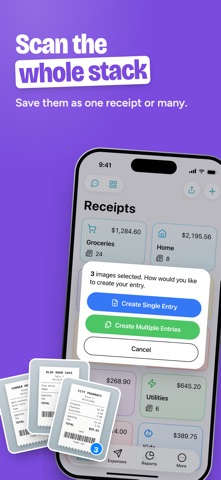


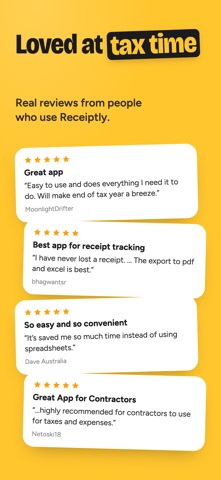


Description by Karmjit Singh Written by the developer, not by AppBrain. Click to read.
RECEIPTLY: YOUR RECEIPT KEEPER FOR HOME AND BUSINESS
Track groceries and household spending, keep proof of purchase for returns and warranties, or log business costs, mileage and travel for your accountant. Receiptly works for families, freelancers, landlords and small businesses, and syncs with iCloud across your iPhone and iPad.
Features:
> Smart Scan: scan paper receipts with the camera or import photos and PDFs. On-device AI fills in the details where available, and you check them before saving.
> Quick capture: share a receipt from any app to Receiptly, or drag and drop images and PDFs on iPad.
> Expense tracker: log expenses, income and reimbursements to see what comes in and what goes out.
> Mileage tracker: log trips in miles or kilometers with your own rate, and Receiptly works out the amount.
> Warranty tracker: add a warranty end date to any product and get a reminder before it expires.
> Receipt organizer: categories, tags, pins and archive, plus search by store, item, amount or date.
> Duplicate check: get a warning before you save the same receipt twice.
> Siri and Shortcuts: scan receipts, find them and log expenses or mileage by voice, or add an expense automatically each time you pay with Apple Wallet.
> Widgets and Spotlight: see a category's receipts or warranty countdowns on your Home Screen, and find receipts in Spotlight search.
Receiptly Pro, an auto-renewable subscription, adds:
> Unlimited receipts, expenses and categories (the free version includes 10 of each).
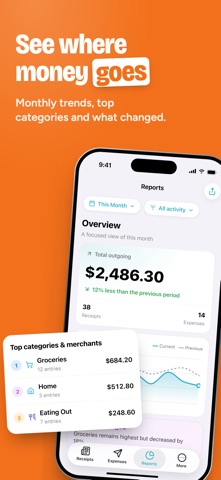
> Reports: spending trends, categories, calendar, forecast, price watch, tax summary, and a business report with mileage.
> Export receipts, expenses and tax reports to PDF, Excel or CSV for your accountant.
> Travel currencies: set the currency and your own exchange rate on each receipt.
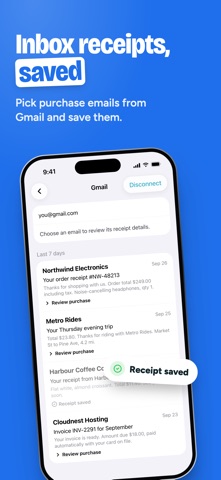
> Import receipts from Gmail. Emails are read on your device.
> Bulk import from CSV, save receipt images to Files, and get a spending summary from Siri.
For support and suggestions, email karm.singh@outlook.com
• Auto-renewable subscription
• Payment is charged to your Apple Account when you confirm the purchase. The subscription renews automatically for the same period unless auto-renew is turned off at least 24 hours before the end of the current period.
• You can manage your subscription or turn off auto-renew in your Apple Account settings after purchase.
• Privacy Policy: https://receipttrackerapp.com/privacypolicy/
• Terms of Use: https://receipttrackerapp.com/termsofuse/