

Smart Remote Control: Smart TV
Smart Remote Control: Smart TV is made and published by Phi Anh. AppBrain is an independent app data site and isn't affiliated with Phi Anh. The app name, icon, screenshots and description belong to Phi Anh and are shown as published on the App Store.
AppBrain's verdict
- Rating on App Store
- 4.91
- 11 ratings
- Last updated
- July 15, 2026
It doesn't have enough ratings yet to judge what users think.
Rankings
App Store top chartsApp Store Rankings for Smart Remote Control: Smart TV
Competitors
Similar apps and more from Phi AnhAlternatives to Smart Remote Control: Smart TV


More from Phi Anh





Releases
Updates seen on the App Store- Version
- 1.0.25
- Launched
- April 2026
No changelog data
User feedback
Ratings and reviews on the App StoreComments on Smart Remote Control: Smart TV for iOS
We don't have enough comments to show example comments. Please check back later.
Technology
Found in the app by AppBrain- Price
- Free
- App size
- 23.7 MB
- Content rating
- Everyone
Technologies used by Smart Remote Control: Smart TV
About the app and developer
About Smart Remote Control: Smart TV
Smart Remote Control: Smart TV is an utilities app developed by Phi Anh.
What is the rating of Smart Remote Control: Smart TV?
Smart Remote Control: Smart TV is rated 4.91 out of 5 stars, based on 11 ratings.
Is Smart Remote Control: Smart TV free?
Smart Remote Control: Smart TV is free. The app size is 23.73 MB. The latest version available is 1.0.25. The last update was on July 15, 2026.
What are the requirements for Smart Remote Control: Smart TV?
The app has a content rating of Everyone. The app has been available on the App Store since April 2026.
Developer information for Phi Anh
Address:
Store listing
By Phi Anh, from the App Store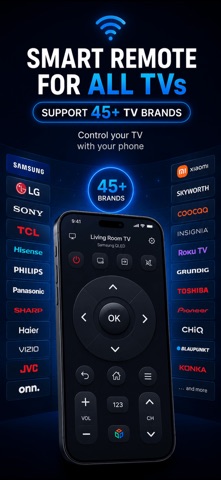



Description by Phi Anh Written by the developer, not by AppBrain. Click to read.
SUPPORTED TV BRANDS:
- Samsung Smart TV
- LG WebOS TV
- Sony Bravia TV
- TCL & Hisense Smart TVs
- Roku TV & Streaming Devices
- Amazon Fire TV
- NVIDIA SHIELD
KEY FEATURES:
- Auto-Discovery: Automatically finds Smart TVs on your Wi-Fi network
- Full Remote Control: D-pad navigation, volume, channel, power, and more
- Keyboard Input: Type text on your TV for search and login
- Number Pad: Quick channel entry with number keys
- Brand-Specific Controls: Custom buttons for each TV brand (Bixby, Smart Hub, etc.)
- iOS Widget: Control your TV right from your home screen
- Wake-on-LAN: Turn on your TV remotely
PREMIUM FEATURES:
- Touchpad Mode: Navigate like a laptop trackpad
- App Launcher: Launch Netflix, YouTube, and other apps directly
- Macros & Automation: Create one-tap routines (e.g., "Movie Night" = Power On + HDMI 2 + Netflix)
- Custom Layouts: Rearrange buttons to match your workflow
- Ad-Free Experience
- Unlimited TV Connections
HOW IT WORKS:
1. Connect your iPhone and TV to the same Wi-Fi network
2. Open the app — your TV is discovered automatically
3. Pair with one tap (Samsung: Allow on TV, LG: Enter PIN)
4. Start controlling your TV!
No hub, no extra hardware, no account required. Just your iPhone and your TV.
----------------
## Terms of Use
https://cuongproit.github.io/remote-control-tv-docs/terms.html
## Privacy Policy URL
https://cuongproit.github.io/remote-control-tv-docs/privacy-policy.html