

Smart Remote: Universal TV App
Smart Remote: Universal TV App is made and published by MONI TECHNOLOGY CO. LTD. AppBrain is an independent app data site and isn't affiliated with MONI TECHNOLOGY CO. LTD. The app name, icon, screenshots and description belong to MONI TECHNOLOGY CO. LTD and are shown as published on the App Store.
AppBrain's verdict
- Last updated
- August 9, 2026
Rankings
App Store top chartsApp Store Rankings for Smart Remote: Universal TV App
Competitors
Similar apps and more from MONI TECHNOLOGY CO. LTDAlternatives to Smart Remote: Universal TV App


More from MONI TECHNOLOGY CO. LTD


Releases
Updates seen on the App Store- Version
- 1.0.2
- Launched
- May 2026
No changelog data
User feedback
Ratings and reviews on the App StoreComments on Smart Remote: Universal TV App for iOS
We don't have enough comments to show example comments. Please check back later.
Technology
Found in the app by AppBrain- Price
- Free
- App size
- 24.1 MB
- Content rating
- Everyone
Technologies used by Smart Remote: Universal TV App
About the app and developer
About Smart Remote: Universal TV App
Smart Remote: Universal TV App is an utilities app developed by MONI TECHNOLOGY CO. LTD.
User Ratings
The app has no ratings yet.
App Information
Smart Remote: Universal TV App is freely available from the App Store. The app size is 24.13 MB. The latest version available is 1.0.2. The last update was on August 9, 2026.
Technical Requirements
The app has a content rating of Everyone. The app has been available on the App Store since May 2026.
Developer information for MONI TECHNOLOGY CO. LTD
Address:
Store listing
By MONI TECHNOLOGY CO. LTD, from the App Store


Description by MONI TECHNOLOGY CO. LTD Written by the developer, not by AppBrain. Click to read.
Smart Remote+ makes it easy to control your Smart TV directly from your iPhone. Connect to your TV over Wi-Fi and use your phone as a convenient TV remote for everyday control, navigation, typing, casting, and screen mirroring.
Lost your remote? Tired of switching between different remotes? Smart Remote+ brings your essential TV controls together in one simple app.
UNIVERSAL TV REMOTE
Control compatible Smart TVs directly from your iPhone.
• Power your TV on or off when supported
• Adjust volume
• Change channels
• Navigate menus
• Play and pause media
• Open Home, Menu, Guide, and other TV controls
• Control multiple compatible TVs
SMART TOUCHPAD
Navigate your TV with simple swipe gestures.
The built-in touchpad makes it easier to browse menus, navigate apps, and control compatible Smart TV interfaces without repeatedly pressing directional buttons.
TV KEYBOARD
Typing on a TV remote can be frustrating.
Use your iPhone keyboard to quickly enter text on supported TVs — useful for searching movies, entering titles, browsing content, and more.
QUICK APP ACCESS
Open supported TV apps and streaming services faster from your phone.
Access popular entertainment apps and services available on your connected Smart TV without navigating through multiple TV menus.
CAST PHOTOS & VIDEOS TO TV
Enjoy your favorite media on the big screen.
Select photos or videos from your iPhone and cast supported content directly to a compatible TV over your local Wi-Fi network.
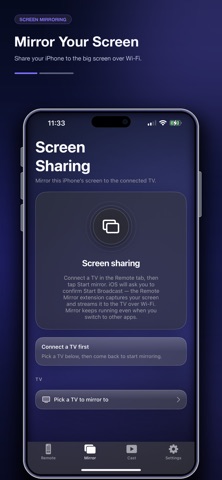
SCREEN MIRRORING
Share your iPhone screen with a compatible TV.
Use screen mirroring to display supported content from your phone on a larger screen for presentations, photos, videos, and more.
AUTO TV DISCOVERY
Getting started is simple.
Smart Remote+ automatically searches your local network for compatible TVs. Select your device, complete the pairing process if required, and start controlling your TV.
SUPPORTED SMART TVs & DEVICES
Smart Remote+ is designed to work with a wide range of popular Smart TV platforms and devices, including compatible:
• Samsung Smart TVs
• LG Smart TVs
• Roku TVs and streaming devices
• Sony Smart TVs
• TCL Smart TVs
• Hisense Smart TVs
• Vizio Smart TVs
• Fire TV devices
• Android TV and Google TV devices
• Chromecast-compatible devices
• DLNA and DIAL supported screens
Available features may vary depending on your TV brand, model, operating system, and network configuration.
HOW TO CONNECT
1. Connect your iPhone and Smart TV to the same Wi-Fi network.
2. Open Smart Remote+.
3. Allow the app to discover devices on your local network.
4. Select your TV.
5. Enter the pairing code shown on your TV if required.
6. Start using your iPhone as your TV remote.
ONE REMOTE FOR YOUR HOME
Whether your physical remote is lost, broken, out of reach, or you simply prefer using your phone, Smart Remote+ gives you a convenient way to control compatible TVs from one place.
Remote control, touchpad navigation, keyboard input, casting, and screen mirroring — all from your iPhone.
Download Smart Remote+ and turn your iPhone into a Smart TV remote today.
DISCLAIMER
Smart Remote+ is an independent application and is not affiliated with, endorsed by, sponsored by, or officially associated with Samsung, LG, Roku, Sony, TCL, Hisense, Vizio, Amazon, Google, or any other brands mentioned above.
All trademarks, product names, and company names are the property of their respective owners.
A compatible Smart TV and Wi-Fi connection are required. Feature availability varies by TV brand and model.