

Smart Remote+
Smart Remote+ is made and published by Bouncing Ball Games. AppBrain is an independent app data site and isn't affiliated with Bouncing Ball Games. The app name, icon, screenshots and description belong to Bouncing Ball Games and are shown as published on the App Store.
AppBrain's verdict
- Rating on App Store
- 4.10
- 10 ratings
- Last updated
- September 22, 2026
It doesn't have enough ratings yet to judge what users think.
Rankings
App Store top chartsApp Store Rankings for Smart Remote+
Competitors
Similar apps and more from Bouncing Ball GamesAlternatives to Smart Remote+


More from Bouncing Ball Games


Releases
Updates seen on the App Store- Version
- 3.2.4
- Launched
- September 2025
No changelog data
User feedback
Ratings and reviews on the App StoreComments on Smart Remote+ for iOS
We don't have enough comments to show example comments. Please check back later.
Technology
Found in the app by AppBrain- Price
- Free
- App size
- 21.1 MB
- Content rating
- Everyone
Technologies used by Smart Remote+
About the app and developer
About Smart Remote+
Smart Remote+ is an utilities app developed by Bouncing Ball Games.
User Ratings
Smart Remote+ is rated 4.10 out of 5 stars. The rating is based on 10 ratings.
App Information
Smart Remote+ is freely available from the App Store. The app size is 21.10 MB. The latest version available is 3.2.4. The last update was on September 22, 2026.
Technical Requirements
The app has a content rating of Everyone. The app has been available on the App Store since September 2025.
Developer information for Bouncing Ball Games
Address:
Store listing
By Bouncing Ball Games, from the App Store

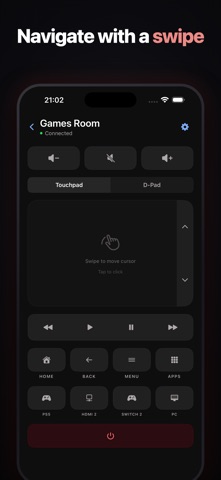


Description by Bouncing Ball Games Written by the developer, not by AppBrain. Click to read.
Whether you're across the room or anywhere in your home, your TV is always just a tap away.
Works With Your TV
• LG webOS TVs (2016 and newer) — the full experience: touchpad, Scenes, picture settings, Live Activities, service menu, and more
• Sony Bravia TVs — power, volume, inputs, navigation, and media playback; connects instantly with no pairing codes
• Samsung TVs — power, volume, inputs, navigation, and media playback; just accept the pairing on the TV
• Google TV and Android TV devices (TCL, Philips, Nvidia Shield, Chromecast with Google TV, US Hisense, and more) — power, volume, inputs, navigation, media playback, and app launching
• Apple TV — pair with the on-screen code, navigate with the D-pad or swipe gestures, control playback, and launch installed apps. Choose a saved TV for volume control while using your Apple TV remote.
Live Activity & Dynamic Island (LG webOS)
See what's playing on your TV directly from your Lock Screen and Dynamic Island.
Control play/pause, volume, and mute instantly — with app-themed colors for Netflix, YouTube, Disney+, and more.
Your TV controls, without even opening the app.
Full Apple Watch App
Control your TV from your wrist.
Includes:
• Directional pad navigation
• Media playback controls
• Power on/off
• HDMI input switching
Perfect when your phone isn't nearby.
Powerful Home Screen Widgets
Access your TV controls instantly without opening the app.
Widgets let you:
• Power on your TV
• Adjust volume
• Switch HDMI inputs
• Launch streaming apps (LG and Google TV)
• Control playback
Available in multiple sizes and fully integrated with Wake-on-LAN.
Scenes (LG webOS)
Save picture mode, sound output, and input as a one-tap preset. Movie night, gaming, daytime TV — set the whole TV up in a single tap from the app, widgets, or Shortcuts.
Automatic TV Discovery
Find the TVs on your network with a single tap.
The app automatically detects your TV's name, IP address, and MAC addresses — no manual configuration required.
Customizable Remote Layout
Build your ideal remote.
Rearrange, show, or hide:
• Volume slider
• Volume buttons
• Media controls
• Navigation controls
• And more
Give every TV its own layout — or share one default across them all. The editor only offers controls your TV actually supports, and layouts are independent on iPhone and Apple Watch.
TV Self-Test
Not sure everything's working? Run a live command sweep that proves what your TV responds to and produces a shareable report — perfect for diagnosing tricky network setups.
Configuration Import & Export
Back up or transfer your TV configurations between devices with ease.
Service Menu Access (LG webOS)
Access the TV service menu and number pad for hotel mode and advanced settings when needed.
Multiple TV Support
Easily switch between different TVs in your home — even different brands.
Each TV maintains its own connection and settings for effortless multi-room control.
Built for Reliability
• Improved auto-reconnect after background idle
• Enhanced Live Activity state tracking
• More stable watch command handling
• Continuous performance improvements
Pay once for Pro — no subscriptions, no ads.
Experience the convenience of complete TV control — through the full app, widgets, Live Activities, or right from your wrist.
No more searching for the remote.