




AppBrain's verdict
- Last updated
- November 3, 2026
- Size
- 49.0 MB
User feedback
Ratings and reviews on the App StoreComments on SmartAlarm - Alarm Clock for iOS
We don't have enough comments to show example comments. Please check back later.
Store listing
By SmartSense Inc., from the App StoreDescription by SmartSense Inc. Written by the developer, not by AppBrain. Click to read.
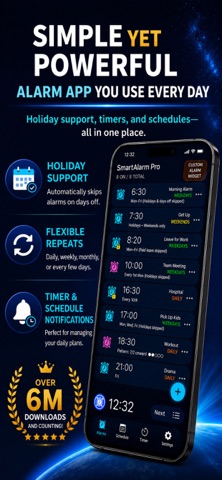
SmartAlarm is a simple, easy-to-use, and feature-rich alarm clock app designed to support your daily wake-up routine and schedule management.
In addition to standard alarms, SmartAlarm offers holiday-aware repeat settings, snooze, quick timers, stopwatch, schedule notifications, custom alarm sounds, and customizable backgrounds and theme colors.
Main Features
■ US Holiday Support
You can set repeating alarms to skip Japanese holidays and special days.
This helps prevent alarms from ringing on holidays or long vacations, while also reducing the risk of forgetting to turn alarms back on after a break.
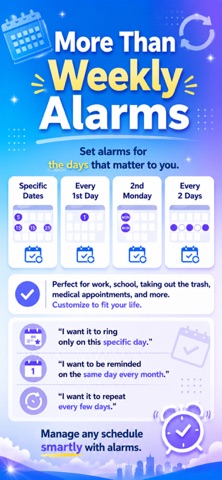
■ Date-Specific Alarms
Set alarms for specific dates, including plans several days, weeks, or months ahead.
SmartAlarm can also be used as a reminder for important events.
■ Flexible Repeat Settings
In addition to weekly repeat settings, SmartAlarm supports practical scheduling options such as “every month on a specific day,” “the nth weekday of the month,” “every few days,” and custom repeat patterns.
■ Custom Alarm Sounds
Use preset alarm sounds or select songs from your Music Library as custom alarm sounds.
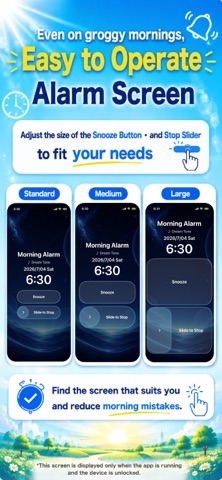
■ Custom Alarm Screen
When the app is open in the foreground and the device is not locked, SmartAlarm can show a custom alarm screen.
You can adjust the size of the stop and snooze buttons to help prevent accidentally stopping an alarm.
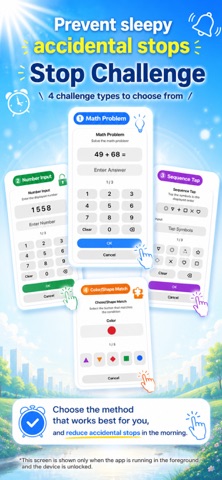
■ Stop Challenges
The custom alarm screen supports stop challenges such as number input, math problems, sequence tapping, and color/shape matching.
These options can make alarms harder to stop too easily and help prevent oversleeping.
■ Alarm ON/OFF Lock
Lock the ON/OFF switch for alarms you use regularly.
This helps prevent accidentally disabling an important alarm.
■ Bulk Alarm Controls
Turn multiple alarms ON or OFF, or change settings in bulk.
This is useful when you need to quickly prevent alarms from ringing during meetings, classes, or other quiet situations.
■ Next Alarm Check
Use the Next button on the alarm list to check the next alarm date and the time remaining until it rings.
This helps you confirm that your alarms are set correctly.
■ Skip Next Alarm
Skip only the next occurrence of a repeating alarm without turning the alarm OFF.
This is useful when you wake up earlier than usual or your schedule changes.
■ Quick Timer
Start timers quickly by selecting from preset timer durations.
You can also add custom timer durations.
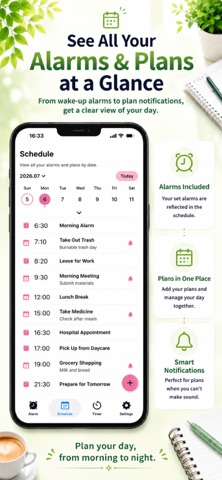
■ Schedule Notifications
Use schedule notifications when you want to be reminded without playing an alarm sound.
This is useful for appointments, outings, or situations where an alarm sound would not be appropriate.
■ Design Customization
Customize the app with built-in background images, your own photos, and theme colors.
About Custom Alarms
Custom alarms work only when the app is open in the foreground and the device is not locked.
To use a custom alarm, keep the app open until the alarm time.
Because the device may be prevented from auto-locking while waiting for a custom alarm, please be careful when using this feature in public places.
If the app is in the background or the device is locked when the alarm time arrives, SmartAlarm uses the standard iOS alarm presentation.
In that case, the alarm volume follows the system “Ringtone and Alerts” volume, and vibration is enabled.
Free Version and Pro Version
The free version includes ads and supports up to 30 alarms.
SmartAlarm Pro removes ads and increases the alarm limit.
Permissions
Some features may require the following permissions:
• AlarmKit
Used to schedule alarms.
• Music Library
Used to select songs as custom alarm sounds.
• Tracking Permission
May be requested to help show more relevant ads.
SmartAlarm helps you manage daily alarms, timers, and schedules in a simple and practical way.
Terms of Use:
https://www.apple.com/legal/internet-services/itunes/dev/stdeula/
Safety and technology
Found in the app by AppBrain- Price
- Free
- App size
- 49.0 MB
- Content rating
- Everyone
Technologies used by SmartAlarm - Alarm Clock
Releases
Updates seen on the App Store- Version
- 1.0.8
- Launched
- July 2026
No changelog data
Alternatives
Similar apps and more from SmartSense Inc.Alternatives to SmartAlarm - Alarm Clock


Rankings
App Store top chartsApp Store Rankings for SmartAlarm - Alarm Clock
About the app and developer
About SmartAlarm - Alarm Clock
SmartAlarm - Alarm Clock is an utilities app developed by SmartSense Inc.
User Ratings
The app has no ratings yet.
App Information
SmartAlarm - Alarm Clock is freely available from the App Store. The app size is 49.04 MB. The latest version available is 1.0.8. The last update was on November 3, 2026.
Technical Requirements
The app has a content rating of Everyone. The app has been available on the App Store since July 2026.
SmartAlarm - Alarm Clock is made and published by SmartSense Inc. AppBrain is an independent app data site and isn't affiliated with SmartSense Inc. The app name, icon, screenshots and description belong to SmartSense Inc. and are shown as published on the App Store.
Developer information for SmartSense Inc.
Address:
Frequently asked questions about SmartAlarm - Alarm Clock
Is SmartAlarm - Alarm Clock free?
Yes. SmartAlarm - Alarm Clock is free on the App Store.
Is SmartAlarm - Alarm Clock still available?
Yes. SmartAlarm - Alarm Clock is on the App Store, and the last update we saw was on November 3, 2026.
How large is SmartAlarm - Alarm Clock?
SmartAlarm - Alarm Clock is 49.04 MB.
Is SmartAlarm - Alarm Clock suitable for children?
App Store rates the content of SmartAlarm - Alarm Clock as suitable for everyone.
Who made SmartAlarm - Alarm Clock?
SmartAlarm - Alarm Clock was developed by SmartSense Inc. It is listed in the utilities category on the App Store.
What are the best alternatives to SmartAlarm - Alarm Clock?
People looking at SmartAlarm - Alarm Clock also look at these utilities apps: Date Alarm & Shift Calendar, Repeating Alarm Clock: Weekly, Akaru: Alarm Clock & Calendar, AlarmSan: Voice Alarm, Smart Alarm Clock - Alarmer.