

SmartWallet - Budget Manager
SmartWallet - Budget Manager is made and published by Nikhil Fuge. AppBrain is an independent app data site and isn't affiliated with Nikhil Fuge. The app name, icon, screenshots and description belong to Nikhil Fuge and are shown as published on the App Store.
AppBrain's verdict
- Last updated
- September 26, 2026
Rankings
App Store top chartsApp Store Rankings for SmartWallet - Budget Manager
Competitors
Similar apps and more from Nikhil FugeMore from Nikhil Fuge


Releases
Updates seen on the App Store- Version
- 2.0
- Launched
- March 2025
No changelog data
User feedback
Ratings and reviews on the App StoreComments on SmartWallet - Budget Manager for iOS
We don't have enough comments to show example comments. Please check back later.
Technology
Found in the app by AppBrain- Price
- Free
- App size
- 2.11 MB
- Content rating
- Everyone
Technologies used by SmartWallet - Budget Manager
About the app and developer
About SmartWallet - Budget Manager
SmartWallet - Budget Manager is a finance app developed by Nikhil Fuge.
User Ratings
The app has no ratings yet.
App Information
SmartWallet - Budget Manager is freely available from the App Store. The app size is 2.11 MB. The latest version available is 2.0. The last update was on September 26, 2026.
Technical Requirements
The app has a content rating of Everyone. The app has been available on the App Store since March 2025.
Developer information for Nikhil Fuge
Address:
Frequently asked questions about SmartWallet - Budget Manager
Is SmartWallet - Budget Manager free?
Yes. SmartWallet - Budget Manager is free on the App Store.
Is SmartWallet - Budget Manager still available?
Yes. SmartWallet - Budget Manager is on the App Store, and the last update we saw was on September 26, 2026.
How large is SmartWallet - Budget Manager?
SmartWallet - Budget Manager is 2.11 MB.
Is SmartWallet - Budget Manager suitable for children?
App Store rates the content of SmartWallet - Budget Manager as suitable for everyone.
Who made SmartWallet - Budget Manager?
SmartWallet - Budget Manager was developed by Nikhil Fuge. It is listed in the finance category on the App Store.
Store listing
By Nikhil Fuge, from the App Store



Description by Nikhil Fuge Written by the developer, not by AppBrain. Click to read.
Manage Your Money
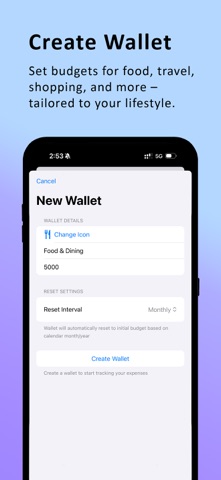
Wallets – Organize bank accounts, savings, cash and other wallets in one place.
Budgets – Set spending limits and track your progress throughout each budget period.
Transactions – Record payments and income and keep your spending organised.
Wallet History – Review previous spending periods and understand where your money went.
Recurring Transactions – Keep track of regular income and expenses automatically.
UPI Integration – Quickly launch your preferred UPI app when making payments.
Understand Your Finances
Smart Insights – Discover spending trends, budget changes, savings patterns and recurring expense changes.
Budget Forecast – See where your spending is heading before the budget period ends.
Subscription Tracker – Keep track of recurring subscriptions, monthly costs and upcoming renewals.
Plan Ahead with SmartWallet Pro
Cashflow Runway – See how long your liquid funds could last based on your essential spending.
Safe-to-Spend – Get a daily spending allowance based on available funds, upcoming obligations and your budget.
Financial Goals – Set goals such as an emergency fund, holiday or new car and track your progress.
Private by Design
Face ID App Lock – Protect your financial information with Face ID or your device passcode.
iCloud Backup & Restore – Back up your SmartWallet data to your personal iCloud account and restore it when needed.
Your financial data stays on your device and is not sent to third-party analytics services.
Free to get started. SmartWallet Pro unlocks advanced tools for understanding, predicting and planning your finances.
Start managing your money with more clarity and confidence.
Privacy & Legal
Privacy Policy: https://nikhilfuge.github.io/smartwallet-web/privacy-policy.txt
Terms of Use: https://www.apple.com/legal/internet-services/itunes/dev/stdeula