

Smarty Shopping is made and published by Smarty LLC. AppBrain is an independent app data site and isn't affiliated with Smarty LLC. The app name, icon, screenshots and description belong to Smarty LLC and are shown as published on the App Store.
AppBrain's verdict
Established- Rating on App Store
- 3.44
- 1,399 ratings
- Last updated
- September 3, 2026
Users are divided: 3.4 stars from 1,399 ratings.
Rankings
App Store top chartsApp Store Rankings for Smarty Shopping
Competitors
Similar apps and more from Smarty LLC






Releases
Updates seen on the App Store- Version
- 26.903.70035.4
- Launched
- May 2021
No changelog data
User feedback
Ratings and reviews on the App StoreComments on Smarty Shopping for iOS
We don't have enough comments to show example comments. Please check back later.
Technology
Found in the app by AppBrain- Price
- Free
- App size
- 92.6 MB
- Content rating
- High
Technologies used by Smarty Shopping
About the app and developer
About Smarty Shopping
Smarty Shopping is a shopping app developed by Smarty LLC.
User Ratings
Smarty Shopping is rated 3.44 out of 5 stars. The rating is based on 1.4 thousand ratings.
App Information
Smarty Shopping is freely available from the App Store. The app size is 92.63 MB. The latest version available is 26.903.70035.4. The last update was on September 3, 2026.
Technical Requirements
The app has a content rating of High Maturity. The app has been available on the App Store since May 2021.
Developer information for Smarty LLC
Address:
Store listing
By Smarty LLC, from the App Store




Description by Smarty LLC Written by the developer, not by AppBrain. Click to read.
Compare prices across the web with Smarty and always get the best price.
Check out our new views for historically tracking item pricing, Top Deals by merchant, working coupon history, verified coupons, and Top Merchants who have better deals.
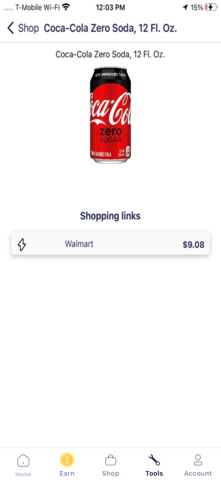
Use our improved Price Comparison feature with barcode scanner to simplify shopping. To get started, click the barcode scanner icon in the upper right corner of our home screen. Accept the permission for the barcode scanner to access the device camera. Center the barcode in the rectangle. When recognized, it will automatically get scanned and show the price history and links to buy at the best deals, if available. To scan a different barcode, click the barcode image in the top left corner. To exit the barcode scanner screen, click the Cancel button in the top right corner.