

SnapAction: Screenshot AI
SnapAction: Screenshot AI is made and published by ReScience Lab Inc. AppBrain is an independent app data site and isn't affiliated with ReScience Lab Inc. The app name, icon, screenshots and description belong to ReScience Lab Inc. and are shown as published on the App Store.
AppBrain's verdict
- Last updated
- September 3, 2026
Rankings
App Store top chartsApp Store Rankings for SnapAction: Screenshot AI
Competitors
Similar apps and more from ReScience Lab Inc.Alternatives to SnapAction: Screenshot AI





Releases
Updates seen on the App Store- Version
- 1.15.0
- Launched
- August 2026
No changelog data
User feedback
Ratings and reviews on the App StoreComments on SnapAction: Screenshot AI for iOS
We don't have enough comments to show example comments. Please check back later.
Technology
Found in the app by AppBrain- Price
- Free
- App size
- 38.2 MB
- Content rating
- Everyone
Technologies used by SnapAction: Screenshot AI
About the app and developer
About SnapAction: Screenshot AI
SnapAction: Screenshot AI is a productivity app developed by ReScience Lab Inc.
User Ratings
The app has no ratings yet.
App Information
SnapAction: Screenshot AI is freely available from the App Store. The app size is 38.23 MB. The latest version available is 1.15.0. The last update was on September 3, 2026.
Technical Requirements
The app has a content rating of Everyone. The app has been available on the App Store since August 2026.
Developer information for ReScience Lab Inc.
Address:
Frequently asked questions about SnapAction: Screenshot AI
Is SnapAction: Screenshot AI free?
Yes. SnapAction: Screenshot AI is free on the App Store.
Is SnapAction: Screenshot AI still available?
Yes. SnapAction: Screenshot AI is on the App Store, and the last update we saw was on September 3, 2026.
How large is SnapAction: Screenshot AI?
SnapAction: Screenshot AI is 38.23 MB.
Is SnapAction: Screenshot AI suitable for children?
App Store rates the content of SnapAction: Screenshot AI as suitable for everyone.
Who made SnapAction: Screenshot AI?
SnapAction: Screenshot AI was developed by ReScience Lab Inc. It is listed in the productivity category on the App Store.
What are the best alternatives to SnapAction: Screenshot AI?
People looking at SnapAction: Screenshot AI also look at these productivity apps: SnapAction, SnapAction AI, Nexora - AI Model Router, Kiro - Screenshot AI, Remy: Screenshot Calendar AI.
Store listing
By ReScience Lab Inc., from the App Store


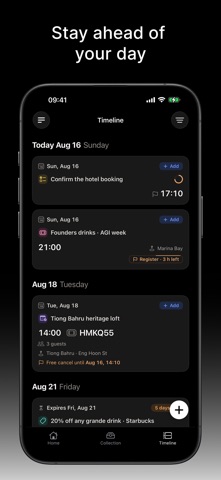
Description by ReScience Lab Inc. Written by the developer, not by AppBrain. Click to read.
SnapAction reads the time inside the picture. Then the picture comes back to find you, before that time runs out.
TIME COMES FIRST
SnapAction reads dates and times out of the screenshot itself, including relative ones like "tomorrow 10:00", "this Friday", or "in 3 days", and resolves them against when the screenshot was taken and the time zone you were in. Five kinds of dated card:
- Events — talks, concerts, launches, school and sports schedules. Registration deadlines are tracked separately from the event itself, so you are reminded to sign up, not just to show up.
- Meetings — invites, calls, interviews.
- Travel — flights with departure and arrival times, airports, and flight numbers.
- Bookings — hotels, restaurants, clinics, salons, rentals.
- To-dos — anything with a due date.
Anything else with an expiry — a coupon, a subscription, a document — carries its valid-until date on the card.
Then it hands you the action: add to Calendar, send to Reminders, open the place in Maps, or save the contact.
IT COMES BACK TO YOU
SnapAction does not plan your day and does not ask you to. It waits, and then it comes to find you. Once a card has a date, the app schedules its own reminder:
- An event already on your calendar: three hours before it starts.
- An event you have not committed to yet: two days ahead, at 9am, with an Add to Calendar button on the notification itself.
- A to-do: at the time it is due, with a Mark Done button.
Tap the reminder and you land on that card with the original screenshot, not on a list you still have to search. If you would rather not be reminded, turn notifications off and nothing is scheduled.
YOU NEVER HAD TO CHOOSE A PHOTO
Every card keeps the image it came from, and you never picked it — it is the shot you already took. Tap to see it full-screen, exactly as you captured it, so you can check any extracted date, time, address, or flight number against the source instead of trusting it blind. Nothing is a black box, and nothing is lost when you clear your camera roll.
IT HANDLES THE REST TOO
- Types what it reads: link, article, repo, video, product, place, receipt, invoice, coupon, contact, or note.
- Recovers missing links. When a screenshot shows a title but no URL, SnapAction looks for the canonical link and attaches it.
- Builds a library you can search, filter by type, and browse by date.
SCAN WITHOUT OPENING THE APP
- Action Button: press to scan your newest screenshot.
- Control Center: add the SnapAction control and scan from any screen.
- Back Tap: double or triple tap the back of your iPhone.
- Siri and Shortcuts: "Scan screenshot with SnapAction."
Scan progress appears in the Dynamic Island while it runs.
WHAT IT COSTS
Free includes 30 scans a month — enough to use it properly before deciding anything. One image is one scan, and a batch uses one scan per image.
SUBSCRIPTION DETAILS
SnapAction Membership raises your quota to 300 scans a month.
- Monthly: $14.99 per month
- Annual: $149.99 per year
Payment is charged to your Apple Account at confirmation of purchase. Your subscription renews automatically unless you turn off auto-renew at least 24 hours before the end of the current period. Manage or cancel your subscription in your Apple Account settings.
BEFORE YOU INSTALL
The screenshots you choose to scan are uploaded to SnapAction for analysis. The rest of your photo library is never uploaded. SnapAction requires iOS 17 or later and a free SnapAction account (Sign in with Apple or Google).
Privacy Policy: https://snapaction.ai/privacy
Terms of Use (EULA): https://www.apple.com/legal/internet-services/itunes/dev/stdeula/