

SnapDic is made and published by RaynearSoft LLC. AppBrain is an independent app data site and isn't affiliated with RaynearSoft LLC. The app name, icon, screenshots and description belong to RaynearSoft LLC and are shown as published on the App Store.
AppBrain's verdict
- Last updated
- October 9, 2026
Rankings
App Store top chartsApp Store Rankings for SnapDic
Competitors
Similar apps and more from RaynearSoft LLCMore from RaynearSoft LLC


Also available on Google Play

Releases
Updates seen on the App Store- Version
- 1.0.7
- Launched
- February 2026
No changelog data
User feedback
Ratings and reviews on the App StoreComments on SnapDic for iOS
We don't have enough comments to show example comments. Please check back later.
Technology
Found in the app by AppBrain- Price
- Free
- App size
- 156.6 MB
- Content rating
- Medium
Technologies used by SnapDic
About the app and developer
About SnapDic
SnapDic is an education app developed by RaynearSoft LLC.
User Ratings
The app has no ratings yet.
App Information
SnapDic is freely available from the App Store. The app size is 156.59 MB. The latest version available is 1.0.7. The last update was on October 9, 2026.
Technical Requirements
The app has a content rating of Medium Maturity. The app has been available on the App Store since February 2026.
Developer information for RaynearSoft LLC
Address:
Frequently asked questions about SnapDic
Is SnapDic free?
Yes. SnapDic is free on the App Store.
Is SnapDic still available?
Yes. SnapDic is on the App Store, and the last update we saw was on October 9, 2026.
How large is SnapDic?
SnapDic is 156.59 MB.
Is SnapDic suitable for children?
App Store gives SnapDic a medium maturity rating, so it is not meant for young children.
Who made SnapDic?
SnapDic was developed by RaynearSoft LLC. It is listed in the education category on the App Store.
Store listing
By RaynearSoft LLC, from the App Store


Description by RaynearSoft LLC Written by the developer, not by AppBrain. Click to read.
Three ways to collect a word
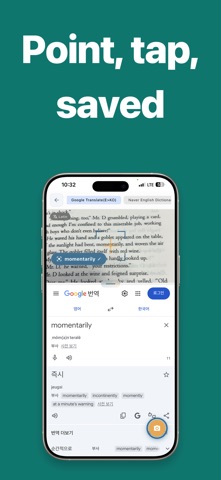
• Point your camera — on-device OCR reads text from books, signs, and screens; tap a word to see its meaning
• Share from any app — select a word while reading and send it straight to your vocabulary
• Search directly — look it up in the dictionary you prefer and save it on the spot
Memorize with FSRS
FSRS (Free Spaced Repetition Scheduler) tracks the stability and difficulty of each word separately and picks your next review date from them. Words you already know drift further apart; words you keep missing come back sooner. You never have to decide what to review or when.
Features
• Camera OCR dictionary — English, Korean, Japanese, and Chinese
• Offline dictionaries — look words up with no connection
• Share sheet intake — save a word without leaving what you were reading
• Multiple vocabulary lists
• FSRS-based review mode with automatic scheduling
• Pick the dictionary you want at save time
• Search history
• Adjustable split — size the camera and dictionary panes to taste
Made for
• Readers who keep skipping over words they don't know
• Anyone who builds vocabulary lists and never opens them again
• People who want to remember words for years, not until the test
This app is subject to Apple's standard terms and conditions (EULA). For more information, see Apple's Standard Terms and Conditions(https://www.apple.com/legal/internet-services/itunes/dev/stdeula/).