

SnapSweep: Remove Junk Photos
SnapSweep: Remove Junk Photos is made and published by Tomas Tauber. AppBrain is an independent app data site and isn't affiliated with Tomas Tauber. The app name, icon, screenshots and description belong to Tomas Tauber and are shown as published on the App Store.
AppBrain's verdict
- Rating on App Store
- 4.53
- 19 ratings
- Last updated
- August 30, 2026
It doesn't have enough ratings yet to judge what users think.
Rankings
App Store top chartsApp Store Rankings for SnapSweep: Remove Junk Photos
Competitors
Similar apps and more from Tomas TauberMore from Tomas Tauber


Releases
Updates seen on the App Store- Version
- 1.8.2
- Launched
- April 2025
No changelog data
User feedback
Ratings and reviews on the App StoreComments on SnapSweep: Remove Junk Photos for iOS
We don't have enough comments to show example comments. Please check back later.
Technology
Found in the app by AppBrain- Price
- Free
- App size
- 9.47 MB
- Content rating
- Everyone
Technologies used by SnapSweep: Remove Junk Photos
About the app and developer
About SnapSweep: Remove Junk Photos
SnapSweep: Remove Junk Photos is an utilities app developed by Tomas Tauber.
User Ratings
SnapSweep: Remove Junk Photos is rated 4.53 out of 5 stars. The rating is based on 19 ratings.
App Information
SnapSweep: Remove Junk Photos is freely available from the App Store. The app size is 9.47 MB. The latest version available is 1.8.2. The last update was on August 30, 2026.
Technical Requirements
The app has a content rating of Everyone. The app has been available on the App Store since April 2025.
Developer information for Tomas Tauber
Address:
Frequently asked questions about SnapSweep: Remove Junk Photos
Is SnapSweep: Remove Junk Photos free?
Yes. SnapSweep: Remove Junk Photos is free on the App Store.
Is SnapSweep: Remove Junk Photos still available?
Yes. SnapSweep: Remove Junk Photos is on the App Store, and the last update we saw was on August 30, 2026.
How large is SnapSweep: Remove Junk Photos?
SnapSweep: Remove Junk Photos is 9.47 MB.
Is SnapSweep: Remove Junk Photos suitable for children?
App Store rates the content of SnapSweep: Remove Junk Photos as suitable for everyone.
How do people rate SnapSweep: Remove Junk Photos?
SnapSweep: Remove Junk Photos scores 4.53 out of 5 stars, from 19 ratings on the App Store.
Who made SnapSweep: Remove Junk Photos?
SnapSweep: Remove Junk Photos was developed by Tomas Tauber. It is listed in the utilities category on the App Store.
Store listing
By Tomas Tauber, from the App Store





Description by Tomas Tauber Written by the developer, not by AppBrain. Click to read.
# Key Features
- Super Simple: Clean up your photo gallery in just three steps: scan, review, and delete:
1) Scan: Tap a button to start scanning your photos, and review the results as they arrive.
2) Review: Tap on any photo to decide whether to keep it or delete it. If you make a mistake or change your mind, tap on the photo again in the Keep or Delete tab to correct your choice.
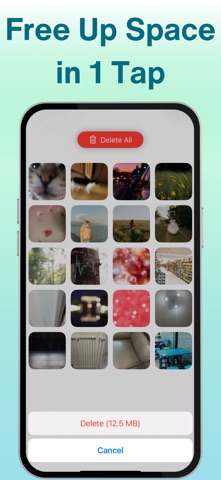
3) Delete: Once you confirm your selection of photos for removal, simply tap a button to purge them all.
- Privacy and Security-first: All functionality is done offline and locally on your device, ensuring your data never leaves your device.
- Ad-free and no user tracking: SnapSweep is free from advertisements, doesn’t track users, and doesn’t collect any personal information.
- Subscription-free: SnapSweep can be used for free with a daily limit of 75 images. Unlimited usage can be unlocked with a one-time purchase.
- Local AI-powered Scan: SnapSweep uses a local model to scan and detect potentially „boring“ photos, helping you free up your storage space faster than going through every single picture on your phone.
- Photo detail review: use a pinch or double tap gesture to zoom in on the details. This allows you to assess whether a photo is worth keeping.
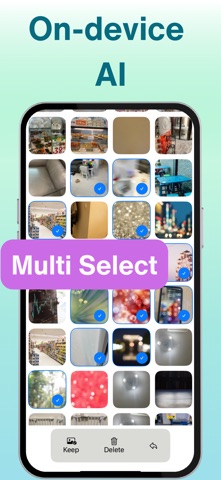
- Multi-photo select: Sometimes, thumbnails can give you enough information to decide which photos to preserve. After a successful scan, tap a button to open a multi-photo selection. You can select photos by tapping on them or dragging over them. Once you complete your selection, click the corresponding button to choose whether to keep or delete all the selected photos.
- Navigate by swiping: browse scan results or selected photos by swiping left or right.
If you enjoyed using SnapSweep to simplify and clean up your photos, please rate it in the App Store!