

SnapText: OCR & AI Tutor
SnapText: OCR & AI Tutor is made and published by Sho Fujimoto. AppBrain is an independent app data site and isn't affiliated with Sho Fujimoto. The app name, icon, screenshots and description belong to Sho Fujimoto and are shown as published on the App Store.
AppBrain's verdict
- Last updated
- April 28, 2026
- Size
- 60.9 MB
User feedback
Ratings and reviews on the App StoreComments on SnapText: OCR & AI Tutor for iOS
We don't have enough comments to show example comments. Please check back later.
Store listing
By Sho Fujimoto, from the App Store


Description by Sho Fujimoto Written by the developer, not by AppBrain. Click to read.
— Point and capture —
Aim at any page. A yellow frame shows what SnapText will read. Pinch to zoom, move it with two fingers. Live OCR recognizes text right inside the camera view, so you can check accuracy before saving.
— Clean results every time —
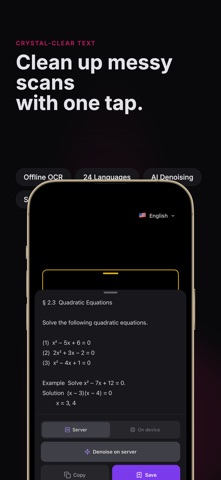
Remove noise and OCR artifacts with one tap. Use offline cleanup for privacy, or server-side cleanup for longer passages. Copy the cleaned text straight into any app.
— Ask your AI tutor —
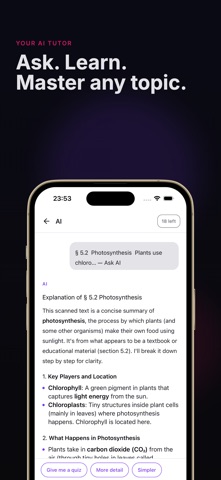
Open a saved scan and tap "Ask AI". Get explanations, step-by-step solutions, summaries, or translations. The AI uses the full scanned text as context, so answers stay focused on what you actually captured.
— Offline OCR keeps you private —
Recognition runs entirely on your device using Apple Vision. Your camera feed never leaves your phone. Only AI chat needs a network connection.
— Everything saved, always with you —
Every saved scan stores both the original image and recognized text. Zoom into images with pinch gestures, copy text to any app, and revisit every study session in one library.
— 24 recognition languages —
English, Japanese, Korean, Chinese (Simplified and Traditional), Arabic, German, French, Spanish, Portuguese, Italian, Russian, Dutch, Polish, Swedish, Finnish, Turkish, Indonesian, Malay, Vietnamese, Thai, and Hindi.
— Made for students and professionals —
• Study math, chemistry, biology, and history with step-by-step AI explanations
• Digitize class notes, research papers, and meeting notes
• Translate foreign textbooks as you read
• Pull quotes and citations straight into essays
• Extract receipts, labels, and handouts into searchable text
Core OCR features require no sign-up. Start scanning in under 10 seconds.
Terms of Service: https://shofj.com/en/apps/snap-text/terms-of-service
Safety and technology
Found in the app by AppBrain- Price
- Free
- App size
- 60.9 MB
- Content rating
- Everyone
Technologies used by SnapText: OCR & AI Tutor
Releases
Updates seen on the App Store- Version
- 1.0.13
- Launched
- April 2026
No changelog data
Alternatives
Similar apps and more from Sho Fujimoto





Rankings
App Store top chartsApp Store Rankings for SnapText: OCR & AI Tutor
About the app and developer
About SnapText: OCR & AI Tutor
SnapText: OCR & AI Tutor is a productivity app developed by Sho Fujimoto.
User Ratings
The app has no ratings yet.
App Information
SnapText: OCR & AI Tutor is freely available from the App Store. The app size is 60.91 MB. The latest version available is 1.0.13. The last update was on April 28, 2026.
Technical Requirements
The app has a content rating of Everyone. The app has been available on the App Store since April 2026.
Developer information for Sho Fujimoto
Address:
Frequently asked questions about SnapText: OCR & AI Tutor
Is SnapText: OCR & AI Tutor free?
Yes. SnapText: OCR & AI Tutor is free on the App Store.
Is SnapText: OCR & AI Tutor still available?
Yes. SnapText: OCR & AI Tutor is on the App Store, and the last update we saw was on April 28, 2026.
How large is SnapText: OCR & AI Tutor?
SnapText: OCR & AI Tutor is 60.91 MB.
Is SnapText: OCR & AI Tutor suitable for children?
App Store rates the content of SnapText: OCR & AI Tutor as suitable for everyone.
Who made SnapText: OCR & AI Tutor?
SnapText: OCR & AI Tutor was developed by Sho Fujimoto. It is listed in the productivity category on the App Store.
What are the best alternatives to SnapText: OCR & AI Tutor?
People looking at SnapText: OCR & AI Tutor also look at these productivity apps: PDFix Master - PDF Tools, AI Text Reply - Convo Helper, Convert Picture to PDF:Seal, CoreNotes: TLDR Summary, AI・Summary.