

SnapTune for Intune
SnapTune for Intune is made and published by Luke Sharkey. AppBrain is an independent app data site and isn't affiliated with Luke Sharkey. The app name, icon, screenshots and description belong to Luke Sharkey and are shown as published on the App Store.
AppBrain's verdict
- Rating on App Store
- 5.00
- 3 ratings
- Last updated
- September 29, 2026
- Size
- 12.2 MB
It doesn't have enough ratings yet to judge what users think.
User feedback
Ratings and reviews on the App StoreComments on SnapTune for Intune for iOS
We don't have enough comments to show example comments. Please check back later.
Store listing
By Luke Sharkey, from the App Store



Description by Luke Sharkey Written by the developer, not by AppBrain. Click to read.
WHO IT'S FOR
IT administrators, helpdesk technicians, MSPs, and security engineers who manage Microsoft Intune / Entra ID tenants and need quick mobile access without firing up the admin center on a laptop.
CORE FEATURES
• Universal device search — find any enrolled device by name, user, serial, or IMEI in a single search box.
• Live device details — OS, compliance, encryption, enrollment date, last check-in, primary user, and full hardware specs from Microsoft Graph.
• BitLocker recovery keys — surface keys instantly when a user is locked out. Audit-friendly: every retrieval is logged in Entra.
• Windows LAPS credentials — retrieve the rotating local admin password without leaving the device card.
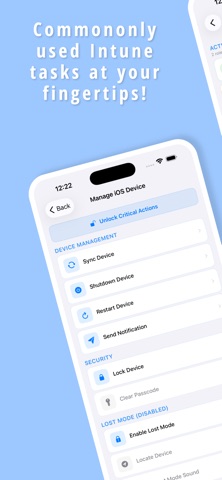
• Remote actions — sync, restart, rename, retire, wipe, and more, with confirmation guards on dangerous operations.
• Reports dashboard — enrollment, platform distribution, compliance status, and management coverage at a glance.
• In-app PIM activation — activate Privileged Identity Management roles directly inside SnapTune. No browser hand-off, no second sign-in.
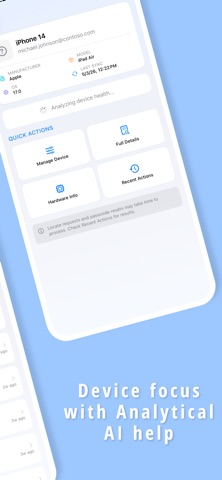
• AI-powered Device Health (iOS 26+) — on-device language model summarizes device health and flags anomalies. All processing stays on your iPhone — no data leaves the device. (AI features are experimental and may produce inaccurate results.)
• Demo Mode — full preview of every screen with realistic mock data, perfect for trials, training, and screenshots.
SECURITY
• Authenticates with your real Microsoft Entra ID account via MSAL
• Supports Microsoft Authenticator broker for single sign-on across Microsoft apps.
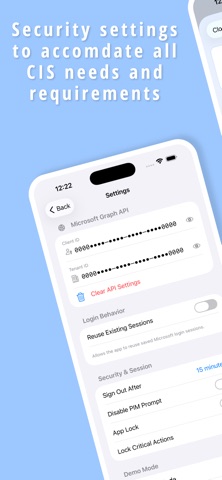
• Optional Face ID / Touch ID app lock with auto-lock on backgrounding.
• Critical action protection — destructive operations (wipe, retire) require a second confirmation.
• No analytics, no third-party trackers, no data collection. Everything runs against your tenant's Graph API directly.
REQUIREMENTS
• A Microsoft Entra ID tenant with Intune.
• An Entra app registration with delegated Graph permissions (a one-time setup; in-app guide included).
• iOS 17 or later. AI Device Health requires iOS 26 or later.
NOT AFFILIATED WITH MICROSOFT
SnapTune is an independent companion app and is not affiliated with, endorsed by, or sponsored by Microsoft Corporation. "Microsoft," "Intune," and "Entra" are trademarks of Microsoft Corporation.
Questions or feedback? Tap Settings → Send Feedback inside the app.
Safety and technology
Found in the app by AppBrain- Price
- Free
- App size
- 12.2 MB
- Content rating
- Medium
Technologies used by SnapTune for Intune
Releases
Updates seen on the App Store- Version
- 2.3
- Launched
- March 2025
No changelog data
Alternatives
Similar apps and more from Luke SharkeyAlternatives to SnapTune for Intune






More from Luke Sharkey


Rankings
App Store top chartsApp Store Rankings for SnapTune for Intune
About the app and developer
About SnapTune for Intune
SnapTune for Intune is a business app developed by Luke Sharkey.
What is the rating of SnapTune for Intune?
SnapTune for Intune is rated 5.00 out of 5 stars, based on 3 ratings.
Is SnapTune for Intune free?
SnapTune for Intune is free. The app size is 12.21 MB. The latest version available is 2.3. The last update was on September 29, 2026.
What are the requirements for SnapTune for Intune?
The app has a content rating of Medium Maturity. The app has been available on the App Store since March 2025.
Developer information for Luke Sharkey
Address: