

SNB Gigs is made and published by Dinar Garipov. AppBrain is an independent app data site and isn't affiliated with Dinar Garipov. The app name, icon, screenshots and description belong to Dinar Garipov and are shown as published on the App Store.
AppBrain's verdict
- Last updated
- October 26, 2026
Rankings
App Store top chartsApp Store Rankings for SNB Gigs
Competitors
Similar apps and more from Dinar GaripovAlternatives to SNB Gigs


More from Dinar Garipov


Releases
Updates seen on the App Store- Version
- 1.7
- Launched
- January 2026
No changelog data
User feedback
Ratings and reviews on the App StoreComments on SNB Gigs for iOS
We don't have enough comments to show example comments. Please check back later.
Technology
Found in the app by AppBrain- Price
- Free
- App size
- 4.26 MB
- Content rating
- Everyone
Technologies used by SNB Gigs
About the app and developer
About SNB Gigs
SNB Gigs is a music app developed by Dinar Garipov.
What is the rating of SNB Gigs?
SNB Gigs has no ratings yet.
Is SNB Gigs free?
SNB Gigs is free. The app size is 4.26 MB. The latest version available is 1.7. The last update was on October 26, 2026.
What are the requirements for SNB Gigs?
The app has a content rating of Everyone. The app has been available on the App Store since January 2026.
Developer information for Dinar Garipov
Address:
Frequently asked questions about SNB Gigs
Is SNB Gigs free?
Yes. SNB Gigs is free on the App Store.
Is SNB Gigs still available?
Yes. SNB Gigs is on the App Store, and the last update we saw was on October 26, 2026.
How large is SNB Gigs?
SNB Gigs is 4.26 MB.
Is SNB Gigs suitable for children?
App Store rates the content of SNB Gigs as suitable for everyone.
Who made SNB Gigs?
SNB Gigs was developed by Dinar Garipov. It is listed in the music category on the App Store.
What are the best alternatives to SNB Gigs?
People looking at SNB Gigs also look at these music apps: The Bandaid, QMe Teleprompter Lyrics Chords, GigScroll, Mixbrite, U Record.
Store listing
By Dinar Garipov, from the App Store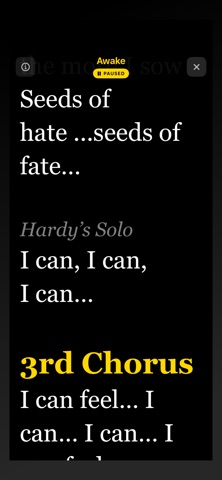


Description by Dinar Garipov Written by the developer, not by AppBrain. Click to read.
BUILT FOR LIVE PERFORMANCE
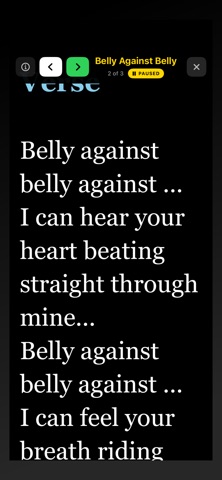
Whether you're playing an intimate acoustic set or headlining a festival, TelePrompter keeps your lyrics flowing at the perfect pace. The distraction-free fullscreen display ensures you stay connected with your audience while never missing a beat.
Intuitive Speed Control
Drag on the right side of the screen to adjust scroll speed in real-time — speed up for fast passages, slow down for dramatic moments, or pause with a simple tap. The current speed indicator appears only when you need it.
Stay Awake, Stay Focused
Your screen stays on throughout your performance. No more fumbling to wake your device mid-song.
POWERFUL SONG ORGANIZATION
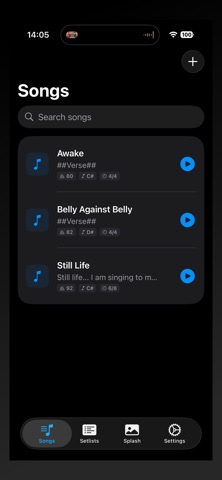
Song Library
Build your complete repertoire with unlimited songs. Each song can include:
• Lyrics with rich formatting
• Tempo (BPM) and time signature
• Musical key and capo position
• Artist/composer credits
• Duration timing
• Performance notes visible during playback
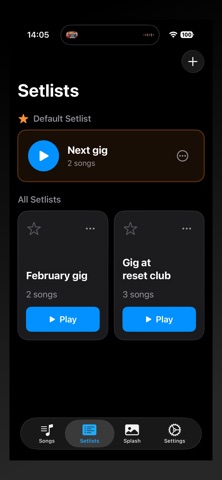
Setlists for Every Gig
Organize songs into setlists for different performances. Set a default setlist that opens automatically when you launch the app — perfect for bands with a regular rotation.
Seamless Song Navigation
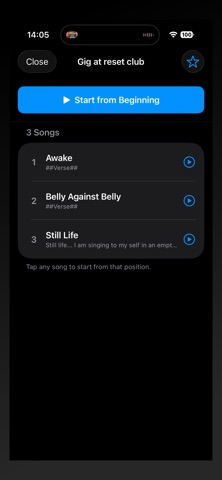
Play through your entire setlist without interruption. Swipe to move between songs, or tap the song list to jump directly to any track.
CUSTOMIZABLE APPEARANCE
Preset Themes
Choose from four carefully designed themes:
• Light & Dark modes
• High-contrast options for bright stages
Full Customization
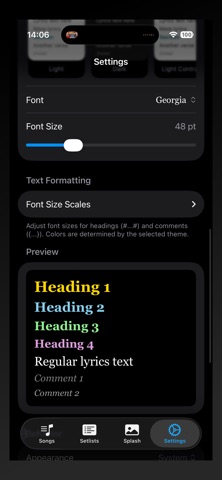
Create your perfect look with custom colors for:
• Background and text
• Four heading levels for sections (Verse, Chorus, Bridge, etc.)
• Two comment styles for stage directions and cues
Typography Control
Select your preferred font and size for optimal readability at any distance.
Per-Song Overrides
Need different settings for a particular song? Override global settings on individual tracks.
SMART LYRICS FORMATTING
Use simple markup to structure your lyrics.
The teleprompter displays your formatting beautifully while the editor shows you the simple markup syntax.
BACKUP & TRANSFER
Full Data Export
Export your complete library — songs, setlists, and settings — to a single file. Perfect for:
- Backing up before a tour
- Transferring to a new device
- Sharing setlists with bandmates
Selective Export
Choose exactly what to include: songs only, setlists, settings, or any combination.
Easy Import
Restore from backup or import shared files with a single tap.
WORKS ON ALL YOUR DEVICES
Optimized for both iPhone and iPad. Use your iPhone as a personal monitor or mount your iPad for the whole band to see.
SPLASH SCREEN
Set a custom splash image for band branding or personalization. Adjust margins and background color to match your style.