




AppBrain's verdict
- Last updated
- November 19, 2026
- Size
- 18.1 MB
User feedback
Ratings and reviews on the App StoreComments on SnipMark: Screenshot Markup for iOS
We don't have enough comments to show example comments. Please check back later.
Store listing
By Nga Nguyen Thi Thuy, from the App StoreDescription by Nga Nguyen Thi Thuy Written by the developer, not by AppBrain. Click to read.
CAPTURE
• Press the SnipMark region shortcut on Mac to grab any part of any display.
• On iPhone and iPad, add screenshots in a couple of taps, or send them straight from other apps’ Share sheet with the SnipMark Share Extension.
• Every capture lands in an ordered session, with the source app attached on Mac.
MARK
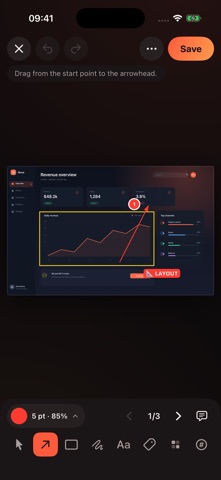
• Arrows, rectangles, freehand lines, text, stamps, step counters and blur.
• Marks are vector-based, so they stay crisp at any export size.
• Blur or pixelate an area to obscure it — check the result before you share.
SEND
• Compress a whole batch to a sharing size with a quality slider and a max long-edge cap.
• Rename files with a pattern instead of typing 01-final-final again.
• Export JPG, PNG, HEIC or a multi-page PDF, stitch a long screenshot into one tall image, or copy straight to the clipboard on Mac.
PRIVATE BY ARCHITECTURE
• No account, no sign-in, no server, no upload queue.
• No third-party analytics, ad SDKs or cross-app tracking.
• Your screenshots stay in local app storage until you export or delete them.
FREE vs PRO
• Free covers short sessions: up to 3 images per session, with a small "Marked with SnipMark" watermark on export.
• SnipMark Pro Lifetime is a one-time in-app purchase: no watermark, unlimited images per session, custom stamps and PDF & Long Stitch export.
• Pro is shared between Mac and iPhone with the same Apple Account.
• All purchases are handled by Apple through the App Store. SnipMark never sees your payment details, and prices in your local currency are shown in the app before you buy.
REQUIREMENTS
macOS 14 or later, iOS/iPadOS 17 or later.
Support: https://snipmark.starlingtech.vn/support — a real person reads every message.
Safety and technology
Found in the app by AppBrain- Price
- Free
- App size
- 18.1 MB
- Content rating
- Everyone
Technologies used by SnipMark: Screenshot Markup
Releases
Updates seen on the App Store- Version
- 1.1.1
- Launched
- November 2026
No changelog data
Alternatives
Similar apps and more from Nga Nguyen Thi ThuyAlternatives to SnipMark: Screenshot Markup


More from Nga Nguyen Thi Thuy


Rankings
App Store top chartsApp Store Rankings for SnipMark: Screenshot Markup
About the app and developer
About SnipMark: Screenshot Markup
SnipMark: Screenshot Markup is a productivity app developed by Nga Nguyen Thi Thuy.
What is the rating of SnipMark: Screenshot Markup?
SnipMark: Screenshot Markup has no ratings yet.
Is SnipMark: Screenshot Markup free?
SnipMark: Screenshot Markup is free. The app size is 18.07 MB. The latest version available is 1.1.1. The last update was on November 19, 2026.
What are the requirements for SnipMark: Screenshot Markup?
The app has a content rating of Everyone. The app has been available on the App Store since November 2026.
SnipMark: Screenshot Markup is made and published by Nga Nguyen Thi Thuy. AppBrain is an independent app data site and isn't affiliated with Nga Nguyen Thi Thuy. The app name, icon, screenshots and description belong to Nga Nguyen Thi Thuy and are shown as published on the App Store.
Developer information for Nga Nguyen Thi Thuy
Address: