

SoloPDF is made and published by 向东 李. AppBrain is an independent app data site and isn't affiliated with 向东 李. The app name, icon, screenshots and description belong to 向东 李 and are shown as published on the App Store.
AppBrain's verdict
- Last updated
- October 7, 2026
Rankings
App Store top chartsApp Store Rankings for SoloPDF
Competitors
Similar apps and more from 向东 李Alternatives to SoloPDF


More from 向东 李


Releases
Updates seen on the App Store- Version
- 0.8.0
- Launched
- July 2026
No changelog data
User feedback
Ratings and reviews on the App StoreComments on SoloPDF for iOS
We don't have enough comments to show example comments. Please check back later.
Technology
Found in the app by AppBrain- Price
- Free
- App size
- 16.0 MB
- Content rating
- Everyone
Technologies used by SoloPDF
About the app and developer
About SoloPDF
SoloPDF is a productivity app developed by 向东 李.
User Ratings
The app has no ratings yet.
App Information
SoloPDF is freely available from the App Store. The app size is 16.04 MB. The latest version available is 0.8.0. The last update was on October 7, 2026.
Technical Requirements
The app has a content rating of Everyone. The app has been available on the App Store since July 2026.
Developer information for 向东 李
Address:
Frequently asked questions about SoloPDF
Is SoloPDF free?
Yes. SoloPDF is free on the App Store.
Is SoloPDF still available?
Yes. SoloPDF is on the App Store, and the last update we saw was on October 7, 2026.
How large is SoloPDF?
SoloPDF is 16.04 MB.
Is SoloPDF suitable for children?
App Store rates the content of SoloPDF as suitable for everyone.
Who made SoloPDF?
SoloPDF was developed by 向东 李. It is listed in the productivity category on the App Store.
What are the best alternatives to SoloPDF?
People looking at SoloPDF also look at these productivity apps: Iris Drive, Dhinote - Structured Notes, Atomic KB, AI Dictation, Vizor – Web Sources.
Store listing
By 向东 李, from the App Store


Description by 向东 李 Written by the developer, not by AppBrain. Click to read.
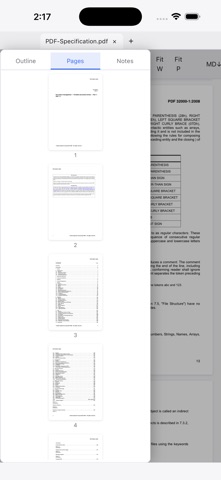
• Reading: multiple tabs, outline, page thumbnails, full-text search, fit-width/fit-page zoom. Huge files open instantly thanks to on-demand loading.
• Highlights become notes: highlight any text and the annotation is saved as a Markdown notes file (.annotations.md) right next to the PDF — open, edit, and version it with any editor (including our SoloMD). solopdf:// links inside the notes jump straight back to the highlighted passage.
• Forms: fill AcroForm PDFs (text fields, checkboxes, dropdowns) and save the result.
• Export to Markdown: turn a whole PDF into a Markdown document, outline headings included.
• Dark mode with smart page inversion for comfortable night reading.
• Interface in English, 简体中文, 繁體中文, and 日本語.
Everything runs on your device. No network calls, no data collection.