





AppBrain's verdict
- Last updated
- September 21, 2026
- Size
- 28.4 MB
User feedback
Ratings and reviews on the App StoreComments on Sound Creator for iOS
We don't have enough comments to show example comments. Please check back later.
Store listing
By Murat Saygin, from the App StoreDescription by Murat Saygin Written by the developer, not by AppBrain. Click to read.
Pick a sound from the bar at the bottom. Drag it onto a lane. That's a beat. Drag another one next to it. That's a pattern. There is no tutorial, no project setup, no menu tree to climb — you touch a sound and it plays, you drop it and it stays.
What's inside
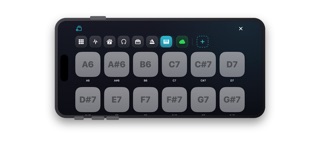
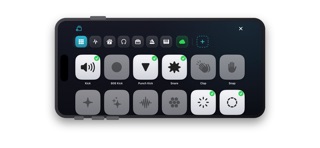
Over 300 sounds, all built in, all offline. Fifty general effects, fifty techno one-shots, fifty house sounds, fifty EDM, fifty dubstep, a drum kit, and a full 88-key piano from A0 to C8. Every sound was synthesized from scratch and level-matched, so nothing jumps out or disappears when you layer it.
You can also bring in your own audio from your device or from iCloud, Google Drive, Dropbox — anything the Files app can reach.
How it works
The screen is a stack of lanes. Each lane is a horizontal timeline; each sound you drop becomes a block you can move, trim, or delete. Grab a block by its edge handle and slide it. Drop it in a gap and nothing else moves. Drop it on top of something and the neighbours step aside. Drag it up or down to move it to another lane, or drag it to the top bar to delete it.
Grab the empty space between sounds and everything to the right shifts with your finger — that's how you open or close a gap without touching each block.
Editing a sound
Tap any block to open its panel. Speed from 0.1× to 3×. Volume. Fade in, fade out. Trim from the start or the end. Reverse it. Repeat it up to 50 times with a gap you set in milliseconds — useful for rolls and stutters. Copy it. Delete it.
The same controls exist for a whole lane, plus a loop that duplicates everything in the lane as many times as you want. Build four bars, loop them eight times, and you have a track.
Piano
The piano notes work like the effects, with one addition: you set the note length once — 100 ms to 5 seconds — and every note you drop after that lasts exactly that long. Notes you already placed keep their own length, so a melody can mix short stabs and long sustains without going back to fix anything.
Playback
Press play and the lanes scroll by themselves. The red playhead sits in the middle of the screen and the music moves past it, so you always see what's about to sound. Every hit is scheduled against the device's audio clock rather than a software timer, which means loops stay tight instead of drifting.
The clip you're hearing pulses in the timeline, so on a busy arrangement you can tell which sound is which.
Saving and sharing
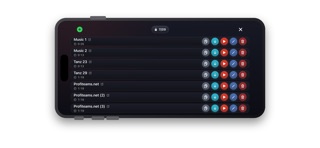
Projects are saved on the device with their length shown. You can rename, duplicate, play, edit or delete any of them. Export a project as an audio file to keep, send or publish — the exported file carries the project inside it, so someone else with the app can open it and keep editing.
On every device
iPhone, iPad and Mac. The same app, the same projects, the same layout. On Mac you get arrow controls for every scroll area; on iPhone and iPad the whole thing works with your thumbs.
Free and Premium
The app is free with everything above available. Free covers 20 saved projects and tracks up to 5 minutes.
Premium is a single €0.99 purchase, no subscription. It removes the project limit, extends tracks to 30 minutes, and enables importing your own sounds, importing project files, and exporting audio. Buy it once on any device and it works on all of them.
Who it's for
Someone who wants to make a beat on the bus. Someone learning what a loop is. Someone who owns a real DAW but wants to sketch an idea before it disappears. It won't replace Logic and doesn't try to — there's no mixer, no MIDI, no plugins. What it does is get from an idea to something you can hear in about thirty seconds, and let you keep going from there.
No ads. No account. No internet required. Nothing is uploaded anywhere.
Safety and technology
Found in the app by AppBrain- Price
- Free
- App size
- 28.4 MB
- Content rating
- Everyone
Technologies used by Sound Creator
Releases
Updates seen on the App Store- Version
- 1.7
- Launched
- September 2026
No changelog data
Alternatives
Similar apps and more from Murat SayginAlternatives to Sound Creator


More from Murat Saygin


Rankings
App Store top chartsApp Store Rankings for Sound Creator
About the app and developer
About Sound Creator
Sound Creator is a music app developed by Murat Saygin.
User Ratings
The app has no ratings yet.
App Information
Sound Creator is freely available from the App Store. The app size is 28.35 MB. The latest version available is 1.7. The last update was on September 21, 2026.
Technical Requirements
The app has a content rating of Everyone. The app has been available on the App Store since September 2026.
Sound Creator is made and published by Murat Saygin. AppBrain is an independent app data site and isn't affiliated with Murat Saygin. The app name, icon, screenshots and description belong to Murat Saygin and are shown as published on the App Store.
Developer information for Murat Saygin
Address:
Frequently asked questions about Sound Creator
Is Sound Creator free?
Yes. Sound Creator is free on the App Store.
Is Sound Creator still available?
Yes. Sound Creator is on the App Store, and the last update we saw was on September 21, 2026.
How large is Sound Creator?
Sound Creator is 28.35 MB.
Is Sound Creator suitable for children?
App Store rates the content of Sound Creator as suitable for everyone.
Who made Sound Creator?
Sound Creator was developed by Murat Saygin. It is listed in the music category on the App Store.
What are the best alternatives to Sound Creator?
People looking at Sound Creator also look at these music apps: Station01 - Beats & Puzzles, Reharmonizator, AcidGroovebox: beat maker, PSA1000, TranceXY - Theremin Synth.