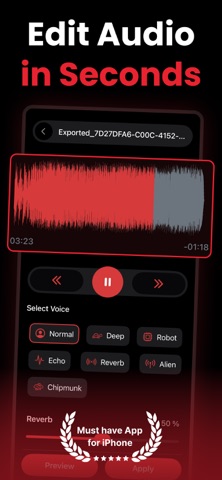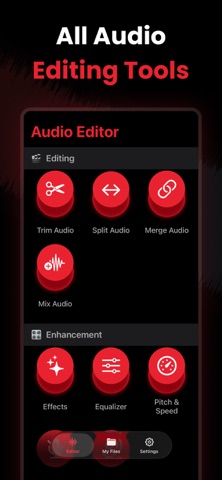
Sound Enhancer - Audio Editor is an overall app developed by Kamalkumar Trapasiya.
Download Statistics
User Ratings
Sound Enhancer - Audio Editor is rated 4.55 out of 5 stars. The rating is based on 11 ratings.
App Information
Sound Enhancer - Audio Editor is FREE to download. The APK download size is 38.41 MB. The latest version available is 1.0. The last update was on December 8, 2025.
Technical Requirements
The app has a content rating of Everyone. The app has been available on Google Play December 2025.
Description
Audio Editor – Enhance, Edit & Transform Your Sound
Meet Audio Editor, the all-in-one sound editing studio designed for creators, musicians, podcasters, and anyone who loves perfect audio. Edit, enhance, convert, and create—right from your iPhone or iPad.
Whether you’re cleaning up a voice recording, boosting music volume, mixing tracks, trimming clips, or applying effects, Audio Editor gives you professional tools in one simple, powerful app.
KEY FEATURES
Sound Enhancer & Amplifier - Boost volume, increase clarity, and make your audio sound crisp and powerful.
Trim, Cut, Split & Merge - Edit any audio file with precision. Combine clips, split sections, or remove unwanted parts.
Mix Multiple Audio Tracks - Layer music, sound effects, and voice recordings to create studio-quality mixes.
Recorder (High Quality) - Record crystal-clear audio directly in the app and start editing instantly.
Equalizer (EQ) - Fine-tune frequencies with professional EQ presets or customize your own.
Audio Effects - Reverb, echo, distortion, fade-in/out, and more—transform your sound instantly.
Pitch & Speed Control - Change pitch, speed up slow audio, or create fun voice variations.
Noise Reduction - Remove background noise and enhance voice clarity in a single tap.
Voice Changer - Convert your voice to multiple fun and creative characters.
Audio to Text (Transcription) - Convert speech to accurate, editable text—perfect for notes, meetings, and podcasts.
Text to Speech - Turn written text into natural-sounding audio in various voices.
Format Converter - Convert audio between MP3, WAV, M4A, AAC, FLAC, and more.
WHY USERS LOVE IT
- Easy for beginners, powerful for pros - Fast processing and high-quality output - Clean, modern, intuitive interface - Works with all major audio formats - Perfect for editing music, reels, podcast clips, and voiceovers
USE CASES
- Improve music tracks - Edit podcast episodes - Clean up voice memos - Create ringtones - Make voice-over content - Fix low-volume audio - Transcribe meetings - Convert files for any platform
PRO Version: Unlock the full potential of our app with premium version. Payment will be charged to your iTunes account at confirmation of purchase. Subscriptions automatically renew unless auto-renew is turned off 24-hours before the end of the current period. Accounts will be charged for renewal within 24 hours of the end of the current period, and a renewal fee will be provided. The unused portion of a free trial period, if offered, will be forfeited when the user purchases a subscription to that product. Please note that a subscription or one-time lifetime purchase is required for the complete functionality of the app.
Each subscription will automatically renew 3 days before the expiration date for
the same time period. Subscriptions can be cancelled at any time before the renewal.