
Sound Lissajous Meter is made and published by TOON,LLC. AppBrain is an independent app data site and isn't affiliated with TOON,LLC. The app name, icon, screenshots and description belong to TOON,LLC and are shown as published on the App Store.
AppBrain's verdict
Removed- Rating on App Store
- 4.00
- 1 ratings
- Last updated
- February 27, 2023
Sound Lissajous Meter is no longer on the App Store. It had too few ratings to say what users thought.
Competitors
Similar apps and more from TOON,LLCMore from TOON,LLC




Releases
Updates seen on the App Store- Version
- 3.0
- Launched
- March 2019
No changelog data
User feedback
Ratings and reviews on the App StoreComments on Sound Lissajous Meter for iOS
We don't have enough comments to show example comments. Please check back later.
Technology
Found in the app by AppBrain- Price
- $3.99
- App size
- 938.0 KB
- Content rating
- Everyone
Technologies used by Sound Lissajous Meter
About the app and developer
About Sound Lissajous Meter
Sound Lissajous Meter was an utilities app developed by TOON,LLC. It was removed from the App Store Sep 28, 2024.
User Ratings
Sound Lissajous Meter was rated 4.00 out of 5 stars, based on one rating ratings.
App Information
Sound Lissajous Meter cost $3.99. The app size was 938.00 kB. The last available version was 3.0. The last update was on February 27, 2023.
Technical Requirements
The app had a content rating of Everyone. The app had been available on the App Store since March 2019.
Developer information for TOON,LLC
Address:
Store listing
By TOON,LLC, from the App StoreSimilar apps




Description by TOON,LLC Written by the developer, not by AppBrain. Click to read.
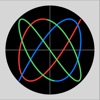
Lissajous is a planar figure obtained by combining two single vibrations vibrating in directions perpendicular to each other.
It can be displayed in a two-dimensional curve by Lissajous in the vertical axis as a microphone input signal and the horizontal axis as a reference sine wave.
For example, when a sine wave with the same frequency as the reference sine wave is reproduced from an audio system, you can observe changes of the frequency or phase in a Lissajous curve pattern.
In the case of an unknown sound source, you can analyze the source using the correlation between amplitude, frequency and phase and the reference sine wave.
In addition, it can display Lissajous demo according to changes in frequency and phase. Please use for Lissajous pattern understanding and learning.
Features:
- Lissajous sound visualizations (X: internal reference signal, Y: microphone input signal)
- Mode selection of reference frequency (Oct / Scale / Any) : "Oct" - 1/3 octave band (63Hz - 16kHz), "Scale" - 12 equal temperament (A3 - A5), "Any" - Arbitrary frequency input (100Hz - 10kHz).
- Reference frequency setting slider (Reference frequency) - change reference sine wave frequency. In "Any" mode, logarithmic change in reference frequency for 1/2 to 2.
- Input level adjustment (Gain) : 0 - 40 (0.1 step)
- Jitter adjustment (Jitter): ± 2.0 (0.01 step)
- Noise filter (Filter)
- Demo display (Lissajous): Lissajous sample display
Example of application:
- Checking phase of room acoustics or monitoring changes in amplitude, phase and frequency from place to place.
- Analysis of unknown sound signal.
- Monitoring and analysis of sound changes of environmental sounds.
- Sound Visualizer
Note:
- The internal reference signal and the measured signal are asynchronous. Since the signals from the microphone and other external inputs are not synchronized, the synchronization relationship is not guaranteed by stop/start, change of various parameters, etc.
- Enabling the noise filter may reduce the level of the input signal extremely. Adjust the input level to make it easy to see the amplitude of Lissajous.
- The jitter adjustment can reduce the rotation of the phase angle when Lissajous curve's phase changes sequentially at the same observation position. But the correction may not be possible if the phase change is severe.
- The phase θ is valid only when the reference frequency and the measurement frequency are the same.
- At the time of the first access to Microphone and Photos after installing the app, you will be asked authorization to access them by the iOS system. If you have not enabled this setting, the app cannot access them by privacy restrictions of the iOS system. Please enable the access permission on the iOS setting, "Settings > Privacy & Security > Photos or Microphone".
Please visit our iOS app support page for more information on this app.